FASTLab 11: Secure Device Administrative Access
FASTLab 11:保護裝置的管理存取
Scenario
情境
A basic network security policy was configured on devices by your colleague, but you can still see that the configurations are incomplete as per the standard basic security policy that is adopted by the CCS company for the customer environment.
你的同事已在裝置上設定了基本網路安全政策,但你仍可看出這些設定並未完全符合 CCS 公司針對客戶環境所採用的標準基本安全政策。
The security policy that is adopted by CCS for R1, the Branch router, and SW1 is as follows:
CCS 針對 R1、Branch 路由器與 SW1 所採用的安全政策如下:
- Access to the privileged mode must be secured using a password on all devices.所有裝置上,進入特權模式的存取都必須以密碼加以保護。
- Passwords must be encrypted on all devices.所有裝置上的密碼都必須加密。
- Access to the console and vty lines must be secured on all devices.所有裝置上,主控台與 vty 連線的存取都必須加以保護。
- Remote access must be secured by enabling SSH on vty 0 to 4 on all devices.必須在所有裝置的 vty 0 到 4 上啟用 SSH,以保護遠端存取。
- A standard IPv4 ACL must be used to restrict remote access on all devices. The ACL should allow the traffic from only the AdminPC.所有裝置都必須使用標準 IPv4 ACL 來限制遠端存取,該 ACL 應僅允許來自 AdminPC 的流量。
- A login banner must be present on all devices.所有裝置都必須設有登入橫幅。
Here are the issues that you need to troubleshoot and resolve:
以下是你需要疑難排解並解決的問題:
- Local authentication is not working on R1.R1 上的本地驗證無法運作。
- AdminPC is not able to SSH to R1 IPv4 address 172.16.160.1. Generate a pair of RSA keys on R1 that will allow the router to support SSHv2. Use the domain name example.com and use 768 bits in the modulus.AdminPC 無法透過 SSH 連線到 R1 的 IPv4 位址 172.16.160.1。請在 R1 上產生一對 RSA 金鑰,使該路由器支援 SSHv2。網域名稱請使用 example.com,模數請使用 768 位元。
- The enable password should be encrypted on SW1 and the Branch router.SW1 與 Branch 路由器上的 enable 密碼應加密。
- AdminPC is not able to SSH to the Branch router (172.16.160.3).AdminPC 無法透過 SSH 連線到 Branch 路由器(172.16.160.3)。
- AdminPC is not able to SSH to SW1 (172.16.130.10). Generate a pair of RSA keys on SW1 that will allow the switch to support SSHv2. Use the domain name example.com and use 768 bits in the modulus.AdminPC 無法透過 SSH 連線到 SW1(172.16.130.10)。請在 SW1 上產生一對 RSA 金鑰,使該交換器支援 SSHv2。網域名稱請使用 example.com,模數請使用 768 位元。
Refer to Job Aids for login credential information.
請參閱工作輔助資料(Job Aids)以取得登入憑證資訊。
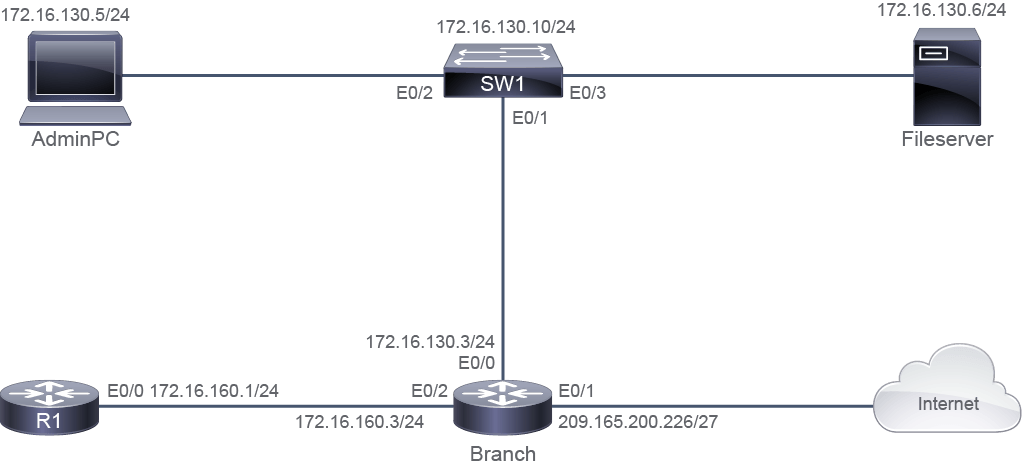
Topology
拓樸
Job Aid
工作輔助資料
Login Credential and Device Information
登入憑證與裝置資訊
Access Level 存取層級 | Username 使用者名稱 | Password 密碼 |
Console access 主控台存取 | admin admin | Admin123 Admin123 |
Remote access 遠端存取 | admin admin | Admin123 Admin123 |
Privileged mode 特權模式 | None 無 | 1234QWer 1234QWer |
Device 裝置 | Interface 介面 | IPv4 Address IPv4 位址 | Remote 遠端裝置 | Interface 介面 | IPv4 Address IPv4 位址 |
SW1 SW1 | VLAN 1 VLAN 1 | 172.16.130.10/24 172.16.130.10/24 | VLAN 1 VLAN 1 | _ _ | _ _ |
SW1 SW1 | Ethernet0/1 Ethernet0/1 | VLAN 1 VLAN 1 | Branch Branch | Ethernet0/0 Ethernet0/0 | 172.16.130.3/24 172.16.130.3/24 |
SW1 SW1 | Ethernet0/2 Ethernet0/2 | VLAN 1 VLAN 1 | AdminPC AdminPC | Ethernet0/0 Ethernet0/0 | 172.16.130.5/24 172.16.130.5/24 |
SW1 SW1 | Ethernet0/3 Ethernet0/3 | VLAN 1 VLAN 1 | Fileserver Fileserver | Ethernet0/0 Ethernet0/0 | 172.16.130.6/24 172.16.130.6/24 |
Branch Branch | Ethernet0/0 Ethernet0/0 | 172.16.130.3/24 172.16.130.3/24 | SW1 SW1 | Ethernet0/1 Ethernet0/1 | VLAN 1 VLAN 1 |
Branch Branch | Ethernet0/1 Ethernet0/1 | 209.165.200.226/27 209.165.200.226/27 | Internet Internet | Ethernet0/0 Ethernet0/0 | 209.165.200.225/27 209.165.200.225/27 |
Branch Branch | Ethernet0/2 Ethernet0/2 | 172.16.160.3/24 172.16.160.3/24 | R1 R1 | Ethernet0/0 Ethernet0/0 | 172.16.160.1/24 172.16.160.1/24 |
Branch Branch | Loopback 0 Loopback 0 | 172.16.2.2/32 172.16.2.2/32 | _ _ | _ _ | _ _ |
R1 R1 | Ethernet0/0 Ethernet0/0 | 172.16.160.1/24 172.16.160.1/24 | Branch Branch | Ethernet0/2 Ethernet0/2 | 172.16.160.3/24 172.16.160.3/24 |
R1 R1 | Loopback 0 Loopback 0 | 172.16.1.1/32 172.16.1.1/32 | _ _ | _ _ | _ _ |
AdminPC AdminPC | Ethernet0/0 Ethernet0/0 | 172.16.130.5/24 172.16.130.5/24 | SW1 SW1 | Ethernet0/2 Ethernet0/2 | _ _ |
Fileserver Fileserver | Ethernet0/0 Ethernet0/0 | 172.16.130.6/24 172.16.130.6/24 | SW1 SW1 | Ethernet0/3 Ethernet0/3 | _ _ |
Answer Key
參考解答
The security policy that is adopted by CCS for R1, the Branch router, and SW1 is as follows:
CCS 針對 R1、Branch 路由器與 SW1 所採用的安全政策如下:
- Access to the privileged mode must be secured using a password on all devices.所有裝置上,進入特權模式的存取都必須以密碼加以保護。
Log in to R1, Branch, and SW1. Enter privileged mode using the
enablecommand—You should be asked for a password.登入 R1、Branch 與 SW1,使用
enable命令進入特權模式,此時你應該會被要求輸入密碼。 - Passwords must be encrypted on all devices.所有裝置上的密碼都必須加密。
On each device, verify that passwords are encrypted.
在每台裝置上確認密碼已加密。
- Access to the console and vty lines must be secured on all devices.所有裝置上,主控台與 vty 連線的存取都必須加以保護。
Try logging in to R1, Branch, and SW1 console and vty lines—You should be asked for credentials.
嘗試登入 R1、Branch 與 SW1 的主控台與 vty 連線,此時你應該會被要求輸入憑證。
- Remote access must be secured by enabling SSH on vty 0 to 4 on all devices.必須在所有裝置的 vty 0 到 4 上啟用 SSH,以保護遠端存取。
Try logging in to R1, Branch, and SW1 vty lines using SSH.
嘗試使用 SSH 登入 R1、Branch 與 SW1 的 vty 連線。
- A standard IPv4 ACL must be used to restrict remote access on all devices. The ACL should allow the traffic from only the AdminPC.所有裝置都必須使用標準 IPv4 ACL 來限制遠端存取,該 ACL 應僅允許來自 AdminPC 的流量。
Only the AdminPC should be able to log in to R1, Branch, and SW1 vty lines using SSH.
只有 AdminPC 應能透過 SSH 登入 R1、Branch 與 SW1 的 vty 連線。
- A login banner must be present on all devices.所有裝置都必須設有登入橫幅。
Try logging in to R1, Branch, and SW1 console and vty lines—you should see a login banner.
嘗試登入 R1、Branch 與 SW1 的主控台與 vty 連線,此時你應該會看到登入橫幅。
Here are the issues that you need to troubleshoot and resolve:
以下是你需要疑難排解並解決的問題:
- Local authentication is not working on R1.R1 上的本地驗證無法運作。
Execute the
show running-configuration | begin linecommand on R1 to verify that the local authentication is configured.在 R1 上執行
show running-configuration | begin line命令,確認是否已設定本地驗證。R1#show running-configuration | begin line Building configuration... Current configuration : 131 bytes ! ! ! ! ! ! ! line con 0 logging synchronous line aux 0 line vty 0 4 access-class 11 in no login transport input telnet ! endYou will notice that the local authentication is not configured on R1.
你會發現 R1 上並未設定本地驗證。
Verify that a username and password is configured on R1.
確認 R1 上已設定使用者名稱與密碼。
R1#show running-configuration | include username
username admin password 7 072E25414707485744
Execute the following commands to enable the local authentication on the console and vty lines.
執行以下命令,在主控台與 vty 連線上啟用本地驗證。
R1# configure terminal
Enter configuration commands, one per line.  End with CNTL/Z.
R1(config)# line con 0
R1(config-line)# login local
R1(config-line)# line vty 0 4
R1(config-line)# login local
R1(config-line)# end
Log out and then log in again on R1 to verify that the local authentication is working.
在 R1 上登出後再重新登入,確認本地驗證已正常運作。
!!! WARNING: ACCESS TO THIS DEVICE IS ONLY FOR AUTHORIZED PERSONNEL!!! User Access Verification Username: admin Password: R1> - AdminPC is not able to SSH to R1 IPv4 address 172.16.160.1. Generate a pair of RSA keys on R1 that will allow the router to support SSHv2. Use the domain name example.com and use 768 bits in the modulus.AdminPC 無法透過 SSH 連線到 R1 的 IPv4 位址 172.16.160.1。請在 R1 上產生一對 RSA 金鑰,使該路由器支援 SSHv2。網域名稱請使用 example.com,模數請使用 768 位元。
Notice from the output in the previous step that R1 is not configured to support SSH. Generate a pair of RSA keys on R1 that will allow the router to support SSHv2. Use the domain nameexample.com and use 768 bits in the modulus. Configure the vty lines to support SSH and configure SSHv2. Execute the following commands on R1:
從上一步驟的輸出可看出,R1 尚未設定為支援 SSH。請在 R1 上產生一對 RSA 金鑰,使該路由器支援 SSHv2,網域名稱請使用 example.com,模數請使用 768 位元。設定 vty 連線以支援 SSH,並設定為 SSHv2。請在 R1 上執行以下命令:
R1#configure terminal
Enter configuration commands, one per line.  End with CNTL/Z.
R1(config)#ip domain-name example.com
R1(config)#crypto key generate rsa modulus 768
% You already have RSA keys defined named R1.example.com.
% They will be replaced.

% The key modulus size is 768 bits
% Generating 768 bit RSA keys, keys will be non-exportable...
[OK] (elapsed time was 0 seconds)

R1(config)#line vty 0 4*Sep 25 07:09:27.290: %SSH-5-DISABLED: SSH 2.0 has been disabled
*Sep 25 07:09:27.697: %SSH-5-ENABLED: SSH 2.0 has been enabled
R1(config-line)#transport input ssh
R1(config-line)#exit
R1(config)#ip ssh version 2
R1(config)#exit
Execute the
ssh -l admin 172.16.160.1command on Admin PC to verify that Admin PC is able to SSH to R1. Terminate the SSH session and return to the Admin PC.在 Admin PC 上執行
ssh -l admin 172.16.160.1命令,確認 Admin PC 能透過 SSH 連線到 R1。結束該 SSH 工作階段並返回 Admin PC。AdminPC#ssh -l admin 172.16.160.1 !!! WARNING: ACCESS TO THIS DEVICE IS ONLY FOR AUTHORIZED PERSONNEL!!! Password: R1> logout [Connection to 172.16.160.1 closed by foreign host] AdminPC> - The enable password should be encrypted on SW1 and the Branch router.SW1 與 Branch 路由器上的 enable 密碼應加密。
Execute the
show running-configuration | include enablecommand to verify that the passwords on all devices are encrypted.執行
show running-configuration | include enable命令,確認所有裝置上的密碼皆已加密。SW1#show running-configuration | include enable enable password 1234QWerBranch#show running-configuration | include enable enable password 1234QWerYou will notice that the passwords that are configured on SW1 and Branch router are not encrypted. Execute the
service password-encryptioncommand on SW1 and Branch router to encrypt the passwords on these devices.你會發現 SW1 與 Branch 路由器上設定的密碼並未加密。請在 SW1 與 Branch 路由器上執行
service password-encryption命令,將這些裝置上的密碼加密。SW1# configure terminal SW1(config)#service password-encryptionBranch# configure terminal Branch(config)#service password-encryptionVerify that the password on SW1 and branch router are now encrypted as a result of the
service password-encryptioncommand.確認 SW1 與 Branch 路由器上的密碼,在執行
service password-encryption命令後已經加密。SW1#show running-configuration | include enable enable password 7 091D1C5A4D34201719Branch#show running-configuration | include enable enable password 7 12485744463A3B0138 - AdminPC is not able to SSH to the Branch router (172.16.160.3).AdminPC 無法透過 SSH 連線到 Branch 路由器(172.16.160.3)。
A standard IPv4 ACL is configured on Branch router must be used to restrict remote access. But, the ACL should allow the traffic from AdminPC.
Branch 路由器上已設定用來限制遠端存取的標準 IPv4 ACL,但該 ACL 應允許來自 AdminPC 的流量。
Execute the
show access-listcommand on Branch router to verify the access-list configured on Branch router.在 Branch 路由器上執行
show access-list命令,確認該路由器上設定的存取清單。Branch#show access-list Standard IP access list 11 10 deny 172.16.130.5 Standard IP access list ACL_FOR_NAT 10 permit 172.16.0.0, wildcard bits 0.0.255.255You will notice that access-list 11 blocks the traffic from Admin PC. Fix the ACL to allow traffic from only Admin PC ( 172.16.130.5). First execute the
no access-list 11command to delete the ACL, then correct the ACL.你會發現 access-list 11 封鎖了來自 Admin PC 的流量。請修正該 ACL,使其只允許來自 Admin PC(172.16.130.5)的流量。請先執行
no access-list 11命令刪除該 ACL,再重新設定正確的 ACL。Branch# configure terminal Enter configuration commands, one per line. End with CNTL/Z. Branch(config)# no access-list 11 Branch(config)# access-list 11 permit 172.16.130.5Execute the
ssh -l admin 172.16.160.3command on Admin PC to verify that the AdminPC is now able to SSH to the Branch router. Terminate the SSH session and return to the Admin PC.在 Admin PC 上執行
ssh -l admin 172.16.160.3命令,確認 AdminPC 現在能透過 SSH 連線到 Branch 路由器。結束該 SSH 工作階段並返回 Admin PC。AdminPC#ssh -l admin 172.16.160.3 !!! WARNING: ACCESS TO THIS DEVICE IS ONLY FOR AUTHORIZED PERSONNEL!!! Password: Branch>logout [Connection to 172.16.160.3 closed by foreign host] AdminPC>You will notice that the Admin PC is now able to SSH to branch router after fixing access-list 11.
你會發現在修正 access-list 11 之後,Admin PC 現在已能透過 SSH 連線到 Branch 路由器。
- AdminPC is not able to SSH to SW1 (172.16.130.10). Generate a pair of RSA keys on SW1 that will allow the switch to support SSHv2. Use the domain name example.com
and use 768 bits in the modulus.AdminPC 無法透過 SSH 連線到 SW1(172.16.130.10)。請在 SW1 上產生一對 RSA 金鑰,使該交換器支援 SSHv2。網域名稱請使用 example.com,模數請使用 768 位元。Execute the following commands to configure the domain name, generate the RSA keys, enable SSH on the vty lines, and globally enable SSHv2. The switch has already a permit access list defined for the AdminPC and a username with the corresponding password.
執行以下命令以設定網域名稱、產生 RSA 金鑰、在 vty 連線上啟用 SSH,並全域啟用 SSHv2。該交換器已設有允許 AdminPC 的存取清單,以及對應的使用者名稱與密碼。
SW1#configure terminal
Enter configuration commands, one per line.  End with CNTL/Z.
SW1(config)#ip domain-name example.com
SW1(config)#crypto key generate rsa modulus 768
The name for the keys will be: SW1.example.com

% The key modulus size is 768 bits
% Generating 768 bit RSA keys, keys will be non-exportable...
[OK] (elapsed time was 0 seconds)

SW1(config)#
*Sep 25 07:10:33.229: %SSH-5-ENABLED: SSH 1.99 has been enabled
SW1(config)#line vty 0 4
SW1(config-line)#transport input ssh
SW1(config-line)#exit
SW1(config)#ip ssh version 2
SW1(config)#exit
Verify the configuration using the
show ip sshcommand.使用
show ip ssh命令確認設定。SW1#show ip ssh SSH Enabled - version 2.0 Authentication timeout: 120 secs; Authentication retries: 3 Minimum expected Diffie Hellman key size : 1024 bits IOS Keys in SECSH format(ssh-rsa, base64 encoded): ssh-rsa AAAAB3NzaC1yc2EAAAADAQABAAAAYQDhZP3BSAjj3U0ctvvbW+lEaEUmRu3ZjQM1bjskDilI bZ9A5tO0Z2+Vx9psBGYgW58emS3vhniP9LoTNQTxrH1g0zBrPb8qWWTa1JBv37EyJhSRM/fL+KVkRMty YAR604k=The switch has already a permit access list defined for the AdminPC and a username with the corresponding password.
該交換器已設有允許 AdminPC 的存取清單,以及對應的使用者名稱與密碼。
Execute the
ssh -l admin 172.16.130.10command on Admin PC to verify that the AdminPC is now able to SSH to SW1. Terminate the SSH session and return to the Admin PC.在 Admin PC 上執行
ssh -l admin 172.16.130.10命令,確認 AdminPC 現在能透過 SSH 連線到 SW1。結束該 SSH 工作階段並返回 Admin PC。AdminPC#ssh -l admin 172.16.130.10 !!! WARNING: ACCESS TO THIS DEVICE IS ONLY FOR AUTHORIZED PERSONNEL!!! Password: SW1>logout [Connection to 172.16.130.10 closed by foreign host] AdminPC>