To prevent unauthorized access to data, it is necessary to secure the transmission of information over a public network through encryption. For example, if you go to your online bank website, then not only do you want to prevent an attacker from seeing your usernames, passwords, and personal information, but you also do not want an attacker to be able to alter the packets in transit during a bank transaction.
為了防止未經授權存取資料,有必要透過加密來保護資訊在公共網路上的傳輸。舉例來說,當你造訪自己的網路銀行網站時,你不僅希望防止攻擊者看到你的使用者名稱、密碼及個人資訊,也不希望攻擊者能夠在銀行交易傳輸過程中竄改封包內容。
This could be achieved by using IPsec to encrypt the data, to ensure that data is not altered during transit, and to authenticate the bank server you are connected to. Unfortunately, not every device has an IPsec client software installed. Therefore, other cryptographic protocols are used to provide confidentiality, integrity, and authentication services.
這可以透過使用 IPsec 對資料加密來達成,確保資料在傳輸過程中不被竄改,並驗證你所連線的銀行伺服器身分。然而,並非每部裝置都安裝了 IPsec 用戶端軟體,因此其他密碼學協定會被用來提供機密性、完整性與驗證等服務。
One such protocol is TLS, which is used to provide secure communication on the internet for things such as web browsing, email, instant messaging, online banking, and other data transfers.
其中一種協定是 TLS,用於在網際網路上提供瀏覽網頁、電子郵件、即時通訊、網路銀行及其他資料傳輸等應用的安全通訊。
The SSL protocol is the predecessor of TLS, therefore terms SSL and TLS are often used interchangeably by IT professionals. Note, that modern systems implement TLS, and that SSL is not used. To use TLS in a browser, the user has to connect to a TLS server, which means that the web server itself has to support the TLS, by using HTTPS instead of HTTP. For example, if you want to visit cisco.com website, then even if you type http://cisco.com, the website itself will automatically redirect you to use HTTPS. The user itself does not need to configure any settings, because everything happens in the background and secure communication is negotiated between the browser and the web server.
SSL 協定是 TLS 的前身,因此 IT 專業人員經常交替使用 SSL 與 TLS 這兩個名詞。請注意,現代系統都是實作 TLS,並不使用 SSL。若要在瀏覽器中使用 TLS,使用者必須連線到支援 TLS 的伺服器,也就是說網站伺服器本身必須支援 TLS,改用 HTTPS 而非 HTTP。舉例來說,如果你想造訪 cisco.com 網站,即使你輸入的是 http://cisco.com,該網站也會自動將你重新導向使用 HTTPS。使用者本身不需要設定任何選項,因為這一切都在背景中進行,安全通訊會由瀏覽器與網站伺服器之間自動協商完成。
Cryptographically, SSL and TLS rely on public key infrastructure (PKI) and digital certificates for authentication. In this case, the web server sends the copy of its public digital certificate to the browser, which in turn authenticates the web server by looking at the digital signature of the Certification Authority (CA) that is on the certificate.
就密碼學而言,SSL 與 TLS 依賴公開金鑰基礎設施(PKI)與數位憑證來進行驗證。在這個過程中,網站伺服器會將其公開數位憑證的副本傳送給瀏覽器,瀏覽器再透過檢視憑證上憑證授權中心(CA)的數位簽章來驗證該網站伺服器的身分。
Two very important terms must be defined when talking about a PKI:
談到 PKI 時,有兩個非常重要的名詞必須先定義:
- CA:The trusted third party that signs the public keys of entities in a PKI-based system.CA: 在以 PKI 為基礎的系統中,為各實體的公開金鑰簽章的受信任第三方。
- Certificate:A document, which in essence binds together the name of the entity and its public key, which has been signed by the CA.憑證: 一份文件,本質上是將實體名稱與其公開金鑰綁定在一起,並由 CA 進行簽署。
The most widely used application-layer protocol that uses TLS is HTTPS, but other well-known protocols also use it. Examples are Secure File Transfer Protocol (SFTP), Post Office Protocol version 3 Secure (POP3S), Secure LDAP, wireless security (Extensible Authentication Protocol-Transport Layer Security [EAP-TLS]), and other application-layer protocols. It is important to distinguish that even though TLS in its name contains transport layer security, both SSL and TLS are considered to be operating at the session layer and higher in the OSI model. In that sense, these protocols encrypt and authenticate from the session layer up, including the presentation and application layers.
使用 TLS 最廣泛的應用層協定是 HTTPS,但也有其他知名協定使用 TLS。例如安全檔案傳輸協定(SFTP)、安全版第 3 版郵局協定(POP3S)、安全 LDAP、無線安全(可延伸驗證協定-傳輸層安全〔EAP-TLS〕)以及其他應用層協定。值得注意的是,儘管 TLS 的名稱中包含「傳輸層安全」,但 SSL 與 TLS 兩者實際上都被視為運作於 OSI 模型中的會議層及更高層。也就是說,這些協定會從會議層開始,一路往上加密並驗證,包括表現層與應用層。
The SSL and TLS protocols support the use of various cryptographic algorithms, or ciphers, for use in operations such as authenticating the server and client to each other, transmitting certificates, and establishing session keys. Symmetric algorithms are used for bulk encryption; asymmetric algorithms are used for authentication and the exchange of keys, and hashing is used as part of the authentication process.
SSL 與 TLS 協定支援使用多種密碼學演算法(即密碼),用於伺服器與用戶端相互驗證、傳輸憑證及建立工作階段金鑰等操作。對稱式演算法用於大量資料加密;非對稱式演算法用於驗證及金鑰交換;雜湊則作為驗證過程的一部分。
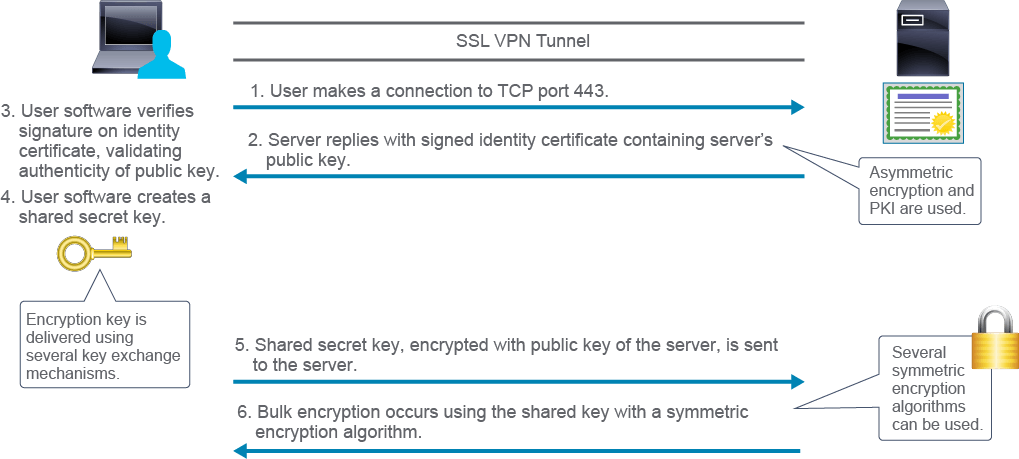
The following figure depicts the steps that are taken in the negotiation of a new TLS connection between a web browser and a web server. The figure illustrates the cryptographic architecture of SSL and TLS, based on the negotiation process of the protocol.
下圖描繪了在網頁瀏覽器與網站伺服器之間協商建立新 TLS 連線所採取的步驟,圖中根據該協定的協商過程,說明了 SSL 與 TLS 的密碼架構。
Cisco AnyConnect SSL VPN
Cisco AnyConnect SSL VPN
TLS is not only used for communication on the internet, but is also used for remote-access VPNs to secure the transit data between the remote workers and internal servers of the company.
TLS 不僅用於網際網路上的通訊,也用於遠端存取 VPN,以保護遠端工作人員與公司內部伺服器之間傳輸的資料。
Cisco AnyConnect is a VPN remote-access client providing a secure endpoint access solution. It delivers enforcement that is context-aware, comprehensive, and seamless. The Cisco AnyConnect client uses TLS and Datagram TLS (DTLS). DTLS is the preferred protocol, but if, for some reason, the Cisco AnyConnect client cannot negotiate DTLS, there is a fallback to TLS.
Cisco AnyConnect 是一款 VPN 遠端存取用戶端,提供安全的端點存取解決方案,能提供具情境感知、全面且無縫的執行機制。Cisco AnyConnect 用戶端會使用 TLS 及資料包傳輸層安全(DTLS)。DTLS 是優先使用的協定,但若 Cisco AnyConnect 用戶端因某些原因無法協商 DTLS,則會退回使用 TLS。
A basic Cisco AnyConnect SSL VPN provides users with flexible, client-based access to sensitive resources over a remote-access VPN gateway, which is implemented on the Cisco ASA. In a basic Cisco AnyConnect remote-access SSL VPN solution, the Cisco ASA authenticates the user against its local user database, which is based on a username and password. The client authenticates the Cisco ASA with a certificate-based authentication method. In other words, the basic Cisco AnyConnect solution uses bidirectional authentication.
基本的 Cisco AnyConnect SSL VPN 可讓使用者透過建置於 Cisco ASA 上的遠端存取 VPN 閘道,以彈性化的用戶端方式存取敏感資源。在基本的 Cisco AnyConnect 遠端存取 SSL VPN 解決方案中,Cisco ASA 會依據使用者名稱與密碼,對照其本地使用者資料庫來驗證使用者身分;用戶端則以憑證式驗證方法來驗證 Cisco ASA 的身分。換句話說,基本的 Cisco AnyConnect 解決方案採用雙向驗證。
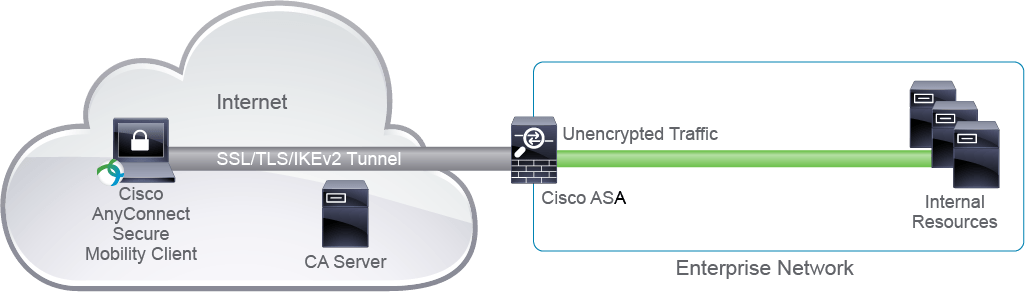
After authentication, the Cisco ASA applies a set of authorization and accounting rules to the user session. When the Cisco ASA has established an acceptable VPN environment with the remote user, the remote user can forward IP traffic into the SSL/TLS tunnel. The Cisco AnyConnect client creates a virtual network interface to provide this functionality. This virtual adapter requires an IP address, and the most basic method to assign an IP address to the adapter is to create a local pool of IP addresses on the Cisco ASA. The client can use any application to access any resource behind the Cisco ASA VPN gateway, subject to access rules and the split tunneling policy that are applied to the VPN session.
驗證完成後,Cisco ASA 會將一組授權與計費規則套用到該使用者工作階段。當 Cisco ASA 與遠端使用者建立起可接受的 VPN 環境後,遠端使用者便可以將 IP 流量轉送進入 SSL/TLS 通道。Cisco AnyConnect 用戶端會建立一個虛擬網路介面來提供此功能,這個虛擬轉接器需要一個 IP 位址,而指派 IP 位址給該轉接器最基本的方法,就是在 Cisco ASA 上建立一個本地 IP 位址集區。用戶端可以使用任何應用程式來存取 Cisco ASA VPN 閘道背後的任何資源,但須遵守套用於該 VPN 工作階段的存取規則與分流通道政策。
There are two types of tunneling policies for a VPN session:
VPN 工作階段有兩種通道政策:
- Full-tunneling: The traffic generated from the user is fully encrypted and is sent to the Cisco ASA, where it is routed. This process occurs for all traffic, even when the users want to access the resources on the internet. It is especially useful to use this type of tunneling policy when the endpoint is connected to the unsecured public wireless network.全通道模式: 由使用者產生的流量會全部加密並傳送到 Cisco ASA 進行路由,即使使用者想存取網際網路上的資源,這個流程也一體適用。當端點連接到不安全的公用無線網路時,使用這種通道政策特別有用。
- Split-tunneling: This approach only tunnels the traffic when the users want to access any internal resources of the organization. The other traffic will utilize the client’s own internet connection for connectivity.分流通道模式: 這種做法只會在使用者想要存取組織內部資源時才建立通道,其餘的流量則會使用用戶端本身的網際網路連線來連接。