Network administrators spend a lot of time troubleshooting the network. Tools that are used for troubleshooting are capable of generating outputs with a lot of information. In troubleshooting, one challenge is to know how and what to look for in an output command—because you want to check only for specific information relevant to the case. You can focus on specific information with Cisco IOS troubleshooting tools and Microsoft Windows tools, if appropriate for your network.
網路管理員花費大量時間在網路疑難排解上。用於疑難排解的工具能夠產生包含大量資訊的輸出。在疑難排解中,一項挑戰是知道要在輸出指令中如何尋找及尋找什麼,因為你只想檢查與案例相關的特定資訊。你可以使用 Cisco IOS 疑難排解工具,以及適用時的 Microsoft Windows 工具,來聚焦於特定資訊。
Logging
記錄
During operation, network devices generate messages about different events. These messages are sent to an operating system process. This process is responsible for sending these messages to various destinations, as directed by the device configuration. Logging messages are also sent to the console by default. Even if the global logging process is disabled, logging messages are nevertheless sent to the console. You can decide about the severity level of the logged messages and their destination.
在運作期間,網路裝置會針對不同事件產生訊息。這些訊息會被送往作業系統的處理程序。此處理程序負責依裝置設定,將訊息送往各種目的地。記錄訊息預設也會送到主控台。即使全域記錄處理程序已停用,記錄訊息仍會送到主控台。你可以決定所記錄訊息的嚴重性等級及其目的地。
You can verify logging settings on networking devices by using a show logging command.
你可以使用 show logging 指令驗證網路裝置上的記錄設定。
R1# show logging
Syslog logging: enabled (0 messages dropped, 0 messages rate-limited, 0 flushes, 0 overruns, xml disabled, filtering disabled)

No Active Message Discriminator.

No Inactive Message Discriminator.

 Console logging: level debugging, 15 messages logged, xml disabled,
                     filtering disabled
 Monitor logging: disabled
    Buffer logging:  level debugging, 15 messages logged, xml disabled,
                    filtering disabled
    Exception Logging: size (4096 bytes)
    Count and timestamp logging messages: disabled
    Persistent logging: disabled
    Trap logging: level informational, 20 message lines logged
        Logging Source-Interface:       VRF Name:

Log Buffer (4096 bytes):

*Dec 18 12:38:49.804: %SYS-5-RESTART: System restarted --
*Dec 18 12:38:51.528: %LINK-3-UPDOWN: Interface Ethernet0/0, changed state to up
*Dec 18 12:38:51.541: %LINK-3-UPDOWN: Interface Ethernet0/1, changed state to up
*Dec 18 12:38:51.545: %LINK-3-UPDOWN: Interface Ethernet0/2, changed state to up
*Dec 18 12:38:52.534: %LINEPROTO-5-UPDOWN: Line protocol on Interface Ethernet0/0, changed state to up
*Dec 18 12:38:52.547: %LINEPROTO-5-UPDOWN: Line protocol on Interface Ethernet0/1, changed state to up
*Dec 18 14:40:34.071: %SYS-5-CONFIG_I: Configured from console by console
*Dec 18 14:44:01.979: %AMDP2_FE-6-EXCESSCOLL: Ethernet0/1 TDR=0, TRC=0
*Dec 18 14:53:13.704: %AMDP2_FE-6-EXCESSCOLL: Ethernet0/1 TDR=0, TRC=0
R1#
From the output of the command, you can chronologically see the events that have triggered the logging messages.
從指令輸出中,你可以按時間順序看到觸發記錄訊息的事件。
The logging messages may be sent to the console, the monitor, and the memory buffer, which has a size of 4096 bytes. There are eight levels of severity of logging messages. Levels are numbered from 0 to 7, from most severe to debugging messages: emergency, alert, critical, error, warning, notification, informational, and debugging. Time stamps show the time when each event occurred. By default, system logging is on, and the default severity level is debugging, which means that all messages are logged.
記錄訊息可能會被送往主控台、監視器,以及大小為 4096 位元組的記憶體緩衝區。記錄訊息共有八個嚴重性等級。等級由 0 到 7 編號,從最嚴重到偵錯訊息依序為:緊急、警報、嚴重、錯誤、警告、通知、資訊、偵錯。時間戳記顯示每個事件發生的時間。預設情況下,系統記錄功能為開啟,且預設嚴重性等級為偵錯,這表示所有訊息都會被記錄。
In the output, you can see that the system was restarted once. After the restart, the interfaces and the line protocols changed the state to "up." This message was logged as a notification message—level 5.
在輸出中,你可以看到系統曾重新啟動一次。重新啟動後,介面與線路協定的狀態變更為「up」。此訊息以通知訊息(等級 5)記錄。
Cisco IOS doesn't send log messages to a terminal session over IP (Telnet or Secure Shell Protocol [SSH] connections) by default. In the output this is shown by logging to the monitor setting, which is set to off (disabled). If you need to enable logging to terminal sessions, you need to use the terminal monitor command. After using the terminal monitorcommand, monitor logging enablement can be verified by a show logging command:
Cisco IOS 預設不會將記錄訊息透過 IP(Telnet 或安全殼層協定 [SSH] 連線)傳送到終端工作階段。在輸出中,這由監視器記錄設定顯示為 off(停用)。若你需要啟用對終端工作階段的記錄功能,需要使用 terminal monitor 指令。使用 terminal monitor指令後,可透過 show logging 指令驗證監視器記錄是否已啟用:
R1# show logging
Syslog logging: enabled (0 messages dropped, 0 messages rate-limited, 0 flushes, 0 overruns, xml disabled, filtering disabled)

No Active Message Discriminator.

No Inactive Message Discriminator.

    Console logging: level debugging, 15 messages logged, xml disabled,
                     filtering disabled
 Monitor logging: level debugging, 15 messages logged, xml disabled,
                     filtering disabled
    Buffer logging:  level debugging, 15 messages logged, xml disabled,
                    filtering disabled
    Exception Logging: size (4096 bytes)
    Count and timestamp logging messages: disabled
   <--- output omitted --->
Logging to the monitor (all tty lines) shows "disabled" or, if enabled, the severity level limit, number of messages logged, and whether XML formatting or filtering is enabled.
傳送到監視器(所有 tty 線路)的記錄會顯示「disabled」,或者若已啟用,則顯示嚴重性等級上限、已記錄訊息數量,以及是否啟用 XML 格式化或篩選。
Internet Control Message Protocol
網際網路控制訊息協定
Internet Control Message Protocol (ICMP) is a supporting protocol in the TCP/IP protocol suite. It is used by network devices, including routers, to send error messages and operational information indicating, for example, that a requested service is not available or that a host or router could not be reached. ICMP differs from transport protocols such as TCP and UDP. It is not typically used to exchange data between systems, nor is it regularly employed by end-user network applications (except for some diagnostic tools, such as ping and traceroute).
網際網路控制訊息協定(ICMP)是 TCP/IP 協定套組中的一個支援性協定。網路裝置(包括路由器)使用它來傳送錯誤訊息與操作資訊,例如指出所要求的服務無法使用,或主機或路由器無法連通。ICMP 與 TCP、UDP 等傳輸協定不同,它通常不用於系統間交換資料,也不常被終端使用者的網路應用程式使用(某些診斷工具除外,例如 ping 與 traceroute)。
ICMP messages are typically used for diagnostic or control purposes or generated in response to errors in IP operations. ICMP errors are directed to the source IP address of the originating packet. For example, every device (such as an intermediate router) forwarding an IPv4 datagram first decrements the Time to Live (TTL) field in the IPv4 header by one. If the resulting TTL is 0, the packet is discarded, and an ICMP time exceeded in transit message is sent to the packet's source address.
ICMP 訊息通常用於診斷或控制目的,或因 IP 操作發生錯誤而產生。ICMP 錯誤會被導向原始封包的來源 IP 位址。舉例來說,每個轉送 IPv4 資料包的裝置(例如中介路由器)會先將 IPv4 標頭中的存活時間(TTL)欄位減一。若結果 TTL 為 0,則封包會被丟棄,並將 ICMP 傳輸中逾時(time exceeded)訊息傳送給封包的來源位址。
Other situations in which network devices use ICMP are when a datagram cannot reach its designated destination, when a network device does not have enough buffering capacity to accommodate the datagram, or when a gateway can redirect the host to use a shorter path to the destination. Because IP was not designed with absolute reliability, ICMP allows the devices to receive feedback on the traffic they are sending and any problems that might occur.
網路裝置使用 ICMP 的其他情況包括:資料包無法到達指定目的地時、網路裝置沒有足夠緩衝容量容納資料包時,或閘道可以重新導向主機使用較短路徑到達目的地時。由於 IP 在設計上並非絕對可靠,ICMP 讓裝置能對其傳送的流量以及可能發生的問題取得回饋。
ICMP does not guarantee that a datagram will be sent to its destination or that a control message will be returned to the source. Some datagrams may be lost in transit to their destination without a report on their loss being sent back to the source. Therefore, higher-level protocols using IP must implement their own reliability mechanisms if reliability is needed in transmission of data. Because ICMP is usually used to report errors in datagrams, reporting on lost ICMP messages using ICMP itself would cause an infinite loop of ICMP messages. Therefore, ICMP messages will not report on the loss of other ICMP messages.
ICMP 不保證資料包會被送達其目的地,也不保證控制訊息一定會回傳到來源端。有些資料包在傳送到目的地途中可能遺失,而不會有遺失報告送回來源端。因此,若傳輸資料需要可靠性,使用 IP 的較高層協定必須自行實作其可靠性機制。由於 ICMP 通常用於回報資料包中的錯誤,若再用 ICMP 本身來回報 ICMP 訊息的遺失,將造成 ICMP 訊息的無窮迴圈。因此,ICMP 訊息不會回報其他 ICMP 訊息的遺失。
ICMP messages are sent by using a basic IP header as seen in the table below:
ICMP 訊息使用如下表所示的基本 IP 標頭來傳送:
Header 標頭 | Value 數值 | Description 說明 |
Version 版本 | 4 or 6 4 或 6 | The IP version using ICMP. 使用 ICMP 的 IP 版本。 |
IHL IHL | 32-bit words 32 位元字組 | The internet header length. 網際網路標頭長度。 |
Type of Service 服務類型 | Decimal Value 0-254 十進位數值 0-254 | This value corresponds to the type of ICMP message. 此數值對應 ICMP 訊息的類型。 |
Total Length 總長度 | Length in Octets 以八位元組為單位的長度 | The length of the internet header and data in octets. 以八位元組表示的網際網路標頭與資料長度。 |
Identification, Flags, Fragment Offset 識別碼、旗標、分段偏移 | - - | The header values used in fragmentation. 用於分段作業的標頭數值。 |
Time to Live 存活時間 | Hop count 跳數 | The time to live value that is decremented at each hop in the network. 在網路中每經過一跳就會遞減的存活時間值。 |
Protocol 協定 | 1 1 | ICMP has protocol number of 1. ICMP 的協定編號為 1。 |
Header Checksum 標頭檢查碼 | Calculated Checksum 計算所得檢查碼 | The checksum calculated for all 16-bit words in the header. 針對標頭中所有 16 位元字組計算出的檢查碼。 |
Source Address 來源位址 | IPv4 or IPv6 address IPv4 或 IPv6 位址 | The IP address of the source device sending the ICMP message. 傳送 ICMP 訊息的來源裝置之 IP 位址。 |
Destination Address 目的位址 | IPv4 or IPv6 address IPv4 或 IPv6 位址 | The IP address for which the ICMP message is being sent to. ICMP 訊息所要傳送到的目的 IP 位址。 |
There are multiple types of ICMP messages that you may see while examining your network. The following are a few of the types that you may encounter:
在檢視你的網路時,可能會看到多種類型的 ICMP 訊息。以下是你可能遇到的幾種類型:
- Destination Unreachable: If the destination traffic is unreachable according to the router’s routing table information, it will send back a Destination Unreachable message to the source. The message is also sent if the traffic must be fragmented but the "Don’t Fragment" flag is set to on.目的無法連線(Destination Unreachable):若根據路由器的路由表資訊,目的流量無法連線,路由器會將目的無法連線訊息送回來源端。若流量必須分段但「不分段」(Don't Fragment)旗標被設為開啟,也會傳送此訊息。
- Time Exceeded: If the device processing the datagram finds the TTL header set to zero, it will discard the datagram and send this message back to the source.逾時(Time Exceeded):若處理資料包的裝置發現 TTL 標頭被設為零,會丟棄該資料包並將此訊息送回來源端。
- Parameter Problem: If the device processing the datagram finds an issue with one of the header’s parameters, it will send back a message to the source. For example, if an option is required but not set in the header or if the option contains incorrect values.參數問題(Parameter Problem):若處理資料包的裝置發現標頭參數中有問題,會將訊息送回來源端。例如,某選項為必要但標頭中未設定,或該選項包含不正確的值。
- Redirect: If a router (R1) receives a message from a host on its attached network (Network A) destined to host in another network (Network B) and R1 finds the next hop router (R2) to the destination to be in the same network as the source host, it will send a redirect message back to the source. A redirect message indicates that the source host should send its traffic destined to Network B directly to R2.重新導向(Redirect):若路由器(R1)從其連接網路(網路 A)上的主機收到一則要送往另一網路(網路 B)中主機的訊息,且 R1 發現通往目的地的下一跳路由器(R2)與來源主機位於同一網路,則會將重新導向訊息送回來源端。重新導向訊息表示來源主機應將送往網路 B 的流量直接傳送給 R2。
- Echo or Echo Reply: Data received in an Echo message must be sent back in an Echo Reply message.回應要求或回應回覆(Echo or Echo Reply):Echo 訊息中收到的資料必須以 Echo Reply 訊息送回。
- When troubleshooting issues within your network, ICMP can be useful for discovering what the issue is. The
pingutility that uses ICMP, can help verify the reachability of devices on your network. Thetraceroutecommand, which also uses ICMP, can be used to display the reachability to the destination hop by hop. This can be useful for discovering where in the network the traffic is being dropped. This information can be used to narrow down the area of troubleshooting for you in the network. Bothpingandtraceroutecommands will be explained in more detail later in this section.在對網路中的問題進行疑難排解時,ICMP 可用於找出問題所在。使用 ICMP 的ping工具,可協助驗證網路上裝置的可連通性。同樣使用 ICMP 的traceroute指令,可用於逐跳顯示到達目的地的可連通性。這有助於找出網路中流量在何處被丟棄,這項資訊可用來縮小你在網路中進行疑難排解的範圍。ping與traceroute指令都將在本節稍後詳細說明。
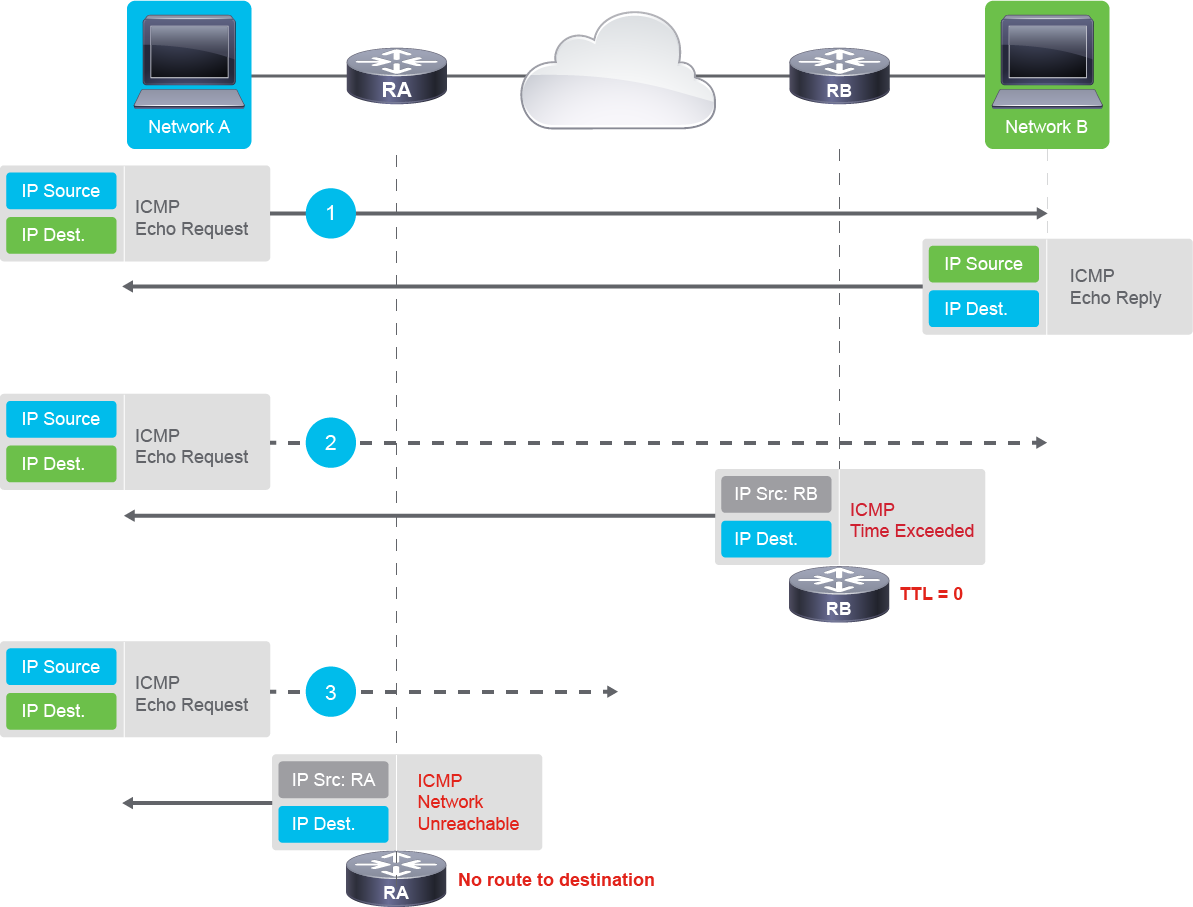
In the first scenario in the preceding image, the blue workstation issues the ping command towards the green workstation. The blue workstation generates an ICMP Echo Request message with its source IP address and the destination IP address of the green workstation. After successful routing towards the green workstation, the green workstation generates an ICMP Echo Reply message to indicate successful receipt of the ICMP Echo Request message. ICMP Echo Reply message will have source IP of green workstation and destination IP of blue workstation. This means that ICMP Echo Request and Echo Reply provide a simple method of checking if you have proper routing and reachable destination between two IP addresses.
在前圖的第一種情境中,藍色工作站向綠色工作站發出 ping 指令。藍色工作站產生一則 ICMP Echo Request 訊息,內含其來源 IP 位址及綠色工作站的目的 IP 位址。成功路由至綠色工作站後,綠色工作站產生一則 ICMP Echo Reply 訊息,表示已成功收到 ICMP Echo Request 訊息。ICMP Echo Reply 訊息的來源 IP 為綠色工作站,目的 IP 為藍色工作站。這表示 ICMP Echo Request 與 Echo Reply 提供了一種簡單的方法,可檢查兩個 IP 位址之間是否有正確的路由與可連通的目的地。
In the second scenario, the blue workstation issues the ping command towards the green workstation, set with a lower TTL value. Because the TTL value decreases with every routing hop, it eventually reaches a zero value before reaching its destination. The router RB detects the TTL=0 condition and generates ICMP Time Exceeded message from its IP to the blue workstation, the original sender of the ICMP Echo Request message.
在第二種情境中,藍色工作站向綠色工作站發出 ping 指令,並設定較低的 TTL 值。由於 TTL 值會隨每次路由跳躍遞減,它會在到達目的地之前就降為零。路由器 RB 偵測到 TTL=0 的情況,並從其 IP 位址產生 ICMP Time Exceeded 訊息,傳送給原始發出 ICMP Echo Request 訊息的藍色工作站。
In the third scenario, the blue workstation issues the ping command towards the green destination, which is an unknown network from the perspective of the first routing hop, router RA. Because router RA does not have a routing entry in its routing table for the green destination, it generates the ICMP Network unreachable message and sends it to the blue workstation, the sender of the ICMP Echo Request message.
在第三種情境中,藍色工作站向綠色目的地發出 ping 指令,但就第一個路由跳點路由器 RA 而言,該目的地屬於未知網路。由於路由器 RA 的路由表中沒有通往綠色目的地的路由項目,它會產生 ICMP Network unreachable 訊息,並將其傳送給發出 ICMP Echo Request 訊息的藍色工作站。
- ICMP uses the support of IP as if it were a higher-level protocol—However, ICMP is integral to IP. Although standard IP packets contain ICMP messages, they are usually processed separately, from IP processing. It may be necessary to inspect the contents of the ICMP message and deliver the appropriate error message. The application responsible for transmitting the IP packet receives the error message.ICMP 借助 IP 的支援,彷彿本身是更高層的協定,然而 ICMP 實際上是 IP 不可或缺的一部分。雖然標準 IP 封包內含 ICMP 訊息,但它們通常與 IP 處理程序分開處理。可能有必要檢查 ICMP 訊息的內容,以便傳遞適當的錯誤訊息。負責傳送該 IP 封包的應用程式會收到此錯誤訊息。
- ICMP is a network layer protocol. There is no TCP or UDP port number associated with ICMP packets because these numbers are associated with the transport layer above.ICMP 是一種網路層協定。ICMP 封包沒有與其相關聯的 TCP 或 UDP 連接埠號,因為這些連接埠號是與上層的傳輸層相關聯的。
Verification of End-To-End IPv4 Connectivity
驗證端對端 IPv4 連線
Using ping
使用 ping
The ping command is a very common method for troubleshooting the accessibility of devices. It uses a series of ICMP Echo messages to determine these parameters:
ping 指令是排解裝置可連通性問題時非常常見的方法。它使用一連串 ICMP Echo 訊息來判斷以下參數:
- Whether a remote host is active or inactive遠端主機是否為啟用中或非啟用中
- The round-trip time (RTT) in communicating with the host與該主機通訊的往返時間(RTT)
- Packet loss封包遺失
- The
pingcommand first sends an echo request packet to an address, then waits for a reply. The ping is successful only if the echo request gets to the destination, and the destination is able to send an echo reply to the source within a predetermined time called a timeout. The default value of this timeout is 2 seconds on Cisco devices.ping指令會先向某個位址傳送 echo request 封包,然後等待回覆。只有當 echo request 到達目的地,且目的地能在稱為逾時(timeout)的預定時間內傳回 echo reply,ping 才算成功。在 Cisco 裝置上,此逾時的預設值為 2 秒。
The ICMP header starts after the IPv4 header since the ICMP messages are encapsulated in IPv4 packets. The first 4 bytes of the ICMP header are fixed in the following format:
由於 ICMP 訊息是封裝在 IPv4 封包中,ICMP 標頭緊接在 IPv4 標頭之後開始。ICMP 標頭的前 4 個位元組採用以下固定格式:
- First byte specifies the ICMP type.第一個位元組指定 ICMP 類型。
- Second byte specifies the code, which depends on the ICMP type.第二個位元組指定代碼(code),其意義取決於 ICMP 類型。
- The third and the fourth bytes are used for the checksum of the ICMP header.第三與第四個位元組用於 ICMP 標頭的檢查碼。
The remaining part of the header depends on the ICMP message type. The ICMP control messages are identified by the value in the type field. The code field gives additional context information for the message.
標頭其餘部分則取決於 ICMP 訊息類型。ICMP 控制訊息由類型欄位中的值來識別,代碼欄位則為該訊息提供額外的上下文資訊。
The following table lists commonly used ICMP-type values during troubleshooting
下表列出疑難排解時常用的 ICMP 類型值
ICMP Type ICMP 類型 | Meaning and Code Values 意義與代碼值 |
0 0 | Echo-reply Echo-reply |
3 3 | Destination unreachable code 0 = net unreachable 1 = host unreachable 2 = protocol unreachable 3 = port unreachable 4 = fragmentation needed and DF set 5 = source route failed 目的無法連線 代碼 0 = 網路無法連線 1 = 主機無法連線 2 = 協定無法連線 3 = 連接埠無法連線 4 = 需要分段但已設定 DF 5 = 來源路由失敗 |
4 4 | Source-quench Source-quench |
5 5 | Redirect code 0 = redirect datagrams for the network 1 = redirect datagrams for the host 2 = redirect datagrams for the type of service and network 3 = redirect datagrams for the type of service and host Redirect 代碼 0 = 為該網路重新導向資料包 1 = 為該主機重新導向資料包 2 = 針對服務類型與網路重新導向資料包 3 = 針對服務類型與主機重新導向資料包 |
6 6 | Alternate-address Alternate-address |
8 8 | Echo Echo |
9 9 | Router-advertisement Router-advertisement |
10 10 | Router-solicitation Router-solicitation |
11 11 | Time-exceeded code 0 = time to live exceeded in transit 1 = fragment reassembly time exceeded Time-exceeded 代碼 0 = 傳輸中存活時間逾時 1 = 分段重組時間逾時 |
- The table below lists the possible output characters from the Cisco IOS
pingcommand:下表列出 Cisco IOSping指令輸出中可能出現的字元:
Character 字元 | Description 說明 |
! ! | Each exclamation point indicates receipt of a reply. 每個驚嘆號代表收到一次回覆。 |
. . | Each period indicates that the device timed out while waiting for a reply. 每個句點代表裝置在等待回覆時逾時。 |
U U | A destination unreachable error protocol data unit (PDU) was received. 收到一則目的無法連線錯誤的協定資料單元(PDU)。 |
Q Q | Source quench (destination too busy). 來源抑制(Source quench,目的地過於忙碌)。 |
M M | Could not fragment. 無法進行分段。 |
? ? | Unknown packet type. 未知的封包類型。 |
& & | Packet lifetime exceeded. 封包存活時間逾時。 |
For example, after sending ICMP echo requests, if an ICMP echo reply packet is received within the default, 2-second (configurable) timeout, an exclamation point (!) is the output, meaning that the reply was received before the timeout expired. A period (.) is the output if the reply was not received before the timeout expired.
舉例來說,在傳送 ICMP echo request 之後,若在預設(可設定)的 2 秒逾時內收到 ICMP echo reply 封包,輸出會顯示驚嘆號(!),代表回覆在逾時到期前已收到。若在逾時到期前未收到回覆,則輸出會顯示句點(.)。
The device also outputs the min/avg/max RTT in milliseconds.
裝置也會輸出以毫秒為單位的最小/平均/最大 RTT。
When a normal ping command is sent from a device, the source address of the ping is the IPv4 address of the interface that the packet uses to exit the device. The source address can be changed to the address of any interface on the device.
當從某裝置傳送一般的 ping 指令時,ping 的來源位址是封包離開該裝置所使用介面的 IPv4 位址。此來源位址可以變更為該裝置上任一介面的位址。
You can also perform an extended ping, and adjust parameters such as the source IPv4 address, as follows:
你也可以執行延伸 ping,並如下調整參數(例如來源 IPv4 位址):
R1# ping
Protocol [ip]:
Target IP address: 10.10.1.2
Repeat count [5]: 1
Datagram size [100]:
Timeout in seconds [2]:
Extended commands [n]: y
Source address or interface: 10.10.1.1
Type of service [0]:
Set DF bit in IP header? [no]:
Validate reply data? [no]:
Data pattern [0xABCD]:
Loose, Strict, Record, Timestamp, Verbose[none]:
Sweep range of sizes [n]:
Type escape sequence to abort.
Sending 1, 100-byte ICMP Echos to 10.10.1.2, timeout is 2 seconds:
Packet sent with a source address of 10.10.1.1
!
Success rate is 100 percent (1/1), round-trip min/avg/max = 1/1/1 ms
If ping fails or returns an unusual RTT, you can use the traceroute command to help narrow down the problem. You can also vary the size of the ICMP echo payload to test problems that are related to the MTU.
若 ping 失敗或傳回異常的 RTT,你可以使用 traceroute 指令協助縮小問題範圍。你也可以改變 ICMP echo 承載資料的大小,以測試與 MTU 相關的問題。
On a Microsoft Windows device, by default, four packets are sent; information displayed is similar to the Cisco IOS output, as shown in the example:
在 Microsoft Windows 裝置上,預設會傳送四個封包;顯示的資訊與 Cisco IOS 的輸出類似,如範例所示:
C:\> ping 172.16.10.2
Pinging 172.16.10.2 with 32 bytes of data:
Reply from 172.16.10.2: bytes2 time<1ms TTL8
Reply from 172.16.10.2: bytes2 time<1ms TTL8
Reply from 172.16.10.2: bytes2 time<1ms TTL8
Reply from 172.16.10.2: bytes2 time<1ms TTL8
Ping statistics for 172.16.10.2:
    Packets: Sent = 4, Received = 4, Lost = 0 (0% loss),
Approximate round trip times in milli-seconds:
    Minimum = 0ms, Maximum = 0ms, Average = 0ms
Using traceroute (Cisco IOS) or tracert (Microsoft Windows)
使用 traceroute(Cisco IOS)或 tracert(Microsoft Windows)
Traceroute is used to test the path that packets take through the network. It sends out either an ICMP echo request (Microsoft Windows) or UDP (most implementations) messages, gradually increasing IPv4 TTL values to probe the path by which a packet traverses the network. The first packet with the TTL set to 1 will be discarded by the first-hop router, which will send an ICMP "time exceeded" message sourced from its IPv4 address. The device that initiated the traceroute therefore knows the address of the first-hop router. When the TTL is set to 2, the packets will arrive at the second router, which will respond with an ICMP "time exceeded" message from its IPv4 address. This process continues until the message reaches its final destination; the destination device will return either an ICMP echo reply (Windows) or an ICMP port unreachable, indicating that the request or message has reached its destination.
Traceroute 用於測試封包在網路中所經過的路徑。它會發出 ICMP echo request(Microsoft Windows)或 UDP(大多數實作)訊息,逐漸增加 IPv4 TTL 值,以探測封包經過網路的路徑。第一個 TTL 設為 1 的封包會被第一跳路由器丟棄,該路由器會傳送一則以其 IPv4 位址為來源的 ICMP「time exceeded」訊息。因此,發起 traceroute 的裝置便得知第一跳路由器的位址。當 TTL 設為 2 時,封包會到達第二個路由器,該路由器會以其 IPv4 位址回應一則 ICMP「time exceeded」訊息。此程序會持續進行,直到訊息到達最終目的地為止;目的裝置會傳回 ICMP echo reply(Windows)或 ICMP port unreachable,表示要求或訊息已到達其目的地。
Cisco traceroute works by sending a sequence of three packets for each TTL value, with different destination UDP ports, which allows it to report routers that have multiple, equal-cost paths to the destination. For example, the first three packets with TTL 1 use UDP ports 33434 (first packet), 33435 (second packet), and 33436 (third packet). The next three UDP datagrams are sent with a TTL of 2 to destination ports 33437, 33438, and 33439.
Cisco traceroute 的運作方式是針對每個 TTL 值傳送三個封包,各使用不同的目的 UDP 連接埠,讓它能夠回報具有多條等成本路徑通往目的地的路由器。舉例來說,TTL 為 1 的前三個封包會使用 UDP 連接埠 33434(第一個封包)、33435(第二個封包)與 33436(第三個封包)。接下來的三個 UDP 資料包則以 TTL 值 2 傳送,目的連接埠分別為 33437、33438 與 33439。
R1# traceroute 10.10.50.2
Type escape sequence to abort.
Tracing the route to 10.10.50.2
VRF info: (vrf in name/id, vrf out name/id)
  1 10.10.10.2 0 msec 0 msec 1 msec
  2 10.10.20.2 0 msec 1 msec 0 msec
  3 172.16.0.2 1 msec 0 msec 0 msec
  4 10.10.80.2 0 msec 1 msec 0 msec
  5 10.10.40.2 1 msec 1 msec 0 msec
  6  *
10.10.50.2 1 msec 1 msecThe table below lists the characters that can appear in the Cisco IOS traceroute command output.
下表列出 Cisco IOS traceroute 指令輸出中可能出現的字元。
Character 字元 | Description 說明 |
nn msec nn msec | For each node, the round-trip time in milliseconds for the specified number of probes 針對每個節點,指定探測次數的往返時間(毫秒) |
* * | The probe timed out 探測逾時 |
A A | Administratively prohibited (for example, by an access control list [ACL]) 管理性禁止(例如受存取控制清單 [ACL] 限制) |
Q Q | Source quench (destination too busy) 來源抑制(目的地過於忙碌) |
I I | User interrupted test 使用者中斷測試 |
U U | Port unreachable 連接埠無法連線 |
H H | Host unreachable 主機無法連線 |
N N | Network unreachable 網路無法連線 |
P P | Protocol Unreachable 協定無法連線 |
T T | Timeout 逾時 |
? ? | Unknown packet type 未知的封包類型 |
The tracert command is a Windows implementation of traceroute (and will not work on Cisco devices).
tracert 指令是 Windows 版本的 traceroute 實作(無法在 Cisco 裝置上使用)。
Using Telnet and SSH
使用 Telnet 與 SSH
One way to obtain information about a remote network device is to connect to it using either the Telnet or SSH applications. Telnet and SSH are virtual terminal protocols that are part of the TCP/IP suite. The protocols allow connections and remote console sessions from one network device to one or more remote devices.
取得遠端網路裝置資訊的方法之一,是使用 Telnet 或 SSH 應用程式連線到該裝置。Telnet 與 SSH 是 TCP/IP 套組中的虛擬終端機協定,可讓一台網路裝置對一台或多台遠端裝置建立連線與遠端主控台工作階段。
When you use Telnet to connect to a remote device, the default port number is used. The default port for Telnet is 23. You can use a different port number, from 1 to 65,535, to test if a remote device is listening to the port.
當你使用 Telnet 連線到遠端裝置時,會使用預設連接埠號。Telnet 的預設連接埠為 23。你可以使用 1 到 65,535 之間的其他連接埠號,以測試遠端裝置是否在監聽該連接埠。
Although Telnet can be used as a troubleshooting tool to check transport layer functionality, it should not be used in a production environment to administer network devices. Nowadays, SSH is used as it is a secure access method.
雖然 Telnet 可作為疑難排解工具,用於檢查傳輸層功能,但不應在正式環境中用於管理網路裝置。現今普遍使用 SSH,因為它是一種安全的存取方式。
To log on to a host that supports Telnet, use the telnet EXEC command:
若要登入支援 Telnet 的主機,請使用 telnet EXEC 指令:
RouterA# telnet host(where host is an IP address or hostname of a remote system)The telnet command in the output tests if HTTP, which listens on TCP port 80, is open. Since we get an Open response, we can assume that the remote device is reachable and listens to TCP port 80. On a Cisco router, to exit the established connection, you must enter a control+C (^C) hotkey as shown in the output. The hotkey that closes the connection on a Cisco device is "ctrl+shift+6 and x."
輸出中的 telnet 指令用於測試監聽 TCP 連接埠 80 的 HTTP 是否開啟。由於我們得到 Open 回應,可推知遠端裝置是可連通的,並在監聽 TCP 連接埠 80。在 Cisco 路由器上,若要結束已建立的連線,如輸出所示,你必須輸入 control+C(^C)快速鍵。在 Cisco 裝置上關閉連線的快速鍵是「ctrl+shift+6 再按 x」。
To start an encrypted session with a remote networking device, use the ssh EXEC command:
若要與遠端網路裝置開始一個加密工作階段,請使用 ssh EXEC 指令:
RouterA # ssh ip addressVerify ARP table
驗證 ARP 表
Devices use ARP to perform IPv4 address resolution for IPv4 to MAC address mapping. The show ip arp or (show arp) command displays the ARP table on a Cisco router.
裝置使用 ARP 執行 IPv4 位址解析,將 IPv4 對應到 MAC 位址。show ip arp 或(show arp)指令會顯示 Cisco 路由器上的 ARP 表。
Branch# show ip arp
Protocol  Address     Age (min)  Hardware Addr    Type   Interface
Internet  10.1.1.1    5          001b.d59c.3427   ARPA   GigabitEthernet0/0
Internet  10.1.1.241  4          00BC.2252.e8bd   ARPA   GigabitEthernet0/0
The arp -a command displays IPv4-to-MAC-address mappings on a Windows Host.
arp -a 指令會顯示 Windows 主機上 IPv4 對應到 MAC 位址的對照表。
C:\Windows\system32> arp -a
Interface: 10.1.10.100 --- 0xd
  Internet Address      Physical Address      Type
   10.1.10.1             54-75-d0-8e-9a-d8     dynamic
  224.0.0.22            01-00-5e-00-00-16     static
  224.0.0.252           01-00-5e-00-00-fc     static
  255.255.255.255       ff-ff-ff-ff-ff-ff     static
Verify IPv4 address information
驗證 IPv4 位址資訊
Commands ipconfig and ipconfig /all (Microsoft Windows) are command-line utilities that are available on all versions of Microsoft Windows, starting with Windows NT. This utility allows you to get the IPv4 address information of a Windows computer. The ipconfig /all option displays the IP address, subnet mask, and gateway for all physical and virtual network adapters. It also displays the Domain Name Service and Microsoft Windows Internet Name Service (Microsoft WINS) settings for each adapter.
ipconfig 與 ipconfig /all(Microsoft Windows)指令是自 Windows NT 起,在所有 Microsoft Windows 版本上都可使用的命令列公用程式。此公用程式可讓你取得 Windows 電腦的 IPv4 位址資訊。ipconfig /all 選項會顯示所有實體與虛擬網路介面卡的 IP 位址、子網路遮罩與閘道,也會顯示每個介面卡的網域名稱服務與 Microsoft Windows 網際網路命名服務(Microsoft WINS)設定。
For a brief overview of interface IPv4 addressing and status information on a Cisco device, use the show ip interface brief command
若要簡要檢視 Cisco 裝置上介面的 IPv4 定址與狀態資訊,請使用 show ip interface brief 指令