A router is a networking device that forwards packets between different networks.
路由器是一種網路裝置,負責在不同網路之間轉發封包。
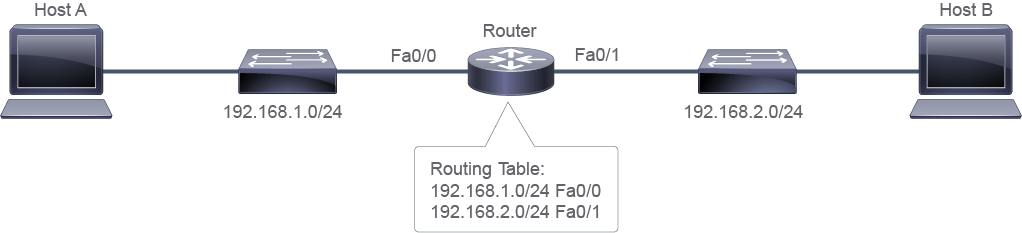
While switches exchange data frames between segments to enable communication within a single network, routers are required to reach hosts that are not in the same network. Routers enable internetwork communication by connecting interfaces in multiple networks. For example, the router in the figure above has one interface connected to the 192.168.1.0/24 network and another interface connected to the 192.168.2.0/24 network. The router uses a routing table to route traffic between the two networks.
交換器在同一個網路內的區段之間交換資料框架以達成通訊,而路由器則是用來連接不在同一網路中的主機。路由器透過連接多個網路的介面,實現網路間通訊。舉例來說,上圖中的路由器有一個介面連接到 192.168.1.0/24 網路,另一個介面連接到 192.168.2.0/24 網路。該路由器使用路由表在這兩個網路之間路由流量。
In the following figure, data frames travel between the various endpoints on LAN A. The switch enables the communication to all devices within the same network, whose network IPv4 address is 10.18.0.0/16. Likewise, the LAN B switch enables communication among the hosts on LAN B, whose network IPv4 address is 10.22.0.0/16.
在下圖中,資料框架在 LAN A 上的各個端點之間傳輸。交換器讓同一個網路(其網路 IPv4 位址為 10.18.0.0/16)內的所有裝置能夠彼此通訊。同樣地,LAN B 的交換器也讓 LAN B 上(網路 IPv4 位址為 10.22.0.0/16)的主機能夠彼此通訊。
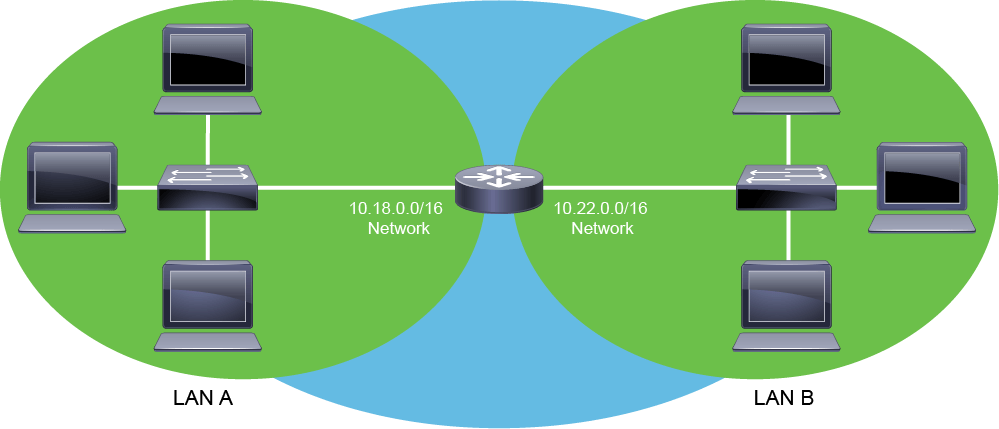
A host in LAN A cannot communicate with a host in LAN B without the router. Routers enable communication between hosts that are not in the same local LAN. Routers can do this function because they can be attached to multiple networks and can route between them. In the figure, the router is attached to two networks, 10.18.0.0/16 and 10.22.0.0/16. Routers are essential components of large IP networks because they can accommodate growth across wide geographical areas.
若沒有路由器,LAN A 上的主機無法與 LAN B 上的主機通訊。路由器讓不在同一個區域 LAN 中的主機得以互相通訊。路由器之所以能執行此功能,是因為它們可以連接多個網路並在其間進行路由。在圖中,該路由器連接了兩個網路:10.18.0.0/16 與 10.22.0.0/16。路由器是大型 IP 網路的關鍵元件,因為它們能因應廣大地理範圍的成長需求。
This figure illustrates another important routing concept. Networks to which the router is attached are called local or directly connected networks. All other networks—networks that a router is not directly attached to—are called remote networks. There are two ways for a router to learn about remote networks. Either the route is entered manually in the routing table by using something called a static route, or the router learns about it automatically by using a dynamic routing protocol.
此圖說明了另一個重要的路由概念。路由器所連接的網路稱為本地或直接連接網路。其他所有網路——即路由器未直接連接的網路——稱為遠端網路。路由器有兩種方式可得知遠端網路的資訊:一種是透過靜態路由手動輸入路由表;另一種是透過動態路由通訊協定自動學習。
This difference is essential for the routers because local and remote networks are referenced with the related routes. However, corresponding local and remote routes are differently constructed in the router’s routing table. And while for the local networks, it is enough to have an interface with an IP address and in the UP state, for the remote networks, it is a different case. Even if the remote network is behind a directly attached neighboring router, or if it is several hops away, having a few other routers interconnecting them in between, it is needed to have the route created. This process of insertion of the remote network’s route into the routing process might be manual, for static routes, or automatic, for dynamic routes.
這項差異對路由器而言至關重要,因為本地與遠端網路都是以相對應的路由來參照的。然而,在路由器的路由表中,對應的本地路由與遠端路由的建構方式並不相同。對本地網路而言,只要有一個具備 IP 位址且處於 UP 狀態的介面即可;但對遠端網路而言,情況則不同。即使遠端網路位於直接相連的鄰近路由器之後,或是相隔數個節點、中間有多台路由器互連,都必須先建立該路由。將遠端網路的路由加入路由程序的這個過程,對靜態路由而言是手動的,對動態路由而言則是自動的。
In other words, every network not accessible over the directly attached interface is considered a remote network.
換句話說,任何無法透過直接連接介面存取的網路,都被視為遠端網路。
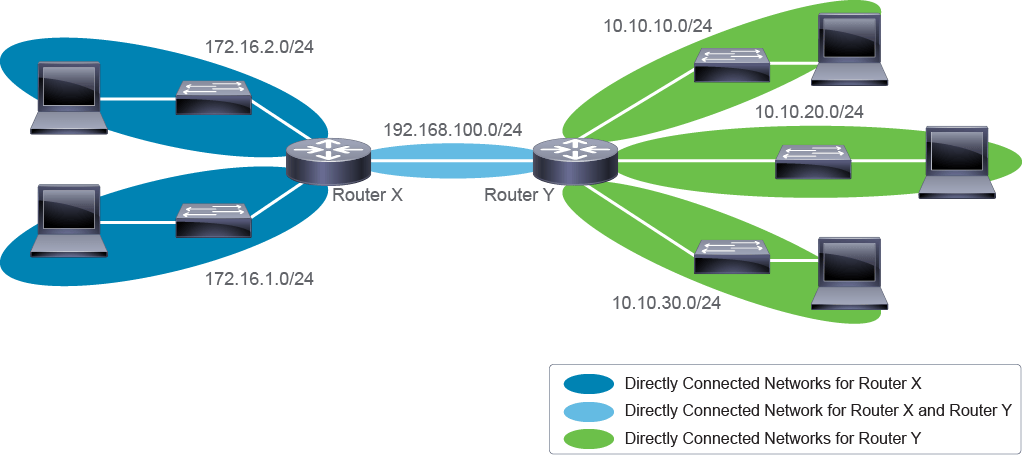
The topology in the figure shows RouterX, which is directly attached to three networks 172.16.1.0/24, 172.16.2.0/24, and 192.168.100.0/24. To RouterX, all other networks, that is, 10.10.10.0/24, 10.10.20.0/24, and, 10.10.30.0/24 are remote networks. To RouterY, networks 10.10.10.0/24, 10.10.20.0/24, and 10.10.30.0/24 are directly connected networks. RouterX and RouterY have a common directly connected network 192.168.100.0/24.
圖中的拓樸顯示 RouterX 直接連接到三個網路:172.16.1.0/24、172.16.2.0/24 與 192.168.100.0/24。對 RouterX 而言,其他所有網路,也就是 10.10.10.0/24、10.10.20.0/24 與 10.10.30.0/24,都是遠端網路。對 RouterY 而言,10.10.10.0/24、10.10.20.0/24 與 10.10.30.0/24 則是直接連接網路。RouterX 與 RouterY 共有一個直接連接網路 192.168.100.0/24。