When you are sending mail via the postal service, you need street addresses to identify the locations of specific homes and companies so that mail can reach those real-world locations. In the same way, each interface on a Cisco router must have its own IP address to uniquely identify it on the network. If no IP address is configured, even if the interface is in the "up/up" state, the router will not attempt to send and receive IP packets on the interface. To attain proper operation, for every interface that a router should use for forwarding IPv4 packets, the router needs an IPv4 address.
當你透過郵政服務寄信時,需要街道地址來標示特定住家與公司的位置,好讓郵件能送達這些真實世界的地點。同樣地,Cisco 路由器上的每個介面都必須擁有自己的 IP 位址,以便在網路上唯一地識別它。若未設定 IP 位址,即使該介面處於「up/up」狀態,路由器也不會嘗試在該介面上傳送與接收 IP 封包。為了讓路由器正常運作,路由器上每一個要用來轉送 IPv4 封包的介面,都需要一個 IPv4 位址。
The configuration of an IPv4 address on an interface is relatively simple. To configure the address and mask, simply use the ip address ip-address mask interface subcommand. The following example shows the configuration of an IPv4 address on the serial interface of a router.
在介面上設定 IPv4 位址相當簡單。若要設定位址與遮罩,只需使用 ip address ip-address mask 這個介面子指令即可。以下範例展示了在路由器的序列介面上設定 IPv4 位址的做法。
RouterX# configure terminal
RouterX(config)# interface Serial 0/0/0
RouterX(config-if)# ip address 172.18.0.1 255.255.0.0RouterX(config-if)# no shutdown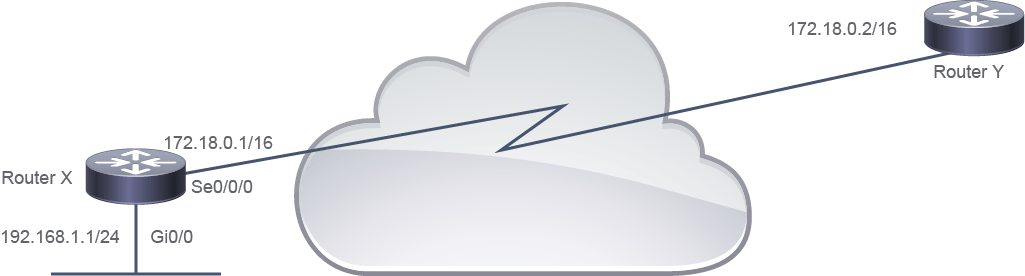
The specific steps to configure an interface on a Cisco router are as follows:
在 Cisco 路由器上設定介面的具體步驟如下:
Configuration of an IPv4 Address on the Serial Interface of a Router
在路由器序列介面上設定 IPv4 位址
Step 步驟 | Action 動作 | Results and Notes 結果與備註 |
1 1 | Enter the global configuration mode by using the configure terminal command:Router# configure terminal使用 configure terminal 指令進入全域設定模式:Router# configure terminal | Displays a new prompt: Router(config)# 顯示新的提示字元: Router(config)# |
2 2 | Identify the specific interface that requires an IPv4 address by using the interfacetype interface-identifier command:Router(config)# interface Serial 0/0/0使用 interfacetype interface-identifier 指令,指定需要 IPv4 位址的特定介面:Router(config)# interface Serial 0/0/0 | Displays a new prompt; for example: Router(config-if)# 顯示新的提示字元,例如: Router(config-if)# |
3 3 | Set the IPv4 address and subnet mask for the interface by using the ip addressip-address mask command:Router(config-if)# ip address 172.18.0.1 255.255.0.0使用 ip addressip-address mask 指令,為該介面設定 IPv4 位址與子網路遮罩:Router(config-if)# ip address 172.18.0.1 255.255.0.0 | Configures the IPv4 address and subnet mask for the selected interface 為所選介面設定 IPv4 位址與子網路遮罩 |
4 4 | Enable the interface to change the state from "administratively down" to "up" by using the no shutdown command:Router(config-if)# no shutdown使用 no shutdown 指令,將介面狀態從「administratively down」啟用為「up」:Router(config-if)# no shutdown | Enables the current interface 啟用目前的介面 |