Interface identifiers in IPv6 addresses are used to identify interfaces on a link. They can also be thought of as the "host portion" of an IPv6 address. Interface identifiers need to be unique on a specific link. Interface IDs are typically 64 bits and can be configured in multiple ways.
IPv6 位址中的介面識別碼用於識別鏈路上的介面,也可以視為 IPv6 位址的「主機部分」。介面識別碼必須在特定鏈路上具有唯一性,通常長度為 64 位元,可以用多種方式設定。
There are several ways to assign an IPv6 address to a device:
有幾種方式可以將 IPv6 位址指派給裝置:
- Static assignment using a manual interface ID:One way to statically assign an IPv6 address to a device is to manually assign both the prefix (network) and interface ID (host) portions of the IPv6 address. To configure an IPv6 address on a Cisco router interface and enable IPv6 processing on that interface, use the
ipv6 addressipv6-address/prefix-length command in the interface configuration mode. The following example shows how to statically configure a global unicast address and a link-local address on a router's interface.使用手動介面 ID 進行靜態指派:靜態指派 IPv6 位址給裝置的一種方式,是手動指派 IPv6 位址的前綴(網路)部分與介面 ID(主機)部分。若要在 Cisco 路由器介面上設定 IPv6 位址並啟用該介面的 IPv6 處理,可在介面設定模式下使用ipv6 addressipv6-address/prefix-length 命令。以下範例顯示如何在路由器介面上靜態設定全球單播位址與鏈路本地位址。Router(config)# interface Ethernet0/0 Router(config-if)# ipv6 address 2001:db8:2222:7272::72/64Router(config-if)# ipv6 address fe80::1 link-local - Static assignment using an EUI-64 interface ID:Another way to statically assign an IPv6 address is to configure the prefix (network) portion of the IPv6 address and derive the interface ID (host) portion from the MAC address of the device, which is known as the EUI-64 interface ID.使用 EUI-64 介面 ID 進行靜態指派:另一種靜態指派 IPv6 位址的方式,是設定 IPv6 位址的前綴(網路)部分,並從裝置的 MAC 位址衍生出介面 ID(主機)部分,此方式稱為 EUI-64 介面 ID。
To configure an IPv6 address for an interface and enable IPv6 processing on the interface using an EUI-64 interface ID in the low order 64 bits of the address (host), use the
ipv6 addressipv6-prefix/prefix-lengtheui-64command in the interface configuration mode. The following example shows how to statically assign an IPv6 address on a router's interface using an EUI-64 interface ID.若要為介面設定 IPv6 位址,並使用位址低位 64 位元(主機部分)的 EUI-64 介面 ID 來啟用該介面的 IPv6 處理,可在介面設定模式下使用
ipv6 addressipv6-prefix/prefix-lengtheui-64命令。以下範例顯示如何使用 EUI-64 介面 ID 在路由器介面上靜態指派 IPv6 位址。Router(config)# interface Ethernet0/0 Router(config-if)# ipv6 address 2001:0db8:0:1::/64 eui-64 - Stateless Address Autoconfiguration (SLAAC):As the name implies, autoconfiguration is a mechanism that automatically configures the IPv6 address of a node. SLAAC means that the client is assigned their own address based on the prefix being advertised on their connected interface. As defined in RFC 4862, the autoconfiguration process includes generating a link-local address, generating global addresses through SLAAC, and the duplicate address detection procedure to verify the uniqueness of the addresses on a link. Some clients may choose to use EUI-64 or a randomized value for the Interface ID. SLAAC uses neighbor discovery mechanisms to find routers and dynamically assign IPv6 addresses based on the prefix advertised by the routers. The autoconfiguration mechanism was introduced to enable plug-and-play networking of devices to help reduce administration overhead.無狀態位址自動設定(SLAAC):顧名思義,自動設定是一種能自動為節點設定 IPv6 位址的機制。SLAAC 表示用戶端會根據其連接介面上通告的前綴取得自己的位址。依據 RFC 4862 的定義,自動設定程序包括產生鏈路本地位址、透過 SLAAC 產生全球位址,以及重複位址檢測程序以驗證鏈路上位址的唯一性。部分用戶端可能會選擇使用 EUI-64 或隨機值作為介面 ID。SLAAC 使用鄰居探索機制尋找路由器,並根據路由器通告的前綴動態指派 IPv6 位址。引進自動設定機制的目的,是為了實現裝置的隨插即用網路連線,以降低管理負擔。
- Stateful DHCPv6: DHCP for IPv6 enables DHCP servers to pass configuration parameters, such as IPv6 network addresses, to IPv6 nodes. It offers the capability of automatic allocation of reusable network addresses and additional configuration flexibility. Stateful DHCP means that the DHCP server is responsible for assigning the IPv6 address to the client. The DHCP server keeps a record of all clients and the IPv6 address assigned to them.有狀態 DHCPv6:IPv6 適用的 DHCP 讓 DHCP 伺服器能將設定參數(例如 IPv6 網路位址)傳遞給 IPv6 節點。它提供了自動指派可重複使用網路位址的能力,並具備更多的設定彈性。有狀態 DHCP 表示 DHCP 伺服器負責將 IPv6 位址指派給用戶端,DHCP 伺服器會保留所有用戶端及其所指派 IPv6 位址的紀錄。
- Stateless DHCPv6: Stateless DHCP works in combination with SLAAC. The device gets its IPv6 address and default gateway using SLAAC. The device then sends a query to a DHCPv6 server for other information such as domain names, DNS servers, and other client relevant information. This is termed stateless DHCPv6 because the server does not track IPv6 address bindings per client.無狀態 DHCPv6:無狀態 DHCP 會與 SLAAC 搭配運作。裝置透過 SLAAC 取得自己的 IPv6 位址與預設閘道,接著向 DHCPv6 伺服器查詢其他資訊,例如網域名稱、DNS 伺服器及其他與用戶端相關的資訊。之所以稱為無狀態 DHCPv6,是因為伺服器不會針對每個用戶端追蹤 IPv6 位址的繫結關係。
IPv6 supports DNS record types that are supported in the DNS name-to-address and address-to-name lookup processes. The DNS record types support IPv6 addresses. IPv6 also supports the reverse mapping of IPv6 addresses to DNS names. The Dynamic DNS support for the Cisco IOS Software feature enables Cisco IOS Software devices to perform Dynamic Domain Name System (DDNS) updates to ensure that an IPv6 host DNS name is correctly associated with its IPv6 address.
IPv6 支援用於 DNS 名稱轉位址與位址轉名稱查詢程序的 DNS 記錄類型,這些 DNS 記錄類型支援 IPv6 位址。IPv6 也支援 IPv6 位址反向對應成 DNS 名稱。Cisco IOS 軟體的動態 DNS 支援功能,讓 Cisco IOS 軟體裝置能夠執行動態網域名稱系統(DDNS)更新,以確保 IPv6 主機的 DNS 名稱正確對應其 IPv6 位址。
Router Advertisements
路由器通告
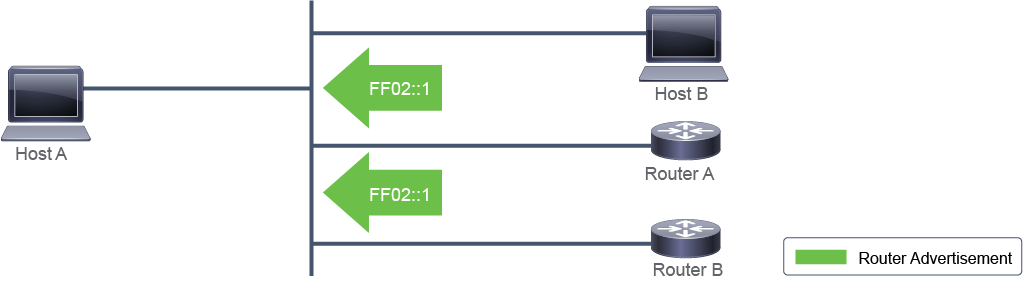
Routers periodically send router advertisements on all their configured interfaces. The router sends a router advertisement to the all-nodes multicast address, ff02::1, to all IPv6 nodes in the same link.
路由器會在其所有已設定的介面上定期傳送路由器通告。路由器會將路由器通告傳送到全節點群播位址 ff02::1,送達同一鏈路上的所有 IPv6 節點。
This figure depicts the router advertisements sent by the router.
下圖描繪路由器所傳送的路由器通告。
Router advertisement packet features include the following:
路由器通告封包的特性包括:
- ICMP type: 134ICMP 類型: 134
- Source:Router link-local address來源:路由器的鏈路本地位址
- Destination: ff02::1 (all-nodes multicast address)目的地: ff02::1(全節點群播位址)
- Data:Options, prefix, lifetime, autoconfiguration flag資料:選項、前綴、存留時間、自動設定旗標
Here are examples of the information that the message might contain:
以下是訊息可能包含的資訊範例:
- Prefixes that can be used on the link: This information enables stateless autoconfiguration of the hosts. These prefixes must be /64 for stateless autoconfiguration.可用於該鏈路的前綴:此資訊可讓主機進行無狀態自動設定。這些前綴必須為 /64 才能用於無狀態自動設定。
- Lifetime of the prefixes: The default valid lifetime is 30 days, and the default preferred lifetime is 7 days.前綴的存留時間:預設有效存留時間為 30 天,預設偏好存留時間為 7 天。
- Flags: Flags indicate the kind of autoconfiguration that the hosts can perform. Unlike IPv4, the router advertisement message suggests to the host how to obtain its addressing dynamically. There are three options:旗標:旗標指出主機可以執行的自動設定種類。與 IPv4 不同的是,路由器通告訊息會建議主機如何動態取得其位址設定。共有三個選項:
- SLAACSLAAC
- SLAAC and stateless DHCPv6SLAAC 與無狀態 DHCPv6
- Stateful DHCPv6有狀態 DHCPv6
- Default preference field:Provides coarse preference metric (low, medium, or high) for default devices. For example, two devices on a link may provide equivalent but not equal-cost routing, and the policy may dictate that one of the devices is preferred.預設偏好欄位:提供預設裝置的粗略偏好度量(低、中或高)。舉例來說,同一鏈路上的兩台裝置可能提供相等但成本不同的路由,此時策略可能規定其中一台裝置為優先選擇。
- Other types of information for hosts:This information can include the default MTU and hop count.提供給主機的其他類型資訊:此資訊可能包括預設 MTU 與躍點數。
By sending prefixes, router advertisements allow host autoconfiguration. You can configure other advertisement timing and other parameters on routers.
透過傳送前綴,路由器通告可讓主機進行自動設定。您也可以在路由器上設定其他通告時間及其他參數。
Router Solicitation
路由器邀請
A router sends router advertisements every 200 seconds or immediately after a router solicitation. Router solicitations ask routers that are connected to the local link to send an immediate router advertisement so that the host can receive the autoconfiguration information without waiting for the next scheduled router advertisement.
路由器每 200 秒傳送一次路由器通告,或在收到路由器邀請後立即傳送。路由器邀請要求連接到本地鏈路的路由器立即傳送路由器通告,讓主機不必等到下一次排定的路由器通告,就能取得自動設定資訊。
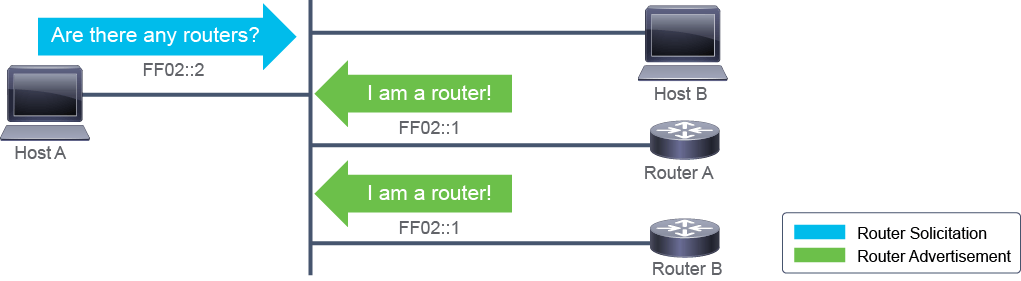
The router solicitation message is defined as follows:
路由器邀請訊息的定義如下:
- The ICMP type is 133.ICMP 類型為 133。
- The source address is usually the unspecified address (the reason for an unspecified address is because the router advertisement is not sent back as a unicast but as an all-nodes multicast, so the source address of the router solicitation is not important.) The source address can also be the link-local address of the device.來源位址通常是未指定位址(之所以使用未指定位址,是因為路由器通告不會以單播方式回傳,而是以全節點群播方式傳送,因此路由器邀請的來源位址並不重要)。來源位址也可以是該裝置的鏈路本地位址。
- The destination address is the all-routers multicast address (ff02::2) with the link-local scope.目的位址是具鏈路本地範圍的全路由器群播位址(ff02::2)。
When a router sends an answer to a router solicitation, the destination address of the router advertisement is the all-nodes multicast (ff02::1). The router could be configured to send solicited router advertisements as a unicast.
當路由器對路由器邀請做出回應時,該路由器通告的目的位址是全節點群播位址(ff02::1)。路由器也可以設定為以單播方式傳送所請求的路由器通告。
A host should send a router solicitation only at the host boot time and only three times. This practice avoids flooding of router solicitation packets if there is no router on the local network.
主機應該只在開機時傳送路由器邀請,且最多傳送三次。此做法可避免在本地網路上沒有路由器時,造成路由器邀請封包氾濫。
Configuring Stateless Autoconfiguration
設定無狀態自動設定
The ipv6 address autoconfig command enables stateless autoconfiguration on routers on an interface-by-interface basis.
ipv6 address autoconfig 命令可依介面分別在路由器上啟用無狀態自動設定。
RouterB(config-if)# ipv6 address autoconfig [default]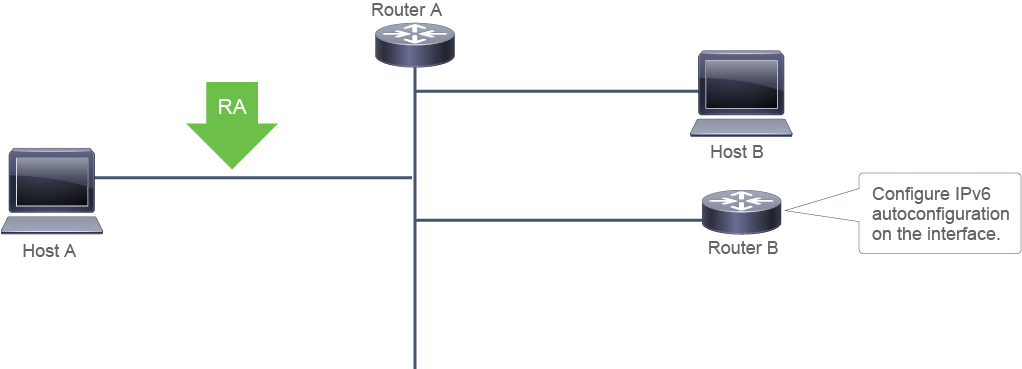
Command 命令 | Description 說明 |
ipv6 address autoconfig [default]ipv6 address autoconfig [default] | Configures stateless autoconfiguration on the interface. If you add the default keyword, the router will install a default route.在介面上設定無狀態自動設定。若加上 default 關鍵字,路由器會安裝預設路由。 |
A typical scenario to configure the ipv6 address autoconfig default command on a router interface is when it is connected directly to an ISP and getting a dynamic address. The ISP provides the prefix using autoconfigure. The IPv6 address and the Default Gateway can be used to configure a default route by using the NDP message that the ISP sends.
在路由器介面上設定 ipv6 address autoconfig default 命令的典型情境,是該介面直接連接到 ISP 並取得動態位址時。ISP 透過自動設定提供前綴,此時可利用 ISP 傳送的 NDP 訊息來使用該 IPv6 位址與預設閘道設定預設路由。
