Designing a WLAN infrastructure is similar to designing a LAN infrastructure. There are DHCP servers, Domain Name System (DNS) servers, and management protocols such as Simple Network Management Protocol (SNMP). The provisioning of services may be different, depending on whether the deployment is centralized or distributed. Firewalls or other security devices must not block protocols that are used for management and operations.
設計 WLAN 基礎架構與設計 LAN 基礎架構類似。其中會有 DHCP 伺服器、網域名稱系統(DNS)伺服器,以及簡易網路管理通訊協定(SNMP)等管理通訊協定。服務的佈建方式可能因部署為集中式或分散式而有所不同。防火牆或其他安全裝置不可封鎖用於管理與維運的通訊協定。
Dynamic Host Configuration Protocol
動態主機設定通訊協定
Both clients and APs need IP addresses in the WLAN. You need to create different subnets for each to break up the broadcast domain and segment for security and routing. Using different IP subnets eliminates contention between wired and wireless clients. Client VLANs can also have different subnets and DHCP servers from each other; for example, the employee VLAN (and SSID) and subnet compared with the guest VLAN (SSID) and subnet.
在 WLAN 中,用戶端與 AP 都需要 IP 位址。你需要為兩者各自建立不同的子網路,以分割廣播網域,並為安全性與路由分段。使用不同的 IP 子網路可消除有線與無線用戶端之間的爭用。用戶端 VLAN 彼此之間也可有不同的子網路與 DHCP 伺服器;例如,員工 VLAN(及 SSID)與子網路,相對於訪客 VLAN(SSID)與子網路。
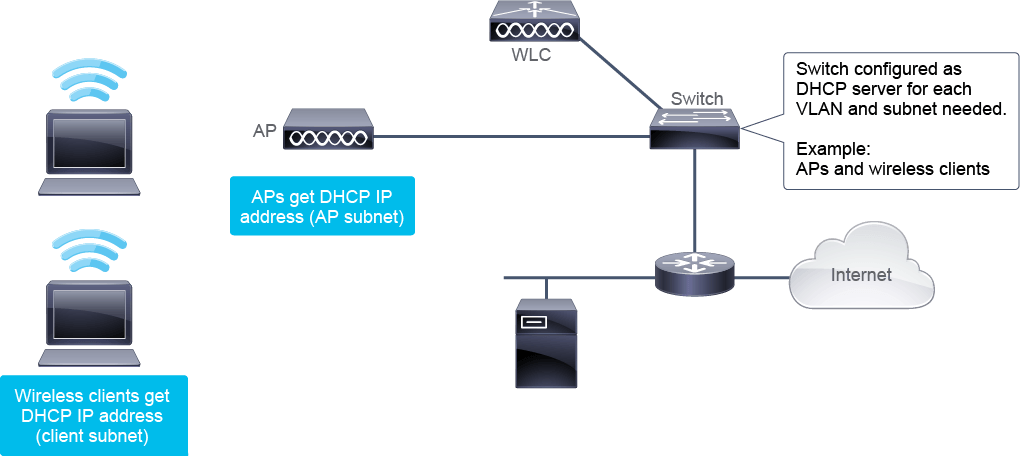
When APs and WLCs are on separated subnets (no common broadcast domain), DHCP Option 43 is a method that can be used to map APs to their WLCs.
當 AP 與 WLC 位於不同子網路(沒有共同的廣播網域)時,DHCP 選項 43 是一種可用來將 AP 對應到其 WLC 的方法。
DHCP Option 43 is specified as a vendor class identifier in RFC 2132. It is used to identify the vendor type and configuration of a DHCP client. Option 43 can be used to include the IP address of the Cisco WLC interface that the AP is attached to.
DHCP 選項 43 在 RFC 2132 中定義為廠商類別識別碼,用來識別 DHCP 用戶端的廠商類型與設定。選項 43 可用來包含 AP 所連接的 Cisco WLC 介面的 IP 位址。
There are two ways of implementing DHCP:
實作 DHCP 有兩種方式:
- Using an internal DHCP server on the Cisco WLC:在 Cisco WLC 上使用內部 DHCP 伺服器:
- WLCs contain an internal DHCP server. This server is typically used in branch offices that do not already have a DHCP server.WLC 內建有內部 DHCP 伺服器。此伺服器通常用於尚未有 DHCP 伺服器的分公司。
- DHCP Option 43 is not supported on the WLC internal server. Therefore, the AP must use an alternative method to locate the management interface IPv4 address of the WLC, such as local subnet broadcast or DNS.WLC 內部伺服器不支援 DHCP 選項 43。因此,AP 必須使用其他方法來找出 WLC 管理介面的 IPv4 位址,例如本地子網路廣播或 DNS。
- Using a switch or a router as a DHCP server:使用交換器或路由器作為 DHCP 伺服器:
- Because the WLC captures the client IPv4 address that is obtained from a DHCP server, it maintains the same IPv4 address for that client during its roaming.由於 WLC 會擷取從 DHCP 伺服器取得的用戶端 IPv4 位址,因此在該用戶端漫遊期間,WLC 會維持相同的 IPv4 位址。
Internal DHCP on the WLC has some limitations, for example, not having the support for DHCP option 43. So, using an external DHCP server (a switch or router) is the preferred solution.
WLC 上的內部 DHCP 有一些限制,例如不支援 DHCP 選項 43。因此,較建議使用外部 DHCP 伺服器(交換器或路由器)。
Domain Name System
網域名稱系統
A DHCP server can be configured with various options that are included inside the DHCP packet. If you have configured your DHCP server to provide both Option 6 (DNS server address) and Option 15 (Domain name) information, both clients and APs can obtain this information from the DHCP option.
DHCP 伺服器可設定各種包含在 DHCP 封包內的選項。若你已將 DHCP 伺服器設定為同時提供選項 6(DNS 伺服器位址)與選項 15(網域名稱)資訊,用戶端與 AP 皆可從 DHCP 選項取得此資訊。
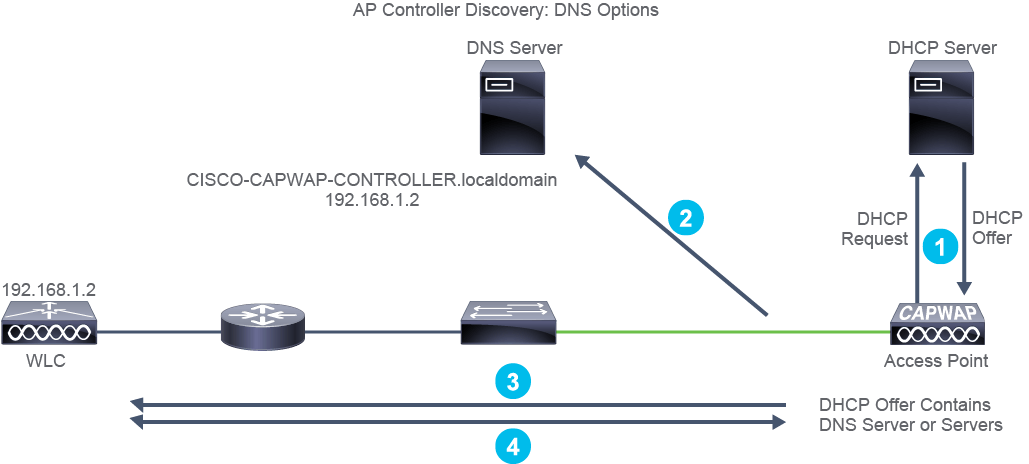
An AP can use DNS during the boot process as a mechanism to discover WLCs that it can join. This process is done using a DNS server entry for CISCO-CAPWAP-CONTROLLER.localdomain.
AP 可在開機過程中使用 DNS 作為探索其可加入之 WLC 的機制。此程序是透過 CISCO-CAPWAP-CONTROLLER.localdomain 的 DNS 伺服器項目來完成。
The localdomain entry represents the domain name that is passed to the AP in DHCP Option 15.
localdomain 項目代表在 DHCP 選項 15 中傳遞給 AP 的網域名稱。
The DNS discovery option mode operates as follows:
DNS 探索選項模式的運作方式如下:
- The AP requests its IPv4 address from DHCP, and includes Options 6 and 15 configured to get DNS information.AP 向 DHCP 要求其 IPv4 位址,並包含已設定的選項 6 與 15 以取得 DNS 資訊。
- The IPv4 address of the DNS server is provided by the DHCP server from the DHCP option 6.DNS 伺服器的 IPv4 位址由 DHCP 伺服器透過 DHCP 選項 6 提供。
- The AP will use this information to perform a hostname lookup using CISCO-CAPWAP-CONTROLLER.localdomain. This hostname should be associated to the available Cisco WLC management interface IP addresses (IPv4, IPv6, or both).AP 會使用此資訊,透過 CISCO-CAPWAP-CONTROLLER.localdomain 執行主機名稱查詢。此主機名稱應對應到可用的 Cisco WLC 管理介面 IP 位址(IPv4、IPv6 或兩者皆有)。
- The AP will then be able to associate to responsive WLCs by sending packets to the provided address.接著 AP 會將封包傳送到所提供的位址,以便與有回應的 WLC 建立關聯。
Network Time Protocol
網路時間通訊協定
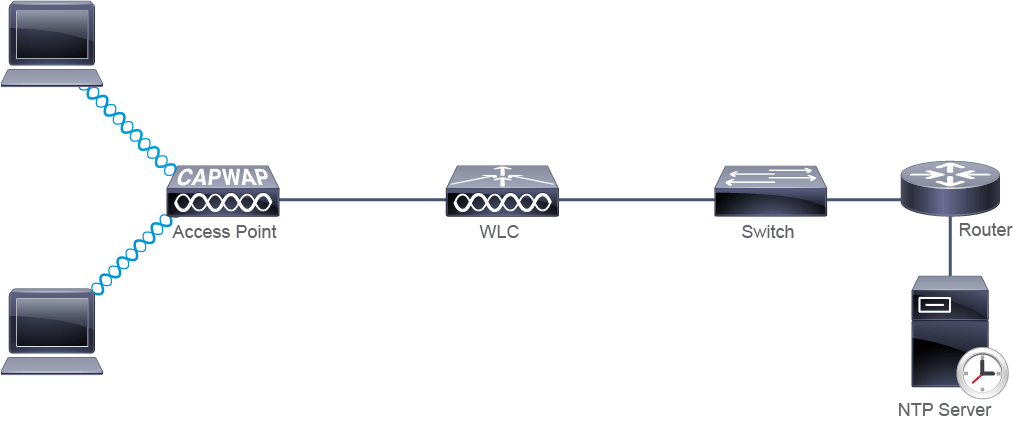
Network Time Protocol (NTP) is used in WLANs, much like it is in LANs. It provides date and time synchronization for logs and scheduled events.
網路時間通訊協定(NTP)在 WLAN 中的用途與在 LAN 中相同,皆用來為記錄與排程事件提供日期與時間同步。
In WLANs, NTP also plays an important role in the AP join process. When an AP is joining a Cisco WLC, the WLC verifies the AP embedded certificate. If the date and time that are configured on the WLC precede the creation and installation date of certificates on the AP, the AP fails to join the WLC. Therefore, the WLC and AP should synchronize their time using NTP.
在 WLAN 中,NTP 在 AP 加入程序中也扮演重要角色。當 AP 加入 Cisco WLC 時,WLC 會驗證 AP 內嵌的憑證。若 WLC 上設定的日期與時間早於 AP 上憑證的建立與安裝日期,AP 將無法加入 WLC。因此,WLC 與 AP 應使用 NTP 同步彼此的時間。
Authentication, Authorization, and Accounting
驗證、授權與記帳
Users that access the wireless network need to be authenticated. The most secure way is for each user to have its own identity, which can be achieved using IEEE 802.1X authentication.
存取無線網路的使用者需要經過驗證。最安全的方式是讓每個使用者擁有自己的身分,這可透過 IEEE 802.1X 驗證來達成。
With IEEE 802.1X, an Authentication, Authorization, and Accounting (AAA) server defines the conditions by which access to the network is granted or refused. Conditions can range from group membership, to the VLAN origin and the time of day. An AAA server does not need to contain all the information, rather it can point to an external resource. In the example of group membership, it can be matched against Active Directory.
在 IEEE 802.1X 中,驗證、授權與記帳(AAA)伺服器會定義授予或拒絕網路存取的條件。條件可從群組成員資格,到 VLAN 來源以及時段等各種因素。AAA 伺服器不必包含所有資訊,也可以指向外部資源。以群組成員資格為例,可與 Active Directory 進行比對。
The AAA server functionality can be provided as follows:
AAA 伺服器功能可透過下列方式提供:
- Locally by a Cisco WLC.由 Cisco WLC 在本地提供。
- Globally by an AAA server (for example, Cisco Identity Service Engine [ISE]).由 AAA 伺服器(例如 Cisco Identity Service Engine [ISE])全域提供。
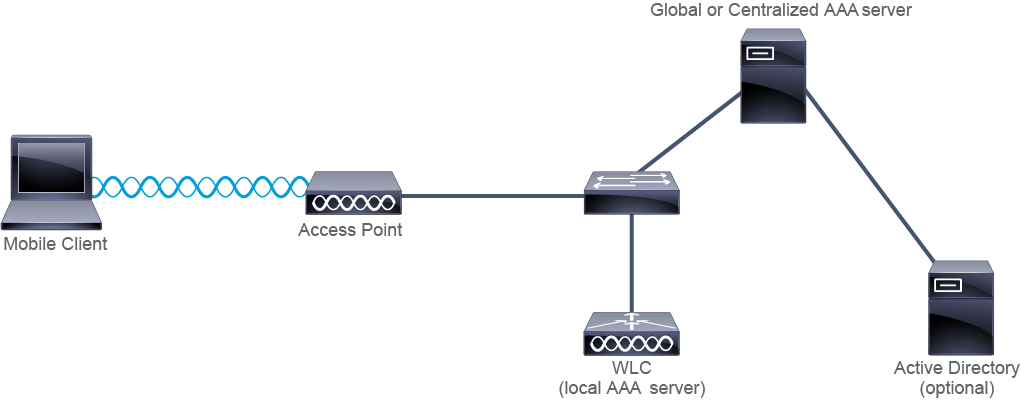
When using a global AAA server, there must be IP reachability between the WLC and the AAA server, because it will need to authenticate itself and pass client credentials.
使用全域 AAA 伺服器時,WLC 與 AAA 伺服器之間必須具有 IP 可達性,因為 WLC 需要驗證自身身分並傳遞用戶端憑證。
Management Protocols
管理通訊協定
Small to midsize businesses can use HTTPS and manage their Cisco WLCs directly through the GUI. From the GUI, you can view the status and trap logs from the Management console menu.
中小型企業可使用 HTTPS 並直接透過 GUI 管理其 Cisco WLC。在 GUI 中,你可以從管理主控台選單檢視狀態與陷阱記錄。
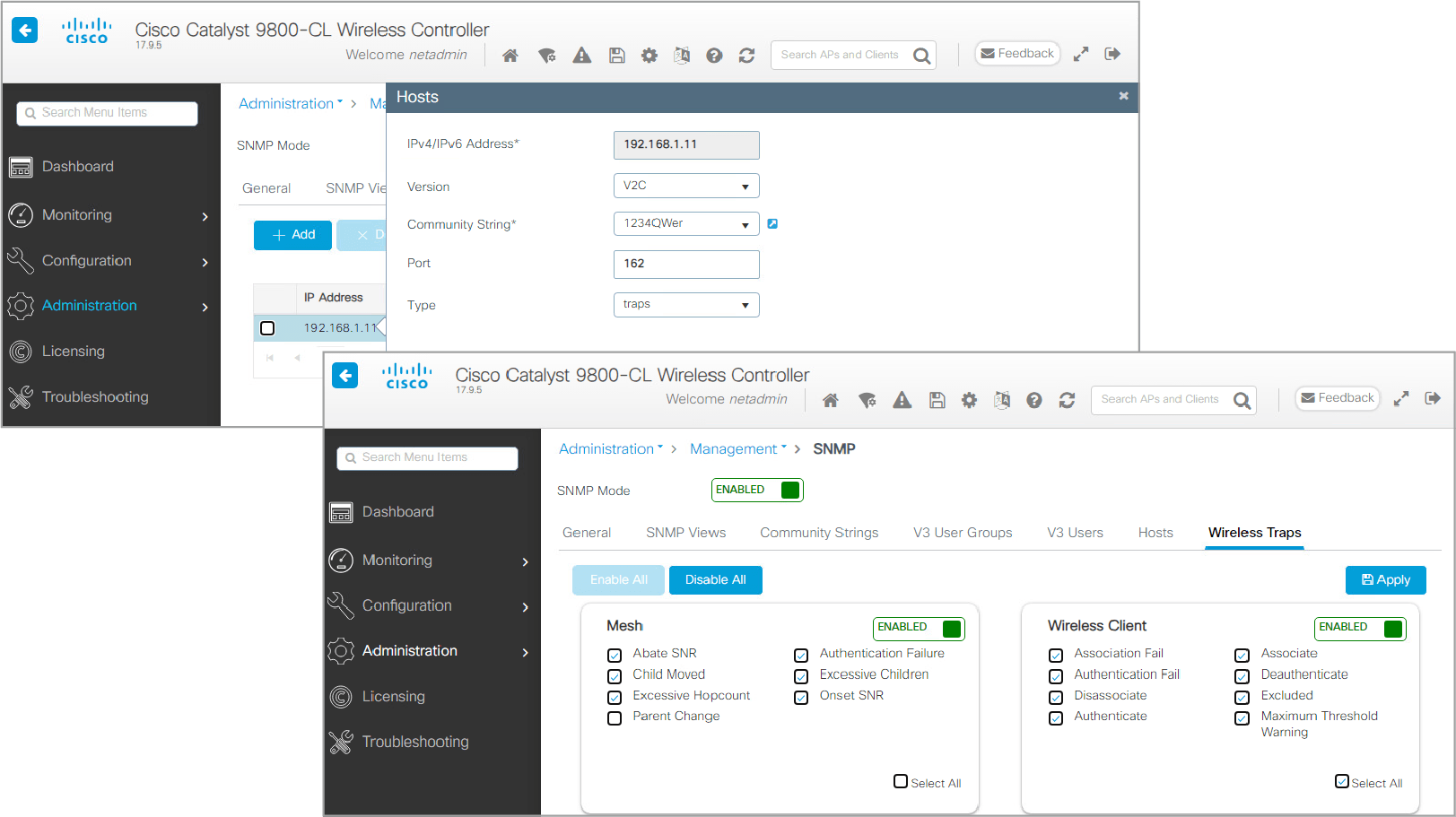
Larger businesses can use SNMP to view the status of the Cisco WLC, or to control it from a remote management station. Cisco Catalyst Center is an example of such management station.
較大型的企業可使用 SNMP 檢視 Cisco WLC 的狀態,或從遠端管理站控制它。Cisco Catalyst Center 就是此類管理站的一個範例。
Command-Line Interface
命令列介面
A Cisco WLC does not have a default configuration, so you must run a setup wizard. The initial WLC configuration is accomplished either through the console port and CLI or through the WLC web interface. The setup using the console port requires a PC with either an available serial (DB-9) or USB port and an appropriate adapter.
Cisco WLC 沒有預設設定,因此你必須執行設定精靈。初始 WLC 設定可透過主控台連接埠與 CLI,或透過 WLC 網頁介面完成。透過主控台連接埠進行設定,需要一台具備可用序列(DB-9)或 USB 連接埠及對應轉接頭的電腦。
WLCs typically use an RJ-45 jack as their serial port. In addition to the RJ-45 jack, some models offer the option to use a USB cable to establish a console connection to a PC using a USB Type A-to-5-pin mini-Type B cable. An adapter may also be required, depending on the interfaces available on the PC.
WLC 通常使用 RJ-45 接頭作為其序列埠。除了 RJ-45 接頭外,部分機型也提供使用 USB Type A 轉 5-pin mini-Type B 纜線,透過 USB 纜線與電腦建立主控台連線的選項。視電腦上可用的介面而定,也可能需要轉接頭。
The PC also needs a serial port and the communications software, such as HyperTerminal or PuTTY, which is configured with the following settings:
電腦也需要有序列埠及通訊軟體,例如 HyperTerminal 或 PuTTY,並設定為以下參數:
- Speed: 9600 bps速度:9600 bps
- Data bits: 8資料位元:8
- Parity: None同位檢查:無
- Stop bit: 1停止位元:1
- Flow control: None流量控制:無
The CLI can be used for normal configuration changes, or configuration changes can be done from the Web GUI.
CLI 可用於一般的設定變更,設定變更也可以透過網頁 GUI 進行。
The APs also have similar CLI access (console port and Telnet or SSH).
AP 也具備類似的 CLI 存取方式(主控台連接埠及 Telnet 或 SSH)。