To configure any of the NAT types on a Cisco IOS Software device, perform the following steps on NAT-enabled devices:
若要在 Cisco IOS 軟體裝置上設定任一種 NAT 類型,請在已啟用 NAT 的裝置上執行以下步驟:
- Specify inside and outside interfaces. You must instruct the border device on where to expect the inside traffic that needs to be translated (inside interface) and where to inspect outside traffic (outside interface) that needs to be translated. Inside/outside interface specification is required regardless of whether you are configuring inside only NAT or outside only NAT.指定內部與外部介面。您必須告知邊界裝置何處會出現需要轉換的內部流量(內部介面),以及要在何處檢查需要轉換的外部流量(外部介面)。不論您設定的是僅內部 NAT 或僅外部 NAT,都需要指定內部/外部介面。
- Specify local addresses that need to be translated. NAT might not be performed for all inside segments and you have to specify exactly which local addresses require translation.指定需要轉換的本地位址。並非所有內部網段都需要執行 NAT,因此您必須明確指定哪些本地位址需要轉換。
- Specify global addresses available for translations.指定可用於轉換的全域位址。
- Specify NAT type using
ip nat inside sourcecommand. The syntax of the command is different for different NAT types.使用ip nat inside source指令指定 NAT 類型。不同的 NAT 類型,指令的語法也不同。
Configuration commands that tell a device which interfaces are inside and which are outside are common to all NAT types. To specify inside and outside interfaces use the ip nat inside and ip nat outside interface configuration commands respectively.
告知裝置哪些介面是內部、哪些是外部的設定指令,對所有 NAT 類型都是相同的。若要指定內部與外部介面,請分別使用介面設定模式下的 ip nat inside 與 ip nat outside 指令。

R1(config)# interface GigabitEthernet 0/1R1(config-if)# ip address 209.165.200.226 255.255.255.224R1(config-if)# ip nat outsideR1(config-if)# exitR1(config)# interface GigabitEthernet 0/0R1(config-if)# ip address 172.16.1.1 255.255.255.0R1(config-if)# ip nat insideR1(config-if)# exitIn the example configuration, interface GigabitEthernet 0/1 with public IPv4 address 209.165.200.226/27 is configured as a NAT outside interface. Interface GigabitEthernet 0/0 with private IPv4 address 172.16.1.1/24 is a NAT inside interface.
在此範例設定中,公開 IPv4 位址為 209.165.200.226/27 的 GigabitEthernet 0/1 介面被設定為 NAT 外部介面;私有 IPv4 位址為 172.16.1.1/24 的 GigabitEthernet 0/0 介面則是 NAT 內部介面。
You can specify more than one inside interface.
您可以指定一個以上的內部介面。
The remaining configuration steps differ in NAT types.
其餘的設定步驟則依 NAT 類型而不同。
Configuring Static Inside IPv4 NAT and Port Forwarding
設定靜態內部 IPv4 NAT 與連接埠轉發
For static inside NAT, you have to configure a static mapping between exactly one local and one global IPv4 address. Specification of the local address, global address, and NAT type, are all done using one command only.
對於靜態內部 NAT,您必須在恰好一個本地位址與一個全域 IPv4 位址之間設定靜態對應。本地位址、全域位址與 NAT 類型的指定,都只需一個指令即可完成。
To configure static inside IPv4 NAT, use the ip nat inside source command with the keyword static. The global configuration mode command has the following syntax: ip nat inside source static local-ip global-ip.
若要設定靜態內部 IPv4 NAT,請搭配關鍵字 static 使用 ip nat inside source 指令。此全域設定模式指令的語法如下:ip nat inside source static local-ip global-ip。
Packets arriving on the inside interface and matching the defined local address will be translated to the defined global address, and vice versa.
抵達內部介面且符合所定義本地位址的封包,會被轉換為所定義的全域位址,反之亦然。
The keyword inside in the command specifies that only inside address is translated (from local to global). The keyword static indicates that the mapping that follows is static.
指令中的關鍵字 inside 指定只轉換內部位址(由本地轉為全域);關鍵字 static 則表示後面接的對應是靜態的。
The ip nat inside source static local-ip global-ip creates an entry in the NAT-mapping table. To verify which addresses are currently being translated, issue the show ip nat translations command.
ip nat inside source static local-ip global-ip 會在 NAT 對應表中建立一筆項目。若要驗證目前正在轉換哪些位址,請執行 show ip nat translations 指令。
Static mapping entries appear in the translations table even when there is no traffic from the inside to the outside interface.
即使沒有從內部到外部介面的流量,靜態對應項目仍會出現在轉換表中。
The following is an example of creating and verifying a static entry which maps 172.16.1.10 local IPv4 address to 209.165.200.230 global IPv4 address.
以下範例示範如何建立並驗證一筆將本地 IPv4 位址 172.16.1.10 對應到全域 IPv4 位址 209.165.200.230 的靜態項目。
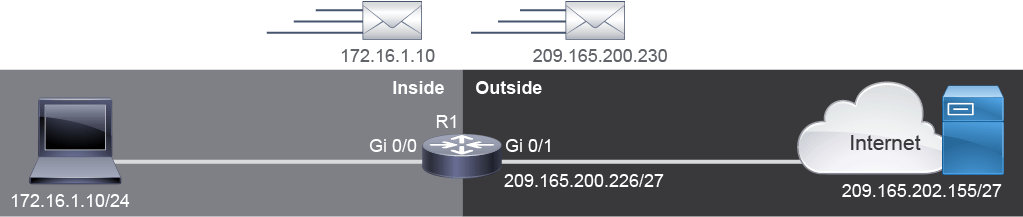
R1(config)# ip nat inside source static 172.16.1.10 209.165.200.230
R1# show ip nat translations
Pro  Inside global        Inside local     Outside local      Outside global
tcp  209.165.200.230:1031 172.16.1.10:1031 209.165.202.155:23 209.165.202.155:23
--- 209.165.200.230 172.16.1.10 --- ---In the example, output of the show ip nat translations command, there is a mapping present. When traffic is generated and static NAT is performed, both outside local and outside global fields are populated. Empty outside local and outside global fields indicate that this entry is result of the configuration activity.
在此範例中,show ip nat translations 指令的輸出顯示有一筆對應項目。當產生流量並執行靜態 NAT 時,外部本地與外部全域欄位都會被填入資料。若外部本地與外部全域欄位為空,表示這筆項目是設定作業的結果。
To configure port forwarding, you also specify a static inside mapping. However, in port forwarding you must specify local and global port numbers and indicate the transport protocol that the port numbers refer to.
若要設定連接埠轉發,您同樣要指定一筆靜態內部對應。不過,在連接埠轉發中,您必須指定本地與全域連接埠號,並指出連接埠號所對應的傳輸協定。
To configure inside IPv4 port forwarding, use the ip nat inside source static tcp|udp local-ip local-port global-ip global-port command.
若要設定內部 IPv4 連接埠轉發,請使用 ip nat inside source static tcp|udp local-ip local-port global-ip global-port 指令。
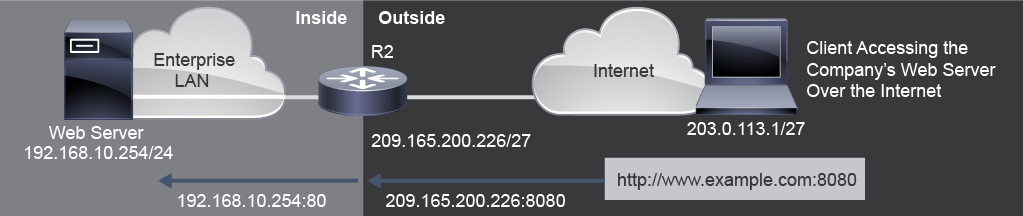
R2(config)# ip nat inside source static tcp 192.168.10.254 80 209.165.200.226 8080
R2# show ip nat translations
Pro  Inside global         Inside local       Outside local  Outside global
tcp 209.165.200.226:8080 192.168.10.254:80 --- ---The sample configuration shows an example of configuring port forwarding. The web server 192.168.10.254 in the inside network is listening on port 80 for the incoming connections. Users will access this internal web server using the global IPv4 address 209.165.200.226 as the destination IPv4 address and destination port 8080.
此範例設定展示了如何設定連接埠轉發。內部網路中的 Web 伺服器 192.168.10.254 在連接埠 80 上監聽進入的連線。使用者會以全域 IPv4 位址 209.165.200.226 作為目的 IPv4 位址、目的連接埠 8080,來存取這台內部 Web 伺服器。
In the example, the port forwarding entry is verified using the show ip nat translations command. In the output, note that port forwarding mapping has the IPv4:port-number format.
在此範例中,連接埠轉發項目是以 show ip nat translations 指令驗證的。在輸出中請注意,連接埠轉發對應採用 IPv4:port-number 的格式。
Configuring Dynamic IPv4 Inside NAT
設定動態 IPv4 內部 NAT
Dynamic NAT configuration differs from static NAT, but it also has some similarities. Like static NAT, it requires the configuration to identify each interface as an inside or outside interface. However, rather than creating a static map between one local and only one global IPv4 address, you can specify pools of addresses.
動態 NAT 的設定與靜態 NAT 不同,但也有一些相似之處。與靜態 NAT 一樣,都需要設定以識別每個介面是內部還是外部介面。不過,動態 NAT 並非在一個本地位址與唯一一個全域 IPv4 位址之間建立靜態對應,而是可以指定位址集區(address pool)。
To specify a pool of local addresses that need to be translated, you use access control lists (ACLs). With an ACL, you identify only those local addresses that are to be translated. You can configure either a named or a numbered ACL.
若要指定需要轉換的本地位址集區,可使用存取控制清單(ACL)。透過 ACL,您可以只識別出需要轉換的本地位址。您可以設定具名或編號 ACL。
To specify a pool of global addresses available for dynamic translations, use the ip nat pool name start-ip end-ip {netmask netmask | prefix-length prefix-length} command. The pool of global IPv4 addresses is available to any device on the inside network on a first-come first-served basis. The NAT pool is referenced in commands by its name.
若要指定可用於動態轉換的全域位址集區,請使用 ip nat pool name start-ip end-ip {netmask netmask | prefix-length prefix-length} 指令。此全域 IPv4 位址集區以先到先服務的方式提供給內部網路上的任何裝置使用。NAT 位址集區在指令中以其名稱來參照。
Outside routers are not aware of NAT translations performed on the inside network. To reach the inside network, outside routers must have a route to the network to which the addresses are translated, in other words to the inside global network. The inside global network contains the range of IPv4 addresses that is specified in the NAT pool.
外部路由器並不知道內部網路上執行的 NAT 轉換。若要抵達內部網路,外部路由器必須擁有通往位址所轉換至的網路,也就是內部全域網路的路由。內部全域網路包含在 NAT 位址集區中指定的 IPv4 位址範圍。
It remains to specify how NAT should be performed. To configure dynamic inside IPv4 NAT, use the ip nat inside source command followed by the mapping between the ACL-defined local addresses and the NAT pool defined global addresses. The ACL and NAT pool are referenced by their names (or number for ACLs). The syntax of the global configuration command is ip nat inside source list ACL-identifier pool pool-name.
接下來要指定 NAT 該如何執行。若要設定動態內部 IPv4 NAT,請使用 ip nat inside source 指令,後面接著 ACL 所定義的本地位址與 NAT 位址集區所定義的全域位址之間的對應。ACL 與 NAT 位址集區都以其名稱(或 ACL 的編號)來參照。此全域設定指令的語法為 ip nat inside source list ACL-identifier pool pool-name。
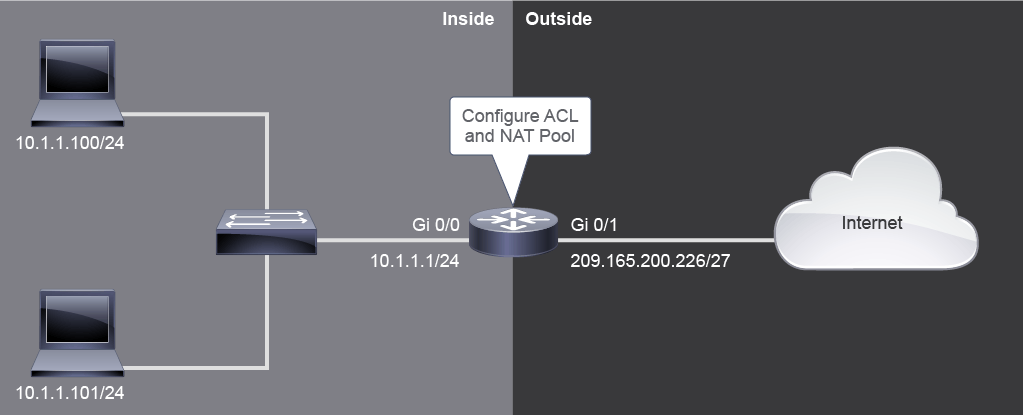
The example configuration has a numbered ACL1 that identifies all addresses in the 10.1.1.0/24 subnet; therefore, packets from both PC1 and PC2 will be translated.
此範例設定使用編號 ACL1,識別出 10.1.1.0/24 子網路中的所有位址,因此來自 PC1 與 PC2 的封包都會被轉換。
The available global addresses are identified in the NAT pool called NAT-POOL. The pool includes six addresses, from 209.165.200.230 to 209.165.200.235, that belong to the 209.165.200.224/27 subnet as indicated by the subnet mask 255.255.255.224.
可用的全域位址是在名為 NAT-POOL 的 NAT 位址集區中識別的。此集區包含六個位址,從 209.165.200.230 到 209.165.200.235,屬於子網路遮罩 255.255.255.224 所標示的 209.165.200.224/27 子網路。
The ip nat inside source command creates a mapping between ACL 1 (list 1 in the command) and NAT-POOL (pool NAT-POOL in the command), which indicates to the router that dynamic many-to-many NAT is performed.
ip nat inside source 指令在 ACL 1(指令中的 list 1)與 NAT-POOL(指令中的 pool NAT-POOL)之間建立對應,這會告知路由器要執行動態多對多 NAT。
Finally, the translations are verified by the show ip nat translations command. In the example, output of the commands includes specific translations, along with configuration-based entries. Configuration-based entries have "Outside" fields empty. Note that the first IPv4 address from the NAT pool, 209.165.200.230 was used first to translate the 10.1.1.100 address, when Internet Control Message Protocol (ICMP) traffic was generated. The second address from the pool was used for 10.1.1.101 address. The traffic that crossed the router included both ICMP and TCP (Telnet) packets. ICMP packets do not have port numbers. Instead of port numbers, for ICMP traffic, the value from the ICMP message identifier field is used.
最後,透過 show ip nat translations 指令驗證轉換結果。在此範例中,指令輸出包含具體的轉換項目,以及以設定為基礎的項目。以設定為基礎的項目其「Outside」欄位為空。請注意,當產生網際網路控制訊息協定(ICMP)流量時,NAT 位址集區中的第一個 IPv4 位址 209.165.200.230 最先被用來轉換 10.1.1.100 位址;集區中的第二個位址則用於 10.1.1.101 位址。通過路由器的流量包含 ICMP 與 TCP(Telnet)封包。ICMP 封包沒有連接埠號,對於 ICMP 流量,會改用 ICMP 訊息識別碼欄位的值。
Configuring IPv4 Inside PAT
設定 IPv4 內部 PAT
PAT mappings include both port numbers along with IPv4 addresses. To specify which local IPv4 addressees and port numbers are to be translated, use ACLs, like in the case of dynamic NAT.
PAT 對應同時包含連接埠號與 IPv4 位址。若要指定哪些本地 IPv4 位址與連接埠號需要轉換,可像動態 NAT 一樣使用 ACL。
Specification of global IPv4 addresses in PAT depends on whether you are using only one global IPv4 address or a pool of global IPv4 addresses. When only one global IPv4 address is used, it is usually the IPv4 address of the outside interface of the border device. To configure this address as the global address, it is enough to specify the interface in the ip nat inside source command.
PAT 中全域 IPv4 位址的指定方式,取決於您使用的是單一全域 IPv4 位址還是一組全域 IPv4 位址。當只使用單一全域 IPv4 位址時,通常會是邊界裝置外部介面的 IPv4 位址。若要將此位址設定為全域位址,只需在 ip nat inside source 指令中指定該介面即可。
The configuration of the pool of global IPv4 addresses for NAT uses the ip nat pool command. The syntax of the command is the same as for the dynamic NAT: ip nat pool name start-ip end-ip {netmask netmask | prefix-length prefix-length}.
NAT 全域 IPv4 位址集區的設定使用 ip nat pool 指令,其語法與動態 NAT 相同:ip nat pool name start-ip end-ip {netmask netmask | prefix-length prefix-length}。
When creating port mappings, the device tries to preserve the local port number value. If the local value cannot be preserved, by default the mapped ports are chosen from the same range of ports as the local port number.
建立連接埠對應時,裝置會嘗試保留本地連接埠號的值。若無法保留本地值,預設會從與本地連接埠號相同的範圍中選擇對應的連接埠。
To specify that PAT is to be performed, you use the ip nat inside source command. The local IPv4 addresses are specified by list keyword followed by an ACL identifier.
若要指定執行 PAT,請使用 ip nat inside source 指令。本地 IPv4 位址是以 list 關鍵字後接 ACL 識別碼來指定。
The global IPv4 addresses are specified using one of the following options:
全域 IPv4 位址可用以下其中一種方式指定:
- When there is only one global IPv4 address, such as the address of the device's outside interface, the interface label is specified in the
ip nat inside source listACL-identifierinterfaceinterface-type-numberoverloadcommand.當只有一個全域 IPv4 位址,例如裝置外部介面的位址時,會在ip nat inside source listACL-identifierinterfaceinterface-type-numberoverload指令中指定介面標籤。 - When there is a pool of global addresses, the name of the NAT pool is specified. The command syntax is
ip nat inside source listACL-identifierpoolpool-nameoverload.當有一組全域位址時,會指定 NAT 位址集區的名稱。指令語法為ip nat inside source listACL-identifierpoolpool-nameoverload。
The command syntax for PAT adds a keyword overload at the end. This keyword indicates to the device that PAT is implemented.
PAT 的指令語法在結尾加上關鍵字 overload,此關鍵字告知裝置要實作 PAT。
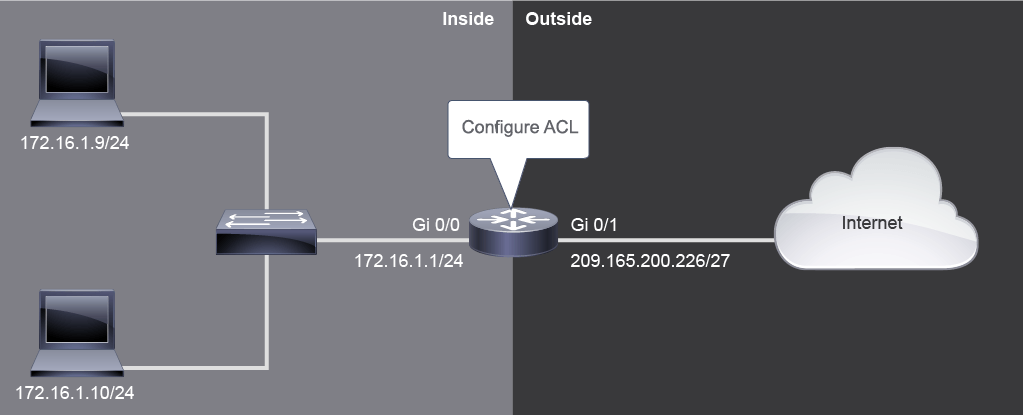
In the example configuration, ACL 1 identifies all addresses in the 172.16.1.0/24 subnet as local addresses. The router's GigabitEthernet0/1 interface with IPv4 address 209.165.200.226 is used for PAT. In the ip nat inside source command, it is specified by its type and number. To instruct the router to perform PAT, the keyword overload is added at the end of the command. The router will translate traffic from both PCs. It will try to preserve the port numbers selected by PCs, if they are available. To the outside networks, the entire inside network of 172.16.1.0/24 is represented by only one IPv4 address 209.165.200.226.
在此範例設定中,ACL 1 識別出 172.16.1.0/24 子網路中的所有位址作為本地位址。路由器的 GigabitEthernet0/1 介面(IPv4 位址為 209.165.200.226)用於 PAT,在 ip nat inside source 指令中以其類型與編號來指定。為了指示路由器執行 PAT,指令結尾加上關鍵字 overload。路由器會轉換來自兩台 PC 的流量,並在可行的情況下嘗試保留 PC 所選用的連接埠號。對外部網路而言,整個 172.16.1.0/24 內部網路都由單一 IPv4 位址 209.165.200.226 來代表。
R1(config)# ip nat pool NAT-POOL2 209.165.201.1 209.165.201.10 netmask 255.255.255.224
R1(config)# ip nat inside source list 1 pool NAT-POOL2 overload
R1(config)# interface GigabitEthernet 0/1
R1(config-if)# ip nat inside
R1(config-if)# interface GigabitEthernet 0/2
R1(config-if)# ip nat inside
R1(config-if)# interface GigabitEthernet 0/0
R1(config-if)# ip nat outsideR1 路由器已設定為執行 PAT。請參閱圖示。網路中的位址未被轉換,可能的原因為何?R1(config)# access-list 1 permit 192.168.0.0 0.0.0.255
R1(config)# ip nat pool NAT-POOL2 209.165.201.1 209.165.201.10 netmask 255.255.255.224
R1(config)# ip nat inside source list 1 pool NAT-POOL2 overload
R1(config)# interface GigabitEthernet 0/1
R1(config-if)# ip nat inside
R1(config-if)# interface GigabitEthernet 0/2
R1(config-if)# ip nat inside
R1(config-if)# interface GigabitEthernet 0/0
R1(config-if)# ip nat outside