Managing a network can be very time-consuming. Network clients break, or are moved, and new clients have purchased that need network connectivity. These tasks are all part of the network administrator job. Depending on the number of IP hosts, manual configuration of IPv4 addresses for every device on the network is virtually impossible.
管理網路可能非常耗費時間。網路用戶端裝置會損壞或搬遷,也會不斷購入需要連接網路的新用戶端裝置。這些工作都是網路管理員職務的一部分。依 IP 主機數量而定,為網路上每一台裝置手動設定 IPv4 位址幾乎是不可能的任務。
DHCP can greatly decrease the workload of the network administrator. DHCP automatically assigns an IPv4 address from an IPv4 address pool that the administrator defines. However, DHCP is much more than just a mechanism that allocates IPv4 addresses. This service automates the assignment of IPv4 addresses, subnet masks, gateways, and other required networking parameters.
DHCP 能大幅減輕網路管理員的工作量。DHCP 會從管理員定義的 IPv4 位址集區中自動指派 IPv4 位址。不過,DHCP 遠不只是配置 IPv4 位址的機制而已,此服務還能自動化指派子網路遮罩、閘道及其他所需網路參數。
DHCP is built on a client/server model. The DHCP server is allocated one or more network addresses and sends configuration parameters to dynamically configured hosts that request them. The term "client" refers to a host that is requesting initialization parameters from a DHCP server. Most endpoint devices on today’s networks are DHCP clients, including Cisco IP phones, desktop PCs, laptops, printers, and even Blu-Ray players. Just about any device that you can configure to participate on a TCP/IP network has the option of using DHCP to obtain its IPv4 configuration.
DHCP 建立在主從式模型之上。DHCP 伺服器會被配置一個或多個網路位址,並向提出請求的動態設定主機傳送設定參數。「用戶端」一詞是指向 DHCP 伺服器要求初始化參數的主機。現今網路上大多數的終端裝置都是 DHCP 用戶端,包括 Cisco IP 電話、桌上型電腦、筆記型電腦、印表機,甚至藍光播放器。幾乎任何可設定以參與 TCP/IP 網路的裝置,都能選擇使用 DHCP 來取得其 IPv4 設定。
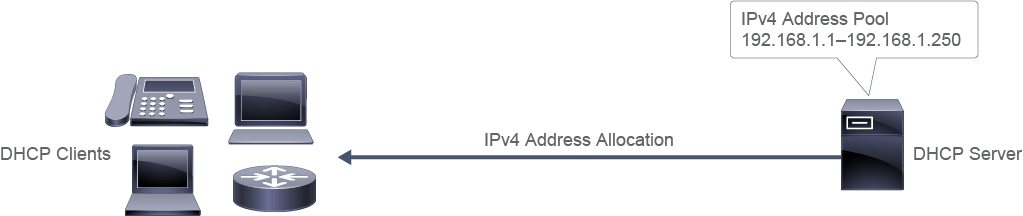
Depending on the actual DHCP server that is in use, there are three basic DHCP IPv4 address allocation mechanisms:
依所使用的實際 DHCP 伺服器而定,共有三種基本的 DHCP IPv4 位址配置機制:
- Dynamic allocation:Dynamic allocation of IPv4 addresses is the most common type of address assignment. As devices boot and activate their Ethernet interfaces, the DHCP client service triggers a DHCP Discover broadcast that includes the DHCP client MAC address. If a DHCP server is listening on that IPv4 subnet, it responds with a DHCP Offer message. The DHCP Offer message offers an unused IPv4 address from the address pool that is on the DHCP server. If the IPv4 address is acceptable, the DHCP client then sends a DHCP Request agreeing to the offered address. The DHCP server then marks the IPv4 address as "in use" in its database and sends a final DHCP ACK to the DHCP client. The DHCP server also starts the countdown on a "lease timer." A DHCP client is given its IPv4 configuration for a specified amount of time with a dynamic allocation. When the lease time expires, the DHCP server can reclaim the address, return it to the address pool, and lease it to another host. DHCP clients can renew their address before it expires.動態配置:動態配置 IPv4 位址是最常見的位址指派方式。裝置開機並啟動其乙太網路介面時,DHCP 用戶端服務會觸發包含 DHCP 用戶端 MAC 位址的 DHCP Discover 廣播。若該 IPv4 子網路上有 DHCP 伺服器正在監聽,就會回覆一個 DHCP Offer 訊息。DHCP Offer 訊息會從 DHCP 伺服器上的位址集區提供一個未使用的 IPv4 位址。若該 IPv4 位址可被接受,DHCP 用戶端便會傳送 DHCP Request,同意接受所提供的位址。DHCP 伺服器接著會在其資料庫中將該 IPv4 位址標記為「使用中」,並向 DHCP 用戶端傳送最終的 DHCP ACK。DHCP 伺服器同時會啟動「租約計時器」的倒數。採用動態配置時,DHCP 用戶端會在指定的時間內取得其 IPv4 設定。租約時間到期後,DHCP 伺服器可以收回該位址、將其歸還位址集區,並租給另一台主機。DHCP 用戶端可以在位址到期前更新租約。
- Automatic allocation:Automatic allocation of IPv4 addresses is very similar to dynamic allocation, except that the lease time is set never to expire. This setting results in the DHCP client always being associated with the same IPv4 address.自動配置:自動配置 IPv4 位址與動態配置非常相似,差別在於租約時間被設定為永不過期。此設定會使 DHCP 用戶端始終與同一個 IPv4 位址相關聯。
- Static allocation: Static allocation is an alternative that is generally used for devices such as servers and printers, where the device needs to keep the same IPv4 address configuration permanently. A static entry is made in the DHCP database that maps the MAC address to an IPv4 address.靜態配置:靜態配置是另一種選擇,通常用於伺服器與印表機等需要永久保持相同 IPv4 位址設定的裝置。DHCP 資料庫中會建立一筆靜態項目,將 MAC 位址對應至某個 IPv4 位址。
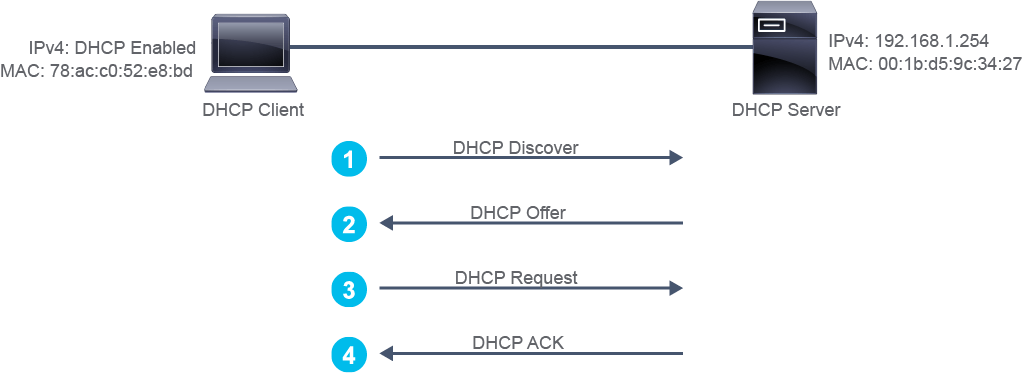
The following figure illustrates how a DHCP server assigns an IPv4 address to a DHCP client computer, while the table provides additional information for the exchanged packets.
下圖說明 DHCP 伺服器如何為 DHCP 用戶端電腦指派 IPv4 位址,表格則提供了所交換封包的額外資訊。
Source 來源 | Destination 目的地 | Protocol 協定 | Info 資訊 | |
1. 1. | IPv4: 0.0.0.0 MAC: 78:ac:c0:52:e8:bd IPv4:0.0.0.0 MAC:78:ac:c0:52:e8:bd | IPv4: 255.255.255.255 MAC: ff:ff:ff:ff:ff:ff IPv4:255.255.255.255 MAC:ff:ff:ff:ff:ff:ff | DHCP DHCP | DHCP Discover DHCP Discover |
2. 2. | IPv4: 192.168.1.10 MAC: 00:1b:d5:9c:34:27 IPv4:192.168.1.10 MAC:00:1b:d5:9c:34:27 | IPv4: 255.255.255.255 MAC: 78:ac:c0:52:e8:bd IPv4:255.255.255.255 MAC:78:ac:c0:52:e8:bd | DHCP DHCP | DHCP Offer 192.168.1.10 DHCP Offer 192.168.1.10 |
3. 3. | IPv4: 0.0.0.0 MAC: 78:ac:c0:52:e8:bd IPv4:0.0.0.0 MAC:78:ac:c0:52:e8:bd | IPv4: 255.255.255.255 MAC: ff:ff:ff:ff:ff:ff IPv4:255.255.255.255 MAC:ff:ff:ff:ff:ff:ff | DHCP DHCP | DHCP Request DHCP Request |
4. 4. | IPv4: 192.168.1.254 MAC: 00:1b:d5:9c:34:27 IPv4:192.168.1.254 MAC:00:1b:d5:9c:34:27 | IPv4: 255.255.255.255 MAC: 78:ac:c0:52:e8:bd IPv4:255.255.255.255 MAC:78:ac:c0:52:e8:bd | DHCP DHCP | DHCP ACK DHCP ACK |
The DHCP client and the DHCP server exchange the following packets:
DHCP 用戶端與 DHCP 伺服器會交換以下封包:
- DHCP Discover: The DHCP client boots up and sends this message on its local physical subnet to the subnet's broadcast (destination IPv4 address of 255.255.255.255 and MAC address of ff:ff:ff:ff:ff:ff), with a source IPv4 address of 0.0.0.0 and its MAC address.DHCP Discover:DHCP 用戶端開機後,會在其本機實體子網路上傳送此訊息,發送到子網路的廣播位址(目的地 IPv4 位址為 255.255.255.255、MAC 位址為 ff:ff:ff:ff:ff:ff),來源 IPv4 位址為 0.0.0.0,並附上自己的 MAC 位址。
- DHCP Offer:The DHCP server responds and fills the yiaddr (your IPv4 address) field with the requested IPv4 address. The DHCP server sends the DHCP Offer to the broadcast address but includes the client hardware address in the chaddr (client hardware address) field of the offer, so the client knows that it is the intended destination.DHCP Offer:DHCP 伺服器回應,並在 yiaddr(你的 IPv4 位址)欄位填入所提供的 IPv4 位址。DHCP 伺服器會將 DHCP Offer 傳送至廣播位址,但會在提供訊息的 chaddr(用戶端硬體位址)欄位中包含用戶端的硬體位址,讓用戶端知道自己就是目標接收者。
- DHCP Request: DHCP Request: The DHCP client may receive multiple DHCP Offer messages, but chooses one and accepts only the DHCP server's offer, implicitly declining all other DHCP Offer messages. The client identifies the server by populating the Server Identifier option field with the DHCP server's IPv4 address. The DHCP Request is also a broadcast, so all DHCP servers that sent a DHCP Offer will receive it, and each will know whether it was accepted or declined. Even though the client has been offered an IPv4 address, it will send the DHCP request message with a source IPv4 address of 0.0.0.0.DHCP Request:DHCP 用戶端可能會收到多個 DHCP Offer 訊息,但只會選擇並接受其中一個 DHCP 伺服器的提供,並隱含地拒絕所有其他 DHCP Offer 訊息。用戶端會透過在 Server Identifier 選項欄位中填入 DHCP 伺服器的 IPv4 位址來識別該伺服器。DHCP Request 也是以廣播方式傳送,因此所有曾傳送 DHCP Offer 的 DHCP 伺服器都會收到此訊息,並各自得知自己的提供是否被接受或拒絕。即使用戶端已被提供一個 IPv4 位址,它仍會以來源 IPv4 位址 0.0.0.0 傳送 DHCP request 訊息。
- DHCP ACK: The DHCP server acknowledges the request and completes the initialization process. DHCP ACK message has a source IPv4 address of the DHCP server, and the destination address is once again a broadcast and contains all the parameters that the client requested in the DHCP request message. When the client receives the DHCP ACK, it enters the bound state and is now free to use the IPv4 address to communicate on the network.DHCP ACK:DHCP 伺服器確認該請求並完成初始化程序。DHCP ACK 訊息的來源 IPv4 位址為 DHCP 伺服器位址,目的地位址同樣是廣播位址,並包含用戶端在 DHCP request 訊息中要求的所有參數。當用戶端收到 DHCP ACK 後,即進入繫結狀態(bound state),可自由使用該 IPv4 位址在網路上通訊。
Configuring a Router as an IPv4 DHCP Client
將路由器設定為 IPv4 DHCP 用戶端
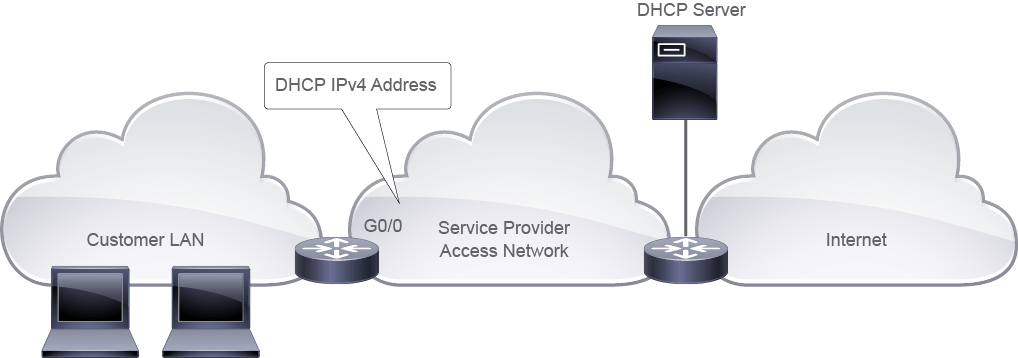
An ISP sometimes provides a static address for a router interface that is connected to the Internet. In other cases, an address is provided using DHCP. If the ISP uses DHCP to provide interface addressing, no manual address can be configured. Instead, the router's interface is configured to operate as a DHCP client.
ISP 有時會為連接到網際網路的路由器介面提供靜態位址,在其他情況下,則以 DHCP 方式提供位址。若 ISP 使用 DHCP 提供介面定址,就不能手動設定位址,而是要將路由器介面設定為以 DHCP 用戶端方式運作。
Router(config)# interface GigabitEthernet0/0
Router(config-if)# ip address dhcp
The interface interface command on the router specifies an interface. It enters the interface configuration mode, while the ip address dhcp command enables the interface to acquire an IPv4 address through DHCP.
路由器上的 interface 介面指令用來指定介面,並進入介面設定模式,而 ip address dhcp 指令則讓該介面能透過 DHCP 取得 IPv4 位址。
If the router receives the optional default gateway DHCP parameter from the server, it will inject the default route into its routing table, pointing to the default gateway IPv4 address.
若路由器從伺服器收到可選的預設閘道 DHCP 參數,就會將預設路由注入其路由表,指向該預設閘道 IPv4 位址。
To verify that the router interface has acquired an IPv4 address through DHCP, you can use the show ip interface brief command:
若要確認路由器介面是否已透過 DHCP 取得 IPv4 位址,可使用 show ip interface brief 指令:
Router# show ip interface brief
Interface                  IP-Address      OK? Method Status                Protocol
GigabitEthernet0/0         192.168.1.10    YES DHCP    up                    up
GigabitEthernet0/1         10.1.1.1        YES NVRAM   up                    up
Configuring an IPv4 DHCP Relay
設定 IPv4 DHCP 中繼
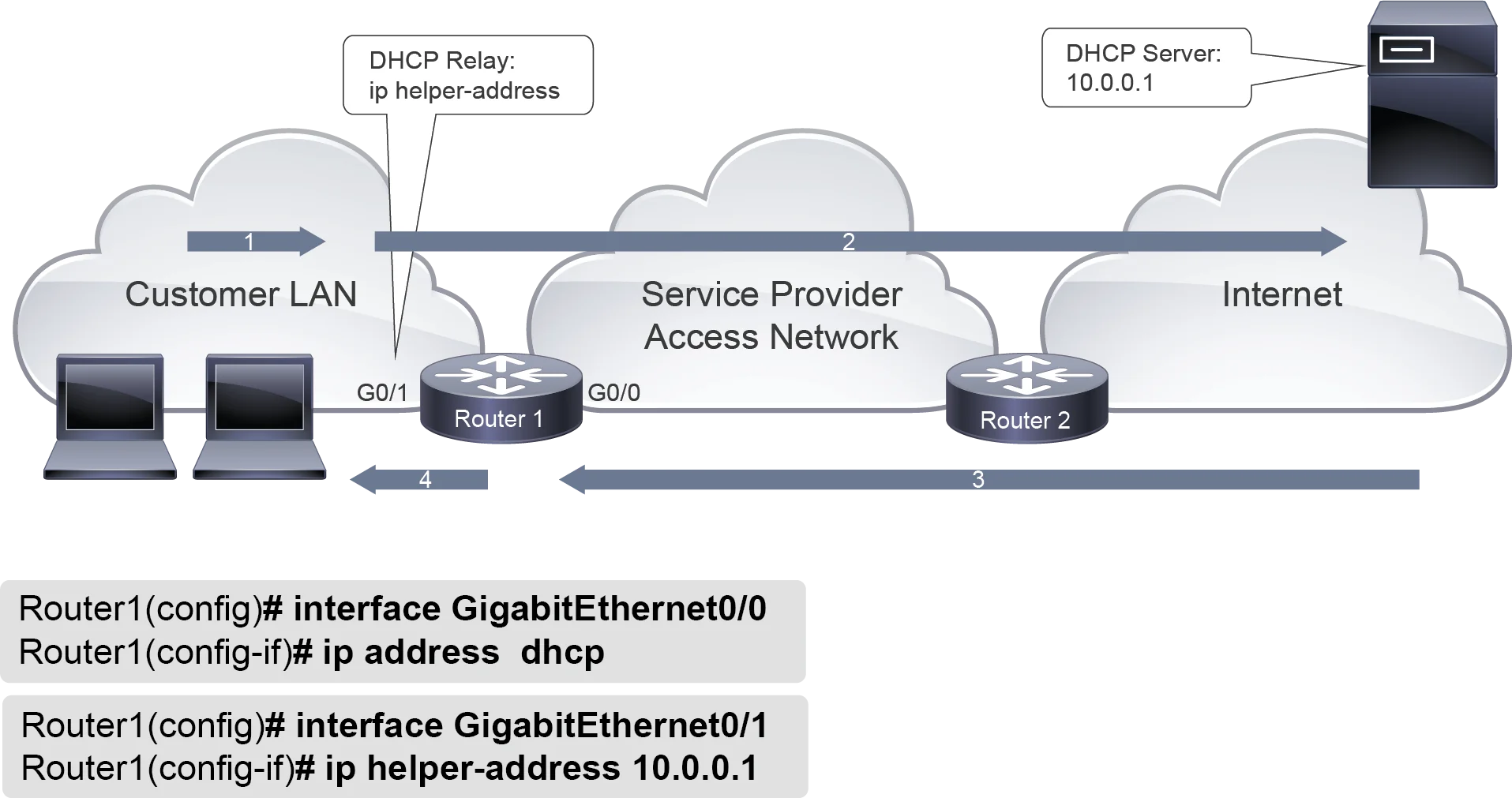
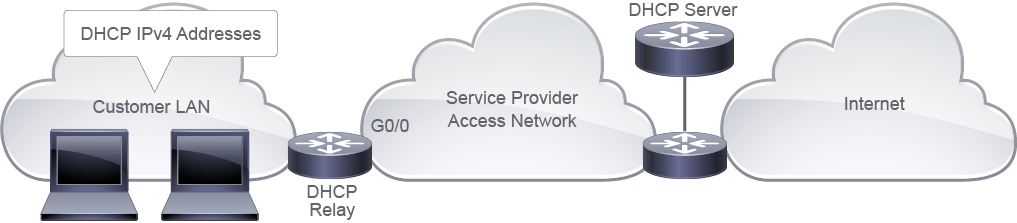
A DHCP relay agent is any host that forwards DHCP packets between clients and servers. Relay agents are used to forwarding requests and replies between clients and servers when they are not on the same subnet. DHCP requests are sent as broadcasts, and because routers block the broadcasts, you need a relay functionality to reach the DHCP server.
DHCP 中繼代理(relay agent)是指在用戶端與伺服器之間轉發 DHCP 封包的任何主機。當用戶端與伺服器不在同一個子網路時,就需要使用中繼代理來轉發請求與回覆。DHCP 請求是以廣播方式傳送,而路由器會封鎖廣播,因此需要中繼功能才能到達 DHCP 伺服器。
Router1(config)# interface GigabitEthernet0/1
Router1(config-if)# ip helper-address 10.0.0.1To configure the DHCP relay agent to forward packets to a DHCP server, you should enter the interface configuration mode using the interface interface command. Then, use the ip helper-address address command to specify that the interface will forward UDP broadcasts, including BOOTP and DHCP, to the specified server address.
若要將 DHCP 中繼代理設定為將封包轉發至 DHCP 伺服器,應先使用 interface 介面指令進入介面設定模式,接著使用 ip helper-address address 指令,指定該介面將把包括 BOOTP 與 DHCP 在內的 UDP 廣播轉發至指定的伺服器位址。
These steps show how DHCP requests are processed when DHCP relay is used:
以下步驟說明使用 DHCP 中繼時,DHCP 請求的處理方式:
- Step 1: A DHCP client broadcasts a DHCP request步驟 1:DHCP 用戶端廣播一個 DHCP 請求
- Step 2: DHCP relay includes option 82 and sends the DHCP request as a unicast packet to the DHCP server. Option 82 includes remote ID and circuit ID.步驟 2:DHCP 中繼加入選項 82,並將 DHCP 請求以單播封包傳送給 DHCP 伺服器。選項 82 包含遠端 ID(remote ID)與電路 ID(circuit ID)。
- Step 3: The DHCP server responds to the DHCP relay步驟 3:DHCP 伺服器回應 DHCP 中繼
- Step 4: The DHCP relay strips off option 82 and sends the response to the DHCP client步驟 4:DHCP 中繼移除選項 82,並將回應傳送給 DHCP 用戶端
To verify the DHCP relay configuration in this example, you can check whether the client computers in the customer LAN have acquired IPv4 addresses from the DHCP server.
若要驗證此範例中的 DHCP 中繼設定,可檢查客戶區域網路中的用戶端電腦是否已從 DHCP 伺服器取得 IPv4 位址。
You can use packet capture to examine the packets on the customer LAN to observe the communication between the clients and the DHCP relay agent. Furthermore, you can examine the packets towards the service provider network to observe that the router has forwarded the DHCP Discover message from the clients towards the DHCP server using as a source the IPv4 address from the router's interface GigabitEthernet0/1. You can also observe that the DHCP server has sent the DHCP Offer, as a unicast packet, back to the DHCP relay agent from which the DHCP Discover message came.
你可以使用封包擷取來檢視客戶區域網路上的封包,觀察用戶端與 DHCP 中繼代理之間的通訊。此外,也可以檢視傳向服務供應商網路的封包,觀察路由器是否已將來自用戶端的 DHCP Discover 訊息,以路由器介面 GigabitEthernet0/1 的 IPv4 位址作為來源轉發給 DHCP 伺服器。你也可以觀察到,DHCP 伺服器已將 DHCP Offer 以單播封包的形式,回傳給發出 DHCP Discover 訊息的 DHCP 中繼代理。
Configuring a Router as an IPv4 DHCP Server
將路由器設定為 IPv4 DHCP 伺服器
The Cisco IOS DHCP server is a full DHCP server implementation that assigns and manages IPv4 addresses from specified address pools within the device to DHCP clients. The DHCP server can be configured to assign additional parameters such as the IPv4 address of the DNS server and the default gateway. You can implement a DHCP server on both Cisco IOS Routers and Cisco Catalyst switches.
Cisco IOS DHCP 伺服器是一個完整的 DHCP 伺服器實作,可從裝置內指定的位址集區為 DHCP 用戶端指派並管理 IPv4 位址。DHCP 伺服器可設定為指派其他參數,例如 DNS 伺服器的 IPv4 位址與預設閘道。你可以在 Cisco IOS 路由器與 Cisco Catalyst 交換器上實作 DHCP 伺服器。
To configure the DHCP server on a router, you should enter the DHCP pool configuration mode using the ip dhcp pool name command. Then, assign the DHCP parameters to the DHCP pool.
若要在路由器上設定 DHCP 伺服器,應使用 ip dhcp pool name 指令進入 DHCP 集區設定模式,然後將 DHCP 參數指派給該 DHCP 集區。
Router(config)# ip dhcp excluded-address 10.1.50.1 10.1.50.50
Router(config)# ip dhcp pool Customer
Router(dhcp-config)# network 10.1.50.0 /24
Router(dhcp-config)# default-router 10.1.50.1
Router(dhcp-config)# dns-server 10.1.50.1
Router(dhcp-config)# domain-name cisco.com
Router(dhcp-config)# lease 0 12
Router(dhcp-config)# exit
Use the following commands that are shown in the table to define the pool parameters.
請使用下表所示的指令來定義集區參數。
Command 指令 | Description 說明 |
network network-number [mask| prefix-length]network network-number [mask| prefix-length] | Defines addresses in the DHCP pool. Optionally, defines a subnet mask or prefix length to define the network part. 定義 DHCP 集區中的位址。也可選擇性地定義子網路遮罩或前綴長度,以定義網路部分。 |
default-router addressdefault-router address | Specifies the IP address of the default router for a DHCP client. 指定 DHCP 用戶端所使用之預設路由器的 IP 位址。 |
dns-server addressdns-server address | Specifies the IP address of a DNS server. 指定 DNS 伺服器的 IP 位址。 |
domain-namedomaindomain-namedomain | Specifies the domain name for the DHCP client. 指定 DHCP 用戶端所使用的網域名稱。 |
lease {days [hours] [minutes] | infinite}lease {days [hours] [minutes] | infinite} | Specifies the duration of the lease. The default is a one-day lease. 指定租約的期限,預設為一天租約。 |
You can also exclude the range of IPv4 addresses from the DHCP assignment, by using the ip dhcp excluded-address ip-address [last-ip-address] command, which is used in the global configuration mode.
你也可以使用在全域設定模式下執行的 ip dhcp excluded-address ip-address [last-ip-address] 指令,將某段 IPv4 位址範圍排除在 DHCP 指派之外。
In the configuration example above the, IPv4 addresses are assigned from the address pool 10.1.50.0/24 with a lease time of 12 hours. Additional parameters are the default gateway, domain name, and DNS server. Also, IPv4 addresses from 10.1.50.1 to 10.1.50.50 are not assigned to the end devices.
在上述設定範例中,IPv4 位址是從位址集區 10.1.50.0/24 指派,租約時間為 12 小時。其他參數包括預設閘道、網域名稱與 DNS 伺服器。此外,從 10.1.50.1 到 10.1.50.50 的 IPv4 位址不會被指派給終端裝置。
To verify information about the configured DHCP address pools, you can use the show ip dhcp pool command, and to display the address binding information, which displays a list of all IPv4 address-to-MAC bindings, you can use the show ip dhcp binding command.
若要驗證已設定的 DHCP 位址集區資訊,可使用 show ip dhcp pool 指令;若要顯示位址繫結資訊,也就是所有 IPv4 位址與 MAC 位址繫結關係的清單,則可使用 show ip dhcp binding 指令。
IPv4 DHCP Settings on Windows Host
Windows 主機上的 IPv4 DHCP 設定
On a Windows computer, you can use different ipconfig command options to view and refresh DHCP and DNS settings.
在 Windows 電腦上,可以使用不同的 ipconfig 指令選項來檢視並重新整理 DHCP 與 DNS 設定。
The following is the syntax for the ipconfig command:
以下是 ipconfig 指令的語法:
ipconfig [/ all] [/ renew [adapter]] [/ release [adapter]] [/displaydns] [/flushdns]The following command options are commonly used:
以下是常用的指令選項:
/allThis option displays the complete TCP/IP configuration for all adapters, including DHCP and DNS configuration. Without this parameter, theipconfigcommand displays only the IP address, subnet mask, and default gateway values for each adapter. Adapters can represent physical interfaces, such as installed network adapters, or logical interfaces, such as dialup connections./all此選項會顯示所有介面卡的完整 TCP/IP 設定,包括 DHCP 與 DNS 設定。若不加此參數,ipconfig指令只會顯示每張介面卡的 IP 位址、子網路遮罩與預設閘道值。介面卡可代表實體介面(例如已安裝的網路介面卡),也可代表邏輯介面(例如撥接連線)。/renew [adapter]This option renews DHCP configuration for all adapters (if an adapter is not specified) or for a specific adapter if the adapter parameter is included. This parameter is available only on computers with adapters that are configured to obtain an IP address automatically. To specify an adapter name, enter the adapter name that appears when you useipconfigwithout parameters./renew [adapter]此選項會更新所有介面卡(若未指定介面卡)或指定介面卡(若包含 adapter 參數)的 DHCP 設定。此參數僅適用於設定為自動取得 IP 位址的介面卡所在電腦。若要指定介面卡名稱,請輸入以無參數方式執行ipconfig時所顯示的介面卡名稱。/release[adapter] This option sends a DHCPRELEASE message to the DHCP server to release the current DHCP configuration and discard the IP address configuration for either all adapters (if an adapter is not specified) or for a specific adapter if the adapter parameter is included. This parameter disables TCP/IP for adapters that are configured to obtain an IP address automatically. To specify an adapter name, enter the adapter name that appears when you useipconfigwithout parameters./release[adapter] 此選項會向 DHCP 伺服器傳送 DHCPRELEASE 訊息,以釋放目前的 DHCP 設定,並捨棄所有介面卡(若未指定介面卡)或指定介面卡(若包含 adapter 參數)的 IP 位址設定。此參數會停用設定為自動取得 IP 位址之介面卡的 TCP/IP。若要指定介面卡名稱,請輸入以無參數方式執行ipconfig時所顯示的介面卡名稱。/displaydnsThis option displays the contents of the host DNS cache. When an IP host makes a DNS query for a hostname, it caches the result to avoid unnecessary queries./displaydns此選項會顯示主機 DNS 快取的內容。當 IP 主機對某主機名稱發出 DNS 查詢時,會將結果快取,以避免不必要的查詢。/flushdnsThis option deletes the host DNS cache. This option is useful if the IP address associated with a hostname has changed, but the host is still caching the old IP address./flushdns此選項會刪除主機 DNS 快取。當某主機名稱對應的 IP 位址已變更,但主機仍快取舊的 IP 位址時,此選項相當實用。/?This option displays help at the command prompt./?此選項會在命令提示字元中顯示說明。
DHCP Security concerns
DHCP 安全考量
While DHCP was designed to be fast and efficient, an important disadvantage is that this protocol does not require any authentication. Apart from the strong security rules that an enterprise has to ensure that users are authenticated when they access protected resources on the network, the DHCP server is still a weak point in the security chain.
雖然 DHCP 的設計目標是快速且有效率,但一項重大缺點是此協定不需要任何身分驗證。除了企業必須確保使用者在存取網路上受保護資源時經過身分驗證的嚴格安全規定之外,DHCP 伺服器本身仍是安全鏈中的一個弱點。
An attacker could take over or spoof the DHCP server and hand out bad IP information to legitimate end users, or it could hand out legitimate IP addresses to unauthorized users.
攻擊者可能奪取或偽造 DHCP 伺服器,並將錯誤的 IP 資訊發送給合法終端使用者,或將合法的 IP 位址發送給未經授權的使用者。
One such common attack is when a rogue DHCP server is connected to the corporate nework. This is an unauthorized DHCP server that is not under the control of network administrators. It could begin by assigning invalid IP addresses which would prevent client devices from connecting to the network resources.
其中一種常見的攻擊,是有惡意 DHCP 伺服器連接到企業網路。這是一台未受網路管理員控管的未授權 DHCP 伺服器,它可能一開始就指派無效的 IP 位址,導致用戶端裝置無法連上網路資源。
Another possible attack is known as DHCP depletion. This occurs when an attacker completely exhausts the allocated address pool of the DHCP server. An attacker might constantly send forged DHCP requests by using different source MAC addresses, forcing the server to continue to assign new addresses until it reaches the end of the pool size.
另一種可能的攻擊稱為 DHCP 耗竭攻擊。當攻擊者將 DHCP 伺服器所配置的位址集區完全耗盡時,就會發生此攻擊。攻擊者可能使用不同的來源 MAC 位址持續傳送偽造的 DHCP 請求,迫使伺服器不斷指派新位址,直到用盡整個集區的位址為止。