Port issues will most likely have visible symptoms, such as users being unable to connect to the network. These problems are sometimes related to faulty media and equipment, such as NICs, but port issues are often related to duplex and speed settings.
連接埠問題通常會有明顯的徵兆,例如使用者無法連上網路。這些問題有時與媒介或設備故障有關,例如網路介面卡(NIC),但連接埠問題往往與雙工(duplex)及速度設定有關。
The most common port issues are related to duplex and speed issues.
最常見的連接埠問題與雙工和速度問題有關。
- Duplex-related issues result from a mismatch in duplex settings.雙工相關問題源自於雙工設定不匹配。

- Speed-related issues result from a mismatch in speed settings.速度相關問題源自於速度設定不匹配。

A common issue with speed and duplex occurs when the duplex settings are mismatched between two switches, between a switch and a router, or between a switch and a workstation or server. This mismatch can occur when you manually hardcode the speed and duplex or autonegotiation issues between the two devices.
速度與雙工的常見問題發生在兩台交換器之間、交換器與路由器之間,或交換器與工作站或伺服器之間的雙工設定不匹配時。這種不匹配可能是因為手動固定設定速度與雙工,或是兩台裝置之間的自動協商(autonegotiation)出現問題所致。
Duplex and Speed-Related Issues
雙工與速度相關問題
A duplex mismatch is when the switch operates at full duplex, and the connected device operates at half duplex. The result of a duplex mismatch is extremely slow performance, intermittent connectivity, and loss of connection. Other possible causes of data-link errors at full duplex are bad cables, a faulty switch port, or NIC software or hardware issues.
雙工不匹配是指交換器以全雙工(full duplex)運作,而連接的裝置以半雙工(half duplex)運作。雙工不匹配的結果是效能極度低落、連線間歇性中斷,以及連線遺失。全雙工下資料鏈結錯誤的其他可能原因,還包括纜線不良、交換器連接埠故障,或網路介面卡的軟硬體問題。
Here are examples of duplex-related issues:
以下是雙工相關問題的範例:
- One end is set to full duplex, and the other is set to half duplex, resulting in a mismatch.一端設為全雙工,另一端設為半雙工,導致不匹配。
- One end is set to full duplex, and the other is set to autonegotiation:一端設為全雙工,另一端設為自動協商:
- If autonegotiation fails and this end reverts to half duplex, it results in a mismatch.若自動協商失敗,且該端回退為半雙工,就會造成不匹配。
- One end is set to half duplex, and the other is set to autonegotiation:一端設為半雙工,另一端設為自動協商:
- If autonegotiation fails, this end reverts to half duplex.若自動協商失敗,該端會回退為半雙工。
- Both ends are set to half duplex, and there is no mismatch.兩端都設為半雙工,因此沒有不匹配的情況。
- Autonegotiation is set on both ends:兩端都設為自動協商:
- One end fails to full duplex, and the other end fails to half duplex.一端變為全雙工,另一端變為半雙工。
- For example, a Gigabit Ethernet interface defaults to full duplex, while a 10/100 defaults to half duplex.例如,Gigabit Ethernet 介面預設為全雙工,而 10/100 介面預設為半雙工。
- Autonegotiation is set on both ends:兩端都設為自動協商:
- Autonegotiation fails on both ends, and they both revert to half duplex.兩端自動協商都失敗,因此都回退為半雙工。
- Both ends are set to half duplex, and there is no mismatch.兩端都設為半雙工,因此沒有不匹配的情況。
Here are examples of speed-related issues:
以下是速度相關問題的範例:
- One end is set to one speed, and the other is set to another speed, resulting in a mismatch.一端設為某個速度,另一端設為另一個速度,導致不匹配。
- One end is set to a higher speed, and autonegotiation is enabled on the other end:一端設為較高速度,另一端啟用自動協商:
- If autonegotiation fails, the switch senses what the other end is using and reverts to the optimal speed.若自動協商失敗,交換器會偵測另一端使用的速度,並回退至最佳速度。
- Autonegotiation is set on both ends:兩端都設為自動協商:
- Autonegotiation fails on both ends, and they revert to their lowest speed.兩端自動協商都失敗,因此都回退至各自最低的速度。
- Both ends are set at the lowest speed, and there is no mismatch.兩端都設為最低速度,因此沒有不匹配的情況。
The IEEE 802.3ab Gigabit Ethernet standard mandates the use of autonegotiation for speed and duplex. Although autonegotiation is not mandatory for other speeds, practically all fast Ethernet NICs also use autonegotiation by default. The use of autonegotiation for speed and duplex is the current recommended practice for ports that are connected to noncritical endpoints. However, if duplex negotiation fails for some reason, you might have to set the speed and duplex manually on both ends. Typically, this would mean setting the duplex mode to full duplex on both ends of the connection. Manually set the speed and duplex on links between networking devices and ports connected to critical endpoints, such as servers.
IEEE 802.3ab Gigabit Ethernet 標準規定必須使用自動協商來決定速度與雙工。雖然自動協商對其他速度並非強制要求,但實際上幾乎所有 Fast Ethernet 網路介面卡預設也都使用自動協商。對於連接到非關鍵端點的連接埠,目前建議的做法是使用自動協商來決定速度與雙工。然而,若因某些原因雙工協商失敗,你可能需要在兩端手動設定速度與雙工,通常這表示要在連線兩端都將雙工模式設為全雙工。對於網路設備之間的鏈路,以及連接到伺服器等關鍵端點的連接埠,則應手動設定速度與雙工。
The table summarizes possible speed and duplex settings for a connection between a switch port and an end-device NIC. The table gives just a general idea about speed and duplex misconfiguration combinations.
此表格摘要說明交換器連接埠與終端裝置網路介面卡之間連線可能的速度與雙工設定,僅提供速度與雙工組合錯誤配置的概略概念。
Speed and Duplex Settings for End-Device NIC and Switch Connections
終端裝置網路介面卡與交換器連線的速度與雙工設定
Configuration on end device NIC (Speed, Duplex) 終端裝置網路介面卡上的設定(速度、雙工) | Configuration on Switch (Speed, Duplex) 交換器上的設定(速度、雙工) | Resulting end device NIC (Speed, Duplex) 終端裝置網路介面卡的結果(速度、雙工) | Resulting Switch (Speed, Duplex) 交換器的結果(速度、雙工) | Comments 備註 |
AUTO 自動 | AUTO 自動 | 1000 Mbps, full duplex 1000 Mbps, 全雙工 | 1000 Mbps, full duplex 1000 Mbps, 全雙工 | Assuming that the maximum capability of a Cisco Catalyst switch and NIC is 1000 Mbps, full duplex. 假設 Cisco Catalyst 交換器與網路介面卡的最大能力皆為 1000 Mbps 全雙工。 |
1000 Mbps, full duplex 1000 Mbps, 全雙工 | AUTO 自動 | 1000 Mbps, full duplex 1000 Mbps, 全雙工 | 1000 Mbps, full duplex 1000 Mbps, 全雙工 | A link is established, but the switch does not see any autonegotiation information from the NIC. Because Cisco Catalyst switches support only a full-duplex operation with 1000 Mbps, they default to full duplex. This change happens only when operating at 1000 Mbps. 已建立連線,但交換器未收到網路介面卡的自動協商資訊。由於 Cisco Catalyst 交換器在 1000 Mbps 下只支援全雙工運作,因此會預設為全雙工。此變化只有在以 1000 Mbps 運作時才會發生。 |
AUTO 自動 | 1000 Mbps, full duplex 1000 Mbps, 全雙工 | 1000 Mbps, full duplex 1000 Mbps, 全雙工 | 1000 Mbps, full duplex 1000 Mbps, 全雙工 | Assuming that the maximum capability of a NIC is 1000 Mbps, full duplex. 假設網路介面卡的最大能力為 1000 Mbps 全雙工。 |
1000 Mbps, full duplex 1000 Mbps, 全雙工 | 1000 Mbps, full duplex 1000 Mbps, 全雙工 | 1000 Mbps, full duplex 1000 Mbps, 全雙工 | 1000 Mbps, full duplex 1000 Mbps, 全雙工 | Correct manual configuration. 正確的手動設定。 |
100 Mbps, full duplex 100 Mbps, 全雙工 | 1000 Mbps, full duplex 1000 Mbps, 全雙工 | No link 無連線 | No link 無連線 | Neither side establishes a link due to a speed mismatch. 因速度不匹配,雙方都無法建立連線。 |
100 Mbps, full duplex 100 Mbps, 全雙工 | AUTO (default 100 Mbps half duplex) 自動 (預設 100 Mbps 半雙工) | 100 Mbps, full duplex 100 Mbps, 全雙工 | 100 Mbps, half duplex 100 Mbps, 半雙工 | A duplex mismatch can result in performance issues, intermittent connectivity, and loss of communication. 雙工不匹配可能導致效能問題、間歇性連線與通訊中斷。 |
AUTO (default 100 Mbps half duplex) 自動 (預設 100 Mbps 半雙工) | 100 Mbps, full duplex 100 Mbps, 全雙工 | 100 Mbps, half duplex 100 Mbps, 半雙工 | 100 Mbps, full duplex 100 Mbps, 全雙工 | A duplex mismatch can result in performance issues, intermittent connectivity, and loss of communication. 雙工不匹配可能導致效能問題、間歇性連線與通訊中斷。 |
100 Mbps, full duplex 100 Mbps, 全雙工 | 100 Mbps, full duplex 100 Mbps, 全雙工 | 100 Mbps, full duplex 100 Mbps, 全雙工 | 100 Mbps, full duplex 100 Mbps, 全雙工 | Correct manual configuration. 正確的手動設定。 |
100 Mbps, half duplex 100 Mbps, 半雙工 | AUTO 自動 | 100 Mbps, half duplex 100 Mbps, 半雙工 | 100 Mbps, half duplex 100 Mbps,半雙工 | A link is established, but the switch does not see any autonegotiation information from the NIC and defaults to half duplex when operating at 10/100 Mbps. 已建立連線,但交換器未收到網路介面卡的自動協商資訊,因此在 10/100 Mbps 運作時預設為半雙工。 |
10 Mbps, half duplex 10 Mbps,半雙工 | AUTO 自動 | 10 Mbps, half duplex 10 Mbps,半雙工 | 10 Mbps, half duplex 10 Mbps,半雙工 | A link is established, but the switch does not see Fast Link Pulse (FLP). It defaults to 10 Mbps, half duplex. 已建立連線,但交換器未偵測到快速鏈路脈衝(FLP),因此預設為 10 Mbps 半雙工。 |
10 Mbps, half duplex 10 Mbps,半雙工 | 100 Mbps, half duplex 100 Mbps,半雙工 | No link 無連線 | No link 無連線 | Neither side establishes a link due to a speed mismatch. 因速度不匹配,雙方都無法建立連線。 |
AUTO 自動 | 100 Mbps, half duplex 100 Mbps,半雙工 | 100 Mbps, half duplex 100 Mbps,半雙工 | 100 Mbps, half duplex 100 Mbps,半雙工 | A link is established, but the NIC does not see any autonegotiation information. It defaults to 100 Mbps, half duplex. 已建立連線,但網路介面卡未收到任何自動協商資訊,因此預設為 100 Mbps 半雙工。 |
AUTO 自動 | 10 Mbps, half duplex 10 Mbps,半雙工 | 10 Mbps, half duplex 10 Mbps,半雙工 | 10 Mbps, half duplex 10 Mbps,半雙工 | A link is established, but the NIC does not see FLP. It defaults to 10 Mbps, half duplex. 已建立連線,但網路介面卡未偵測到 FLP,因此預設為 10 Mbps 半雙工。 |
Troubleshooting Process for Duplex and Speed-Related Issues
雙工與速度相關問題的疑難排解流程
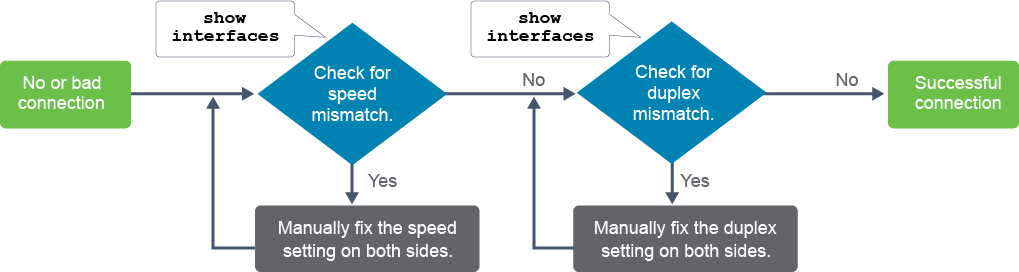
To troubleshoot switch duplex and speed issues when you have no connection or a bad connection between a switch and another device, use this general process:
當交換器與另一裝置之間沒有連線或連線不良時,請使用以下通用流程來排解交換器的雙工與速度問題:
- Use the
show interfacescommand to check whether there is a speed mismatch between the switch and a device on the other side (switch, router, server, and so on). If there is a speed mismatch, set the speed on both sides to the same value.使用show interfaces指令檢查交換器與對端裝置(交換器、路由器、伺服器等)之間是否有速度不匹配的情況。若有速度不匹配,請將兩端的速度設為相同值。 - Use the
show interfacescommand to check whether there is a duplex mismatch between the switch and a device on the other side. It is recommended that you use full duplex if both sides support it.使用show interfaces指令檢查交換器與對端裝置之間是否有雙工不匹配的情況。若兩端都支援全雙工,建議使用全雙工。
The example shows the show interfaces command output. The example highlights duplex and speed settings for the FastEthernet0/1 interface. Based on the output of the show interfaces command, you can find, diagnose, and correct the duplex or speed mismatch between the switch and the device on the other side.
此範例顯示 show interfaces 指令的輸出,並標示出 FastEthernet0/1 介面的雙工與速度設定。根據 show interfaces 指令的輸出,你可以找出、診斷並修正交換器與對端裝置之間的雙工或速度不匹配問題。
If the mismatch occurs between two Cisco devices with Cisco Discovery Protocol enabled, you will see Cisco Discovery Protocol error messages on the console or in the logging buffer of both devices. Cisco Discovery Protocol is useful detecting errors and for gathering port and system statistics on connected Cisco devices. Whenever there is a duplex mismatch (in this example, on the FastEthernet0/1 interface), the consoles of Cisco switches display these error messages:
若不匹配發生在兩台啟用 Cisco Discovery Protocol 的 Cisco 裝置之間,你會在兩台裝置的主控台或記錄緩衝區中看到 Cisco Discovery Protocol 錯誤訊息。Cisco Discovery Protocol 有助於偵測錯誤,並蒐集相連 Cisco 裝置的連接埠與系統統計資料。每當發生雙工不匹配時(在此範例中發生在 FastEthernet0/1 介面上),Cisco 交換器的主控台會顯示以下錯誤訊息:
%CDP-4-DUPLEX_MISMATCH: duplex mismatch discovered on FastEthernet0/1 (not half duplex)Use the duplex mode command to configure duplex operation on an interface. The following are available duplex modes:
使用 duplex mode 指令來設定介面的雙工運作方式,可用的雙工模式如下:
full: Specifies full-duplex operation.full:指定全雙工運作。half:Specifies half-duplex operation.half:指定半雙工運作。auto: Specifies the autonegotiation capability. The interface automatically operates at half or full duplex, depending on environmental factors such as the type of media and the transmission speeds for the peer routers, hubs, and switches that are used in the network configuration.auto:指定自動協商能力。介面會依環境因素(例如媒介類型,以及網路配置中所使用的對端路由器、集線器與交換器的傳輸速度)自動以半雙工或全雙工運作。
Troubleshooting Physical Connectivity Issue
疑難排解實體連線問題
Often troubleshooting processes involve a component of hardware troubleshooting. There are three main categories of issues that could cause a failure on the network: hardware failures, software failures (bugs), and configuration errors. A fourth category might be performance problems, but performance problems are a symptom and not the cause of a problem.
疑難排解流程通常包含硬體疑難排解的環節。導致網路故障的問題主要可分為三大類:硬體故障、軟體故障(錯誤),以及設定錯誤。第四類可能是效能問題,但效能問題是一種症狀,而非問題的根本原因。
After you have used the ping and traceroute utilities to determine that a network connectivity problem exists and where it exists, check to see if there are physical connectivity issues before you get involved in more complex troubleshooting. You could spend hours troubleshooting a situation only to find that a network cable is loose or malfunctioning.
在使用 ping 與 traceroute 工具確定網路連線問題確實存在及其發生位置之後,在進行更複雜的疑難排解之前,應先檢查是否存在實體連線問題。你可能花費數小時排解問題,最後才發現只是網路纜線鬆脫或故障。
The interfaces that the traffic passes through are a component that is always worth verifying when you are troubleshooting performance-related issues. You suspect the hardware to be at fault. The interfaces are usually one of the first things that you would verify while tracing the path between devices.
在排解效能相關問題時,流量所經過的介面永遠是值得驗證的元件之一。若你懷疑是硬體出了問題,介面通常是你在追蹤裝置之間路徑時最先要驗證的項目之一。
If you have physical access to devices that you suspect are causing network problems, you can save troubleshooting time by looking at the port LEDs. The port LEDs show the link status and can indicate an error condition. If a link light for a port is not on, help ensure that both ends of the cable are plugged into the correct ports.
若你能親自接觸到懷疑造成網路問題的裝置,觀察連接埠 LED 燈可以節省疑難排解的時間。連接埠 LED 燈顯示連結狀態,也能指出錯誤狀況。若連接埠的連結燈未亮起,請確認纜線兩端是否都正確插入對應的連接埠。
When troubleshooting Small Form-Factor Pluggable (SFP) and SFP+ modules, always check if you are using SFP or SFP+ transceivers in the switch ports. The transceiver type should match the physical port specification and speed. Normally SFP+ minimum range is 10Gbps, and they should be the same type on both ends. Also check that the same wavelength is used; a transceiver using a 1310nm laser will not communicate with an 850nm transceiver. You need to verify the optical cable, single-mode fiber (SMF), or Multimode fiber (MMF), the SFP module supports, and that you are using the correct one. Always refer to the documentation (typically an installation guide) for a specific networking device to check the specific supported cables and modules.
疑難排解小型可插拔(SFP)與 SFP+ 模組時,務必先確認交換器連接埠使用的是 SFP 還是 SFP+ 光收發模組(transceiver),且收發模組類型應與實體連接埠規格及速度相符。一般而言 SFP+ 的最低傳輸範圍為 10 Gbps,且兩端應使用相同類型。同時也要確認雙方使用相同的波長,例如使用 1310nm 雷射的收發模組無法與 850nm 的收發模組通訊。你需要確認 SFP 模組支援的光纖類型,是單模光纖(SMF)還是多模光纖(MMF),並確保使用正確的類型。務必參考特定網路設備的文件(通常是安裝指南),以確認其支援的特定纜線與模組。
The output of theshow interfaces command lists important statistics that should be checked. The first line of the output from this command tells you whether an interface is up or down.
show interfaces 指令的輸出會列出應檢查的重要統計資料,此指令輸出的第一行會告訴你介面目前是啟用(up)還是停用(down)狀態。
The output of the show interfaces command also displays the following important statistics:
show interfaces 指令的輸出也會顯示以下重要統計資料:
- Input queue drops: Input queue drops (and the related ignored and throttle counters) signify the fact that at some point, more traffic was delivered to the device than it could process. This situation does not necessarily indicate a problem because it could be normal during traffic peaks. However, it could indicate that the CPU cannot process packets in time. So if this number is consistently high, you should try to determine at which moments these counters are increasing and how this increase relates to the CPU usage.輸入佇列丟棄:輸入佇列丟棄(以及相關的忽略與節流計數器)代表在某個時間點,傳送到裝置的流量超過其處理能力。這種情況未必表示有問題,因為在流量高峰期間屬於正常現象;然而,它也可能顯示 CPU 無法即時處理封包。因此,若此數值持續偏高,你應設法找出這些計數器增加的時間點,以及這與 CPU 使用率之間的關聯。
- Output queue drops:Output queue drops indicate that packets were dropped due to congestion on the interface. Seeing output drops is normal when the aggregate input traffic is higher than the output traffic. During traffic peaks, the packets are dropped if traffic is delivered to the interface faster than the interface can send it out. However, although this setting is considered normal behavior, it leads to packet drops and queuing delays, so applications sensitive to packet drops and queuing delays, such as VoIP, might suffer from performance issues. Consistent output drops might indicate that you need to implement an advanced queuing mechanism to provide good quality of service (QoS) to each application.輸出佇列丟棄:輸出佇列丟棄表示因介面壅塞而丟棄了封包。當輸入流量總量高於輸出流量時,出現輸出丟棄屬於正常現象。在流量高峰期間,若流量傳送到介面的速度快於介面送出的速度,封包就會被丟棄。雖然這被視為正常行為,但仍會導致封包遺失與佇列延遲,因此對封包遺失與延遲敏感的應用程式(例如 VoIP)可能會出現效能問題。持續出現輸出丟棄,可能表示你需要實作進階佇列機制,為每個應用程式提供良好的服務品質(QoS)。
- Input errors:Input errors indicate errors experienced during the reception of the frame, such as CRC errors. High numbers of CRC errors could indicate cabling problems, interface hardware problems, or in an Ethernet-based network, duplex mismatches.輸入錯誤:輸入錯誤代表在接收框架時發生的錯誤,例如 CRC 錯誤。CRC 錯誤數量偏高可能顯示佈線問題、介面硬體問題,或在乙太網路中代表雙工不匹配。
- Output errors: Output errors indicate errors, such as collisions, during the transmission of a frame. In most Ethernet-based networks, full-duplex transmission is the norm, and half-duplex transmission is the exception. In full-duplex transmission, operation collisions cannot occur. Therefore, collisions, especially late collisions, often indicate duplex mismatches.輸出錯誤:輸出錯誤代表在傳送框架時發生的錯誤,例如碰撞。在大多數乙太網路中,全雙工傳輸是常態,半雙工傳輸則是例外。在全雙工傳輸中不會發生碰撞,因此若出現碰撞,尤其是晚期碰撞,通常代表發生了雙工不匹配。
show interfaces command?在 show interfaces 指令的輸出中,高碰撞計數的原因為何?