FASTLab 10: Configure System Message Logging
FASTLab 10:設定系統訊息記錄
Scenario
情境
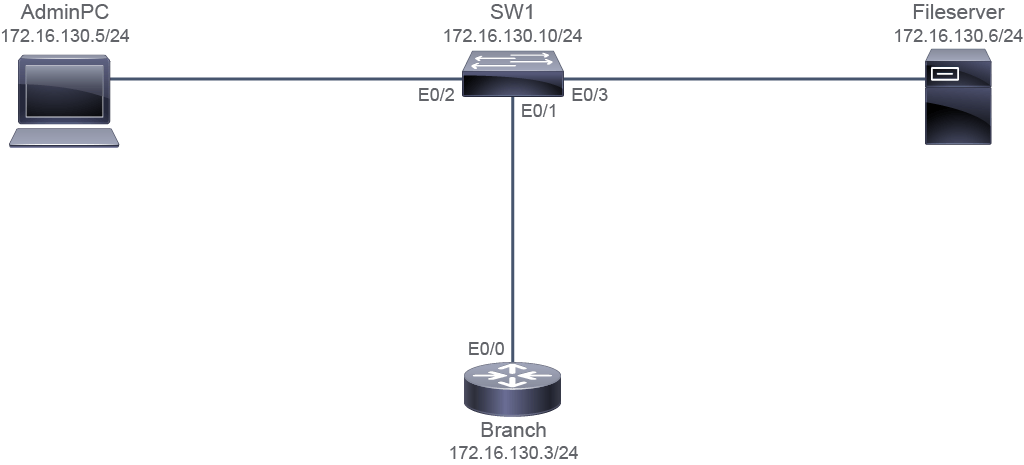
The customer has requested CCS to configure a syslog server to log all the messages. The FileServer is configured as a syslog server. Therefore, you must configure the Branch router and SW1 switch to forward the log messages to the FileServer.
客戶要求 CCS 設定一台 syslog 伺服器,以記錄所有訊息。FileServer 已設定為 syslog 伺服器。因此,你必須設定 Branch 路由器與 SW1 交換器,將日誌訊息轉送到 FileServer。
- Configure logging on the Branch router to forward all messages that have severity levels up to 4 to the syslog server.在 Branch 路由器上設定記錄,將嚴重性等級到 4(含)為止的所有訊息轉送到 syslog 伺服器。
- Configure logging on the SW1 switch to forward all messages that have severity levels up to 5 to the syslog server.在 SW1 交換器上設定記錄,將嚴重性等級到 5(含)為止的所有訊息轉送到 syslog 伺服器。
Topology
拓樸
Job Aid
工作輔助資料
Device Information
裝置資訊
Device 裝置 | Interface 介面 | IPv4 Address IPv4 位址 | Remote 遠端 | Interface 介面 | IPv4 Address IPv4 位址 |
SW1 SW1 | VLAN 1 VLAN 1 | 172.16.130.10/24 172.16.130.10/24 | VLAN 1 VLAN 1 | _ _ | _ _ |
SW1 SW1 | E0/1 E0/1 | VLAN 1 VLAN 1 | Branch Branch | E0/0 E0/0 | 172.16.130.3/24 172.16.130.3/24 |
SW1 SW1 | E0/2 E0/2 | VLAN 1 VLAN 1 | AdminPC AdminPC | E0/0 E0/0 | 172.16.130.5/24 172.16.130.5/24 |
SW1 SW1 | E0/3 E0/3 | VLAN 1 VLAN 1 | FileServer FileServer | E0/0 E0/0 | 172.16.130.6/24 172.16.130.6/24 |
Branch Branch | E0/0 E0/0 | 172.16.130.3/24 172.16.130.3/24 | SW1 SW1 | E0/1 E0/1 | VLAN 1 VLAN 1 |
Branch Branch | Lo0 Lo0 | 172.16.2.2/32 172.16.2.2/32 | _ _ | _ _ | _ _ |
AdminPC AdminPC | E0//0 E0//0 | 172.16.130.5/24 172.16.130.5/24 | SW1 SW1 | E0/2 E0/2 | _ _ |
Fileserver Fileserver | E0/0 E0/0 | 172.16.130.6/24 172.16.130.6/24 | SW1 SW1 | E0/3 E0/3 | _ _ |
Configuration Tips
設定提示
- Use the
loggingip address command to configure the IP address of the host that will receive the system logging (syslog) messages.使用loggingip address 指令設定接收系統記錄(syslog)訊息之主機的 IP 位址。 - Use the
logging traplevel command to limit messages that are logged to the syslog servers based on severity. Use thelogging trapcommand in the global configuration mode. You can use numbers or the word for the level in thelogging trapcommand.使用logging traplevel 指令,依嚴重性限制轉送到 syslog 伺服器的訊息。logging trap指令需在全域設定模式下使用。你可以在logging trap指令中使用數字或等級的英文名稱。 - Use the
show loggingcommand to display the state of system logging (syslog) and the contents of the standard system logging buffer. Use theshow loggingcommand in privileged EXEC mode.使用show logging指令顯示系統記錄(syslog)的狀態以及標準系統記錄緩衝區的內容。show logging指令需在特權 EXEC 模式下使用。 - Use the
show running-config | include loggingcommand to display the information about the configured logging host and the configured severity of the messages that are logged.使用show running-config | include logging指令,顯示已設定之記錄主機的相關資訊,以及所記錄訊息的設定嚴重性。
Answer Key
參考解答
- Configure logging on the Branch router to forward all messages that have severity levels up to 4 to the syslog server.在 Branch 路由器上設定記錄,將嚴重性等級到 4(含)為止的所有訊息轉送到 syslog 伺服器。
Branch> enable Branch# configure terminal Enter configuration commands, one per line. End with CNTL/Z. Branch(config)# logging host 172.16.130.6 Branch(config)# logging trap warnings - Configure logging on the SW1 switch to forward all messages that have severity levels up to 5 to the syslog server.在 SW1 交換器上設定記錄,將嚴重性等級到 5(含)為止的所有訊息轉送到 syslog 伺服器。
SW1(config)# logging host 172.16.130.6
SW1(config)# logging trap notifications
Configure System Message Logging Questions
設定系統訊息記錄問題
Which command do you use to check syslog messages on the router?你會使用哪個指令來檢查路由器上的 syslog 訊息?
What is the expected result, when you issue the
show running-config | include logging command on SW1?在 SW1 上執行 show running-config | include logging 指令時,預期會得到什麼結果?What is the expected result, when you issue the
show running-config | include logging command on the Branch router?在 Branch 路由器上執行 show running-config | include logging 指令時,預期會得到什麼結果?You have received the following syslog message on the router: *Apr 19 06:12:11.393: %LINK-3-UPDOWN: Interface Ethernet0/0, changed state to up Which severity level is used for this message?你在路由器上收到以下 syslog 訊息:*Apr 19 06:12:11.393: %LINK-3-UPDOWN: Interface Ethernet0/0, changed state to up 此訊息使用的是哪個嚴重性等級?