In a complex network of routers, switches, and servers, it can be daunting to manage all devices on your network, and make sure that they are not only up and running, but also performing optimally. SNMP was introduced to meet the growing need for a standard of managing IP devices.
在由路由器、交換器與伺服器組成的複雜網路中,要管理網路上所有裝置可能相當吃力,不僅要確保裝置正常運作,也要確保效能最佳化。SNMP 的推出就是為了滿足管理 IP 裝置的標準化需求日益成長。
SNMP allows an NMS to retrieve the environment and performance parameters of a network device. The NMS will collect and process the data.
SNMP 讓網路管理系統(NMS)能夠取得網路裝置的環境與效能參數,NMS 會收集並處理這些資料。
SNMP is a management protocol that supports message exchange.
SNMP 是支援訊息交換的管理通訊協定。
- SNMP manager: Polls agents on the network and displays information.SNMP 管理端(manager):輪詢網路上的代理端(agent)並顯示資訊。
- SNMP agent: Stores information and responds to manager requests. It also generates traps, which are unsolicited messages.SNMP 代理端(agent):儲存資訊並回應管理端的請求,也會產生陷阱訊息(trap),也就是非請求式訊息。
- You can set thresholds to trigger a trap notification process when values are exceeded.你可以設定門檻值,在超出數值時觸發陷阱通知程序。
- MIB: Contains a database of objects (information variables).MIB:包含物件(資訊變數)的資料庫。
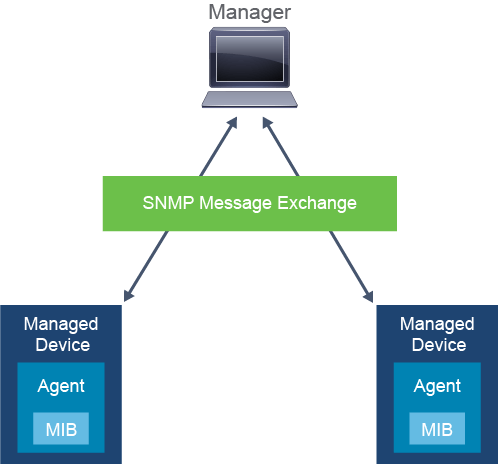
SNMP is an application layer protocol that defines how SNMP managers and SNMP agents exchange management information. SNMP uses the UDP transport mechanism to retrieve and send management information, such as MIB variables.
SNMP 是一種應用層通訊協定,定義了 SNMP 管理端與 SNMP 代理端交換管理資訊的方式。SNMP 使用 UDP 傳輸機制來取得與傳送管理資訊,例如 MIB 變數。
SNMP is broken down into these three components:
SNMP 由下列三個元件組成:
- SNMP manager:Periodically polls the SNMP agents on managed devices by querying the device for data. The SNMP manager can be part of an NMS such as Cisco Prime Infrastructure.SNMP 管理端:定期向受管理裝置上的 SNMP 代理端輪詢,查詢裝置資料。SNMP 管理端可以是 NMS(例如 Cisco Prime Infrastructure)的一部分。
- SNMP agent: Runs directly on managed devices, collects device information, and translates it into a compatible SNMP format according to the MIB.SNMP 代理端:直接在受管理裝置上執行,收集裝置資訊,並依 MIB 將其轉換為相容的 SNMP 格式。
- MIB: Represents a virtual information storage location that contains collections of managed objects. Within the MIB, there are objects that relate to different defined MIB modules (for example, the interface module).MIB:代表一個虛擬的資訊儲存位置,內含受管理物件的集合。在 MIB 中,物件會對應到不同定義的 MIB 模組(例如介面模組)。
Routers and other network devices keep statistics about the information of their processes and interfaces locally. SNMP on a device runs a special process that is called an agent. This agent can be queried, using SNMP. SNMP is typically used to gather environment and performance data such as device CPU usage, memory usage, interface traffic, interface error rate, and so on. By periodically querying or "polling" the SNMP agent on a device, an NMS can gather or collect statistics over time. The NMS polls devices periodically to obtain the values defined in the MIB objects that it is set up to collect. It then offers a look into historical data and anticipated trends. Based on SNMP values, the NMS triggers alarms to notify network operators.
路由器與其他網路裝置會在本地保存其處理程序與介面的統計資訊。裝置上的 SNMP 會執行一個稱為代理端(agent)的特殊處理程序,此代理端可以透過 SNMP 被查詢。SNMP 通常用來收集環境與效能資料,例如裝置 CPU 使用率、記憶體使用率、介面流量、介面錯誤率等等。透過定期查詢或「輪詢」裝置上的 SNMP 代理端,NMS 可以隨時間收集統計資料。NMS 會定期輪詢裝置,取得其設定要收集的 MIB 物件所定義的數值,接著提供歷史資料與預期趨勢的檢視。NMS 會根據 SNMP 數值觸發警報,通知網路維運人員。
To obtain information from the MIB on the SNMP agent, you can use several different operations:
若要從 SNMP 代理端的 MIB 取得資訊,可以使用幾種不同的操作:
- Get: This operation is a request sent by the manager to the SNMP agent to retrieve one or more values from the MIB of the managed device.Get:此操作是管理端向 SNMP 代理端發出的請求,用於從受管理裝置的 MIB 取得一或多個數值。
- Get-next: This operation is used to get the next object in the MIB from an SNMP agent.Get-next:此操作用於從 SNMP 代理端取得 MIB 中的下一個物件。
- Get-bulk: This operation allows a management application to retrieve a large section of a table at once.Get-bulk:此操作可讓管理應用程式一次取得一大段表格資料。
- Set: This operation is used to put information in the MIB from an SNMP manager.Set:此操作用於從 SNMP 管理端將資訊寫入 MIB。
- Trap: This operation is used by the SNMP agent to send a triggered piece of information to the SNMP manager.Trap:此操作由 SNMP 代理端用來將觸發的資訊傳送給 SNMP 管理端。
- Inform: This operation is the same as a trap, but it adds an acknowledgment that a trap does not provide.Inform:此操作與陷阱(trap)相同,但額外提供陷阱所沒有的確認機制。
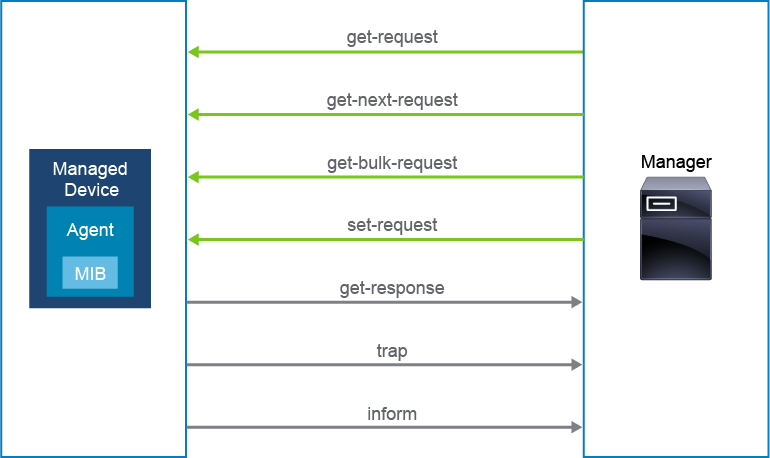
The SNMP manager polls the SNMP agents and queries the MIB via SNMP agents on UDP port 161.
SNMP 管理端會透過 UDP 連接埠 161,在 SNMP 代理端上輪詢並查詢 MIB。
The SNMP agent can also send triggered messages called traps to the SNMP manager, on UDP port 162. For example, if the interface fails, the SNMP agent can immediately send a trap message to the SNMP manager, notifying the manager about the interface status. This feature is extremely useful because you can get information almost immediately when something happens. Remember, the SNMP manager periodically polls SNMP agents, which means that you will always receive the information on the next agent poll. Depending on the interval, this could mean a 10-minute delay.
SNMP 代理端也可以透過 UDP 連接埠 162,向 SNMP 管理端傳送稱為陷阱(trap)的觸發訊息。舉例來說,若介面故障,SNMP 代理端可以立即向 SNMP 管理端傳送陷阱訊息,通知管理端介面狀態。此功能非常實用,因為事件發生時你幾乎能立即取得資訊。請記住,SNMP 管理端是定期輪詢 SNMP 代理端,這代表你一定要等到下一次輪詢代理端時才能取得資訊,視輪詢間隔而定,這可能會延遲達 10 分鐘。
The SNMP trap operation is shown in the example.
範例展示了 SNMP 陷阱操作。
- Interface Ethernet0/0 fails on the branch router.分公司路由器上的介面 Ethernet0/0 故障。
- The branch router sends an SNMP trap to the NMS, informing that interface Ethernet0/0 has failed.分公司路由器向 NMS 傳送 SNMP 陷阱,通知介面 Ethernet0/0 已故障。
- The NMS receives the SNMP trap and raises an alarm, which notifies the network operations center (NOC), which in turn can proactively solve the problem or notify the customer regarding the problem.NMS 收到 SNMP 陷阱並發出警報,通知網路維運中心(NOC),NOC 接著可以主動處理問題或通知客戶此問題。

All versions of SNMP utilize the concept of the MIB. The MIB organizes configuration and status data into a tree structure. The figure below shows a small portion of an MIB tree structure.
所有版本的 SNMP 都使用 MIB 的概念。MIB 以樹狀結構組織設定與狀態資料。下圖顯示 MIB 樹狀結構的一小部分。
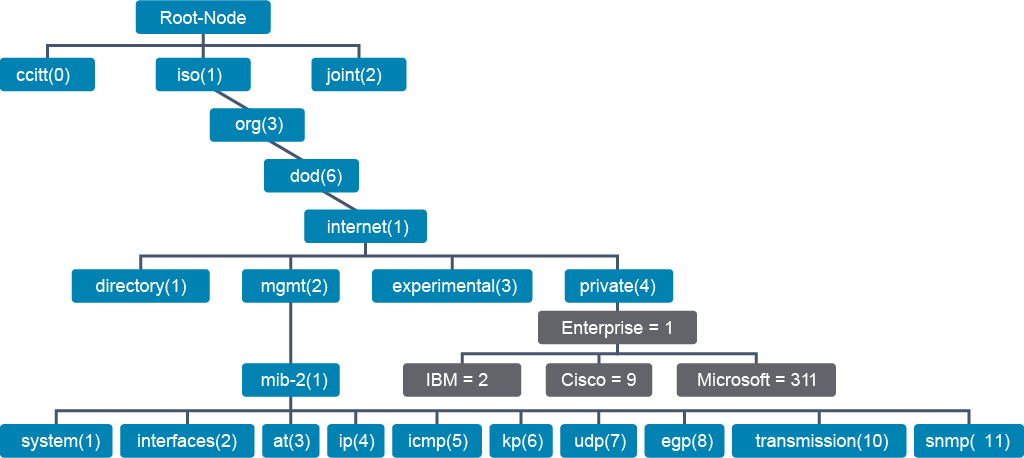
Objects in the MIB are referenced by their object ID (OID), which specifies the path from the tree root to the object. For example, system identification data is located under 1.3.6.1.2.1.1. Some examples of system data include the system name (OID 1.3.6.1.2.1.1.5), system location (OID 1.3.6.1.2.1.1.6), and system uptime (OID 1.3.6.1.2.1.1.3).
MIB 中的物件是以物件 ID(OID)參照,OID 指定了從樹根到該物件的路徑。舉例來說,系統識別資料位於 1.3.6.1.2.1.1 之下。系統資料的一些範例包括系統名稱(OID 1.3.6.1.2.1.1.5)、系統位置(OID 1.3.6.1.2.1.1.6)及系統執行時間(OID 1.3.6.1.2.1.1.3)。
Note that the following commands are not available on Cisco IOS Software, but they are shown as an example of what you can achieve with SNMP. In these examples, a Linux PC is used.
請注意,下列指令並不適用於 Cisco IOS 軟體,僅作為 SNMP 可達成功能的範例展示。這些範例中使用的是一台 Linux 電腦。
The snmpwalk command recursively pulls data from the MIB tree, starting from the specified location. For example, you could use it to show which interfaces exist on a router.
snmpwalk 指令會從指定位置開始,遞迴擷取 MIB 樹狀結構中的資料。舉例來說,你可以用它來顯示路由器上存在哪些介面。
root@NMS:~$ snmpwalk -v 3 -u test-user -l authPriv -a SHA -A auth-pass -x AES -X priv-pass 10.1.10.1 1.3.6.1.2.1.2.2.1.2
IF-MIB::ifDescr.1 = STRING: Ethernet0/0
IF-MIB::ifDescr.2 = STRING: Ethernet0/1
IF-MIB::ifDescr.3 = STRING: Ethernet0/2
IF-MIB::ifDescr.4 = STRING: Ethernet0/3
IF-MIB::ifDescr.5 = STRING: Ethernet1/0
IF-MIB::ifDescr.6 = STRING: Ethernet1/1
IF-MIB::ifDescr.7 = STRING: Ethernet1/2
IF-MIB::ifDescr.8 = STRING: Ethernet1/3
IF-MIB::ifDescr.9 = STRING: Serial2/0
IF-MIB::ifDescr.10 = STRING: Serial2/1
IF-MIB::ifDescr.11 = STRING: Serial2/2
IF-MIB::ifDescr.12 = STRING: Serial2/3
The snmpwalk command essentially performs a whole series of get-next requests automatically for you and stops when it returns results that are no longer inside the range of the OID that you originally specified.
snmpwalk 指令基本上會自動執行一整串的 get-next 請求,並在結果超出你原本指定的 OID 範圍時停止。
You can also use the snmpset command to reset the interface. In this example, the no shutdown command was issued on Serial2/0 via the snmpset command.
你也可以使用 snmpset 指令重設介面。在此範例中,透過 snmpset 指令在 Serial2/0 上發出了 no shutdown 指令。
root@NMS:~$ snmpset -v 3 -u test-user -l authPriv -a SHA -A auth-pass -x AES -X
priv-pass 10.1.10.1 1.3.6.1.2.1.2.2.1.7.9 i 1
IF-MIB::ifAdminStatus.9 = INTEGER: up(1)
Here is the syslog message on the router, which shows that interface Serial2/0 changed state to up.
以下是路由器上的 syslog 訊息,顯示介面 Serial2/0 已變更狀態為啟用(up)。
*Apr 10 18:35:00.273: %SYS-5-CONFIG_I: Configured from 10.1.10.10 by snmp
*Apr 10 18:35:02.274: %LINK-3-UPDOWN: Interface Serial2/0, changed state to up
*Apr 10 18:35:03.278: %LINEPROTO-5-UPDOWN: Line protocol on Interface Serial2/0, changed state to up
However, working with long MIB variable names like 1.3.6.1.2.1.2.2.1.2 can be problematic for the average user. More commonly, the network operations staff uses a network management product with an easy-to-use GUI, with the entire MIB data variable naming transparent to the user.
然而,處理像 1.3.6.1.2.1.2.2.1.2 這樣冗長的 MIB 變數名稱,對一般使用者來說可能較為困難。因此,網路維運人員通常會使用具備易用圖形介面(GUI)的網路管理產品,讓使用者無須直接接觸整個 MIB 資料變數命名方式。
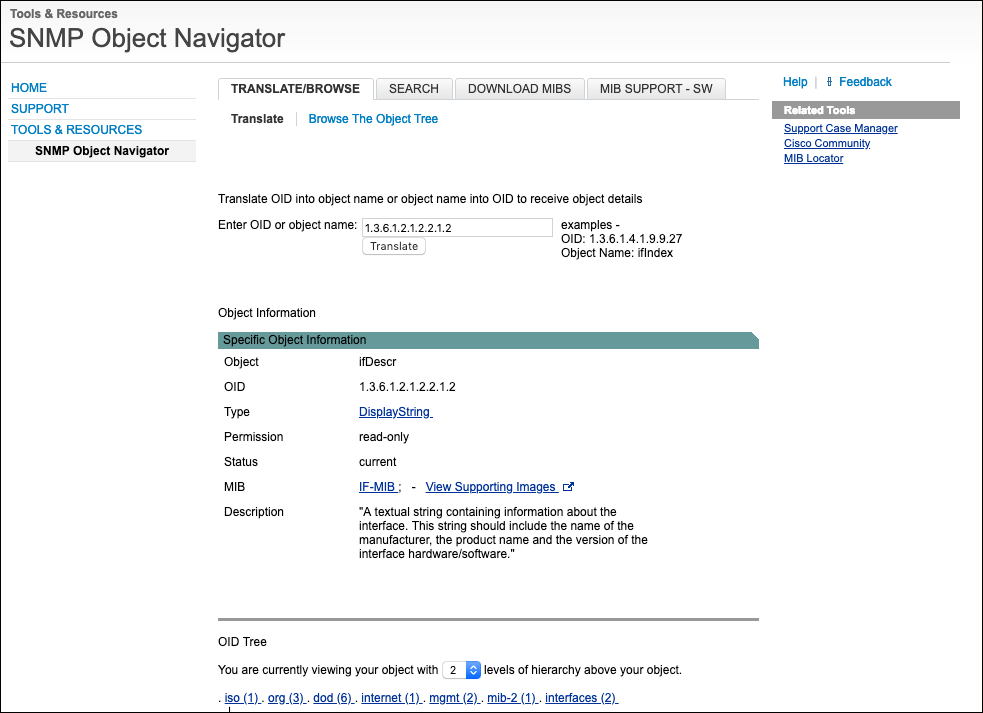
When dealing with SNMP, other useful tools are the Cisco SNMP Object Navigator and Cisco IOS MIB Locator. The Cisco SNMP Object Navigator allows you to find more details about a particular OID, and the Cisco IOS MIB Locator can tell you which OIDs exist on a particular Cisco platform or product. Both features are extremely helpful when you want to create a new graph in your NMS for a particular set of OID return values.
在處理 SNMP 時,另外兩個實用工具是 Cisco SNMP Object Navigator 與 Cisco IOS MIB Locator。Cisco SNMP Object Navigator 可讓你查詢特定 OID 的更多細節,而 Cisco IOS MIB Locator 則可以告訴你特定 Cisco 平台或產品上有哪些 OID。當你想在 NMS 中針對特定一組 OID 回傳值建立新圖表時,這兩項功能都非常有幫助。
Use Case: Using SNMP to Gather Information
使用案例:使用 SNMP 收集資訊
You are redesigning a network for a customer. An engineer on their side pointed out that some users are complaining about slow internet connection. The engineer is asking you to take this issue into account during the redesign.
你正在為某位客戶重新設計網路。對方的一位工程師指出,部分使用者抱怨網際網路連線速度緩慢,並要求你在重新設計時將此問題納入考量。
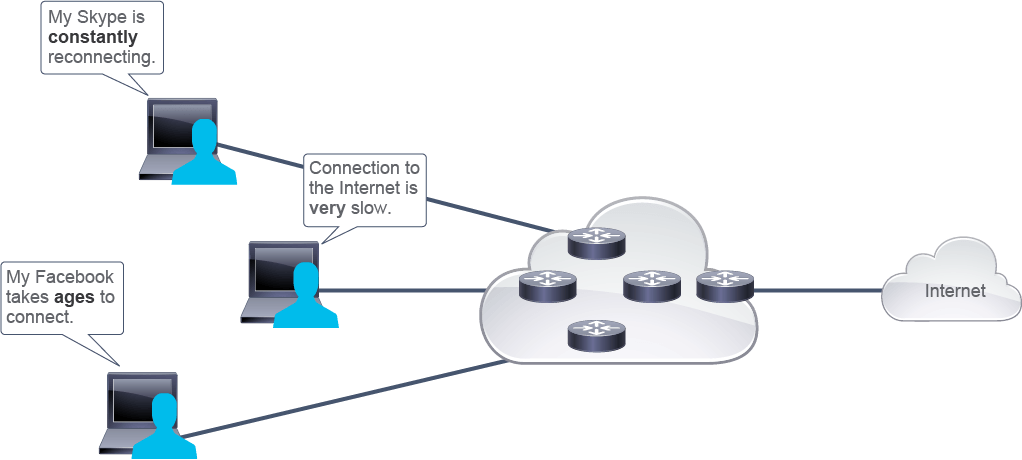
You can use SNMP to monitor the behavior of the router that is connected to the internet. CPU, memory, and link overutilization are usually the reason for a router's poor performance.
你可以使用 SNMP 監控連接到網際網路的路由器的行為。CPU、記憶體及鏈路過度使用,通常是路由器效能不佳的原因。
A network management application (for example, Cisco Prime Infrastructure) can display data that is gathered via SNMP in the form of graphs and reports.
網路管理應用程式(例如 Cisco Prime Infrastructure)可以將透過 SNMP 收集的資料,以圖表與報表的形式呈現。
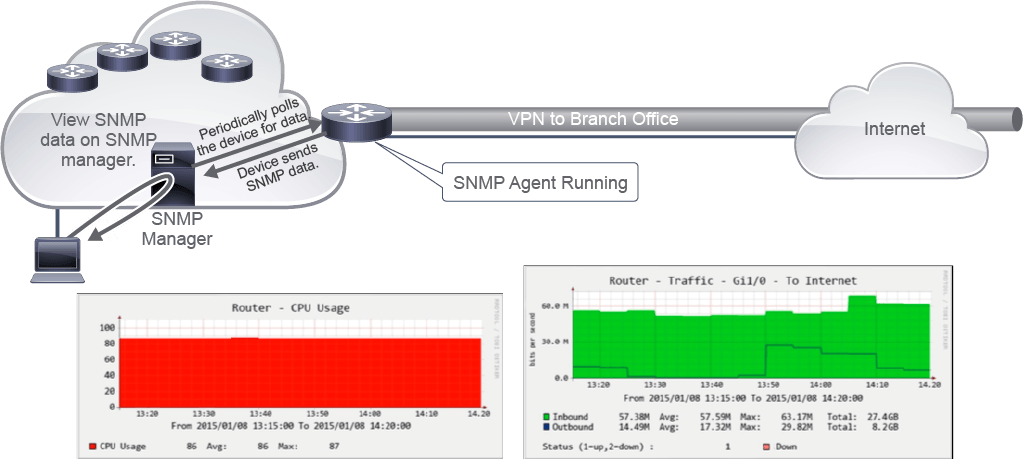
To gather information, configure SNMP on a router to gather performance data such as CPU and memory usage, interface traffic, and so on. Send the data to the network management system and represent it graphically. One example of such a system is Cacti, an open source network monitoring solution.
若要收集資訊,可在路由器上設定 SNMP 以收集效能資料,例如 CPU 與記憶體使用率、介面流量等等,並將資料傳送到網路管理系統,以圖形方式呈現。Cacti 便是這類系統的一個範例,它是一套開放原始碼的網路監控解決方案。
From the graphs in the example, you can determine that the router has high CPU usage. You have read the network documentation and determined that the customer's router that is connected to the internet is a Cisco 1941 Series Integrated Services Router. It has a limitation of 150-Mbps throughput, but since the customer is using a VPN—traffic encryption is performed—the limitation is around 60 Mbps, according to Cisco documentation. You can conclude that the router has increased CPU usage due to high traffic on the interface that is connected to the internet (average value is a bit less than 58 Mbps). So, the router cannot process all the traffic; therefore, the users are experiencing slow internet connectivity. To complete the test, you should also confirm the CPU usage when there is no congestion and verify whether the user experience is flawless at low load.
從範例中的圖表可以判斷該路由器 CPU 使用率偏高。你查閱了網路文件,確認客戶連接到網際網路的路由器是一台 Cisco 1941 系列整合服務路由器(Integrated Services Router),其吞吐量上限為 150 Mbps,但由於客戶使用 VPN(會執行流量加密),實際上限約為 60 Mbps(根據 Cisco 文件)。你可以推斷,由於連接到網際網路的介面流量偏高(平均值略低於 58 Mbps),導致路由器 CPU 使用率上升。因此路由器無法處理所有流量,使用者才會感受到網際網路連線緩慢。為完成測試,你也應在無壅塞情況下確認 CPU 使用率,並驗證低負載時使用者體驗是否完全正常。
Consider the gathered information when redesigning the network. There might be time to install a more powerful router on the network. Make sure that all the processes running on the router are relevant for the operation of your network and the CPU load is not caused by an unnecessary service, such as console log output being left enabled after a troubleshooting session.
在重新設計網路時,請將所收集的資訊納入考量。或許有時間安裝效能更強的路由器。也請確認路由器上執行的所有處理程序都與網路運作相關,且 CPU 負載並非由不必要的服務造成,例如疑難排解結束後忘記關閉的主控台記錄輸出。
SNMP Versions
SNMP 版本
SNMP has evolved through three versions. SNMP versions 1 and 2 do not provide much security. Operations are controlled with community strings, which function as authentication strings (a password). Community strings can be read-only or read-write. GET requests will be honored if the network management system provides either a valid read-only or read-write community string. SET requests require the network management system to provide a read-write community string. With SNMP versions 1 and 2, all data is sent in cleartext, including the community strings. If an attacker can sniff the SNMP communications, they can extract the read-write community strings. It is just as dangerous for an attacker to have the read-write community string as it is for an attacker to have the enable secret password for a Cisco IOS device, because the attacker can issue SET commands on devices.
SNMP 已演進過三個版本。SNMP 第 1 版與第 2 版並未提供太多安全性,操作是以社群字串(community string,作為驗證字串/密碼)控制。社群字串可以是唯讀或讀寫。若 NMS 提供有效的唯讀或讀寫社群字串,GET 請求即會被接受;SET 請求則要求 NMS 提供讀寫社群字串。在 SNMP 第 1 版與第 2 版中,所有資料都以明文傳送,包括社群字串。若攻擊者能側錄 SNMP 通訊,就能取得讀寫社群字串。攻擊者取得讀寫社群字串,其危險程度不亞於取得 Cisco IOS 裝置的 enable secret 密碼,因為攻擊者可以在裝置上發出 SET 指令。
SNMPv3 adds a well-developed security model. SNMPv3 authentication verifies the origin and data integrity. That is, SNMPv3 verifies the originator of the message and that the message has not been altered in transit. SNMPv3 also offers privacy via encryption. Both mechanisms are optional.
SNMPv3 新增了完善的安全性模型。SNMPv3 的驗證機制可確認訊息來源與資料完整性,也就是驗證訊息的發送者,並確認訊息在傳輸過程中未遭竄改。SNMPv3 也透過加密提供隱私保護,這兩種機制都是選用的。
There are currently three versions of SNMP.
目前 SNMP 共有三個版本。
The following list describes the different versions of SNMP:
下列清單說明 SNMP 的不同版本:
- SNMP version 1: SNMPv1 is the initial version of SNMP. SNMPv1 security is based on communities that are nothing more than passwords: plaintext strings that allow any SNMP-based application that knows the strings to gain access to the management information of a device. There are typically three communities in SNMPv1: read-only, read-write, and trap.SNMP 第 1 版:SNMPv1 是 SNMP 的最初版本。SNMPv1 的安全性是以社群(community)為基礎,這其實就是密碼:任何知道該明文字串的 SNMP 應用程式,都能存取裝置的管理資訊。SNMPv1 通常有三種社群:唯讀、讀寫,以及陷阱(trap)。
A key security flaw in SNMPv1 is that the only authentication available is through a community string. Anyone who knows the community string is allowed access. Adding to this problem is the fact that all SNMPv1 packets pass across the network unencrypted. Therefore, anyone who can sniff a single SNMP packet now has the community string that is needed to get access.
SNMPv1 的一項關鍵安全性缺陷,是唯一可用的驗證方式就是社群字串,任何知道社群字串的人都能取得存取權。更糟的是,所有 SNMPv1 封包在網路上傳輸時都未加密。因此,任何能側錄到單一 SNMP 封包的人,就能取得存取所需的社群字串。
- SNMP version 2c: SNMPv2 was the first attempt to fix SNMPv1 security flaws. However, SNMPv2 never really took off. The only prevalent version of SNMPv2 today is SNMPv2c, which contains SNMPv2 protocol enhancements but leaves out the security features that no one could agree on. The letter "c" designates v2c as being "community-based," which means that it uses the same authentication mechanism as v1: community strings.SNMP 第 2c 版:SNMPv2 是修正 SNMPv1 安全性缺陷的第一次嘗試,但 SNMPv2 從未真正普及。如今唯一普遍使用的 SNMPv2 版本是 SNMPv2c,它包含了 SNMPv2 的通訊協定強化功能,但省略了大家始終無法達成共識的安全性功能。字母「c」代表 v2c 是「以社群為基礎(community-based)」的,也就是與 v1 使用相同的驗證機制:社群字串。
- SNMP version 3: SNMPv3 is the latest version. It adds support for strong authentication and private communication between managed entities. You can define a secure policy for each group, and optionally you can limit the IP addresses to which its members can belong. You have to define encryption and hashing algorithms and passwords for each user. The key security additions to SNMPv3 are as follows:SNMP 第 3 版:SNMPv3 是最新版本,新增了對受管理實體之間強式驗證與私密通訊的支援。你可以為每個群組定義安全性原則,也可以選擇限制成員所屬的 IP 位址範圍。你必須為每位使用者定義加密與雜湊演算法及密碼。SNMPv3 的關鍵安全性新增功能如下:
- Can use Message Digest 5 (MD5) or Secure Hash Algorithm (SHA) hashes for authentication可使用訊息摘要 5(MD5)或安全雜湊演算法(SHA)雜湊進行驗證
- Can encrypt the entire packet可將整個封包加密
- Can guarantee message integrity可確保訊息完整性
SNMPv3 introduces three levels of security:
SNMPv3 引進三個安全性等級:
- Security level noAuthNoPriv: No authentication is required, and no privacy (encryption) is provided.安全性等級 noAuthNoPriv:不需要驗證,也不提供隱私保護(加密)。
- Security level authNoPriv:Authentication is required, but no encryption is provided.安全性等級 authNoPriv:需要驗證,但不提供加密。
- Security level authPriv: In addition to authentication, encryption is also used.安全性等級 authPriv:除了驗證之外,還會使用加密。