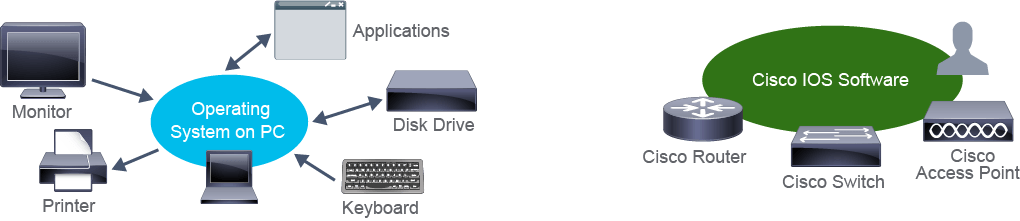
Like many common end devices (such as laptops, servers, and mobile phones), network intermediary devices need an operating system to function. An operating system is the software that manages hardware resources, for example, memory allocation and input/output functions, and manages interaction among different hardware components. Many Cisco devices run Cisco IOS Software. The operating system software includes basic networking functions, but it may also include advanced features, such as management and security services, quality of service (QoS), or call processing features. Examples of devices that use Cisco IOS Software are routers, LAN switches, small wireless access points (APs), and so on. The main function of Cisco IOS Software is to provide network features and functions.
如同許多常見的終端裝置(例如筆記型電腦、伺服器與行動電話),網路中介裝置也需要作業系統才能運作。作業系統是負責管理硬體資源(例如記憶體配置與輸入/輸出功能)並協調不同硬體元件間互動的軟體。許多 Cisco 裝置都執行 Cisco IOS Software。此作業系統軟體包含基本的網路功能,但也可能包含進階功能,例如管理與安全服務、服務品質(QoS)或通話處理功能。使用 Cisco IOS Software 的裝置範例包括路由器、LAN 交換器、小型無線基地台(AP)等。Cisco IOS Software 的主要功能是提供網路功能與作用。
Cisco IOS Software delivers the following network features and functions:
Cisco IOS Software 提供以下網路功能與作用:
- Support for basic and advanced networking functions and protocols支援基本與進階的網路功能及通訊協定
- Connectivity for high-speed traffic transmission提供高速流量傳輸的連線能力
- Security for access control and prevention of unauthorized network use提供存取控制與防止未經授權使用網路的安全性
- CLI-based and GUI-based access enabling users to execute configuration commands提供以 CLI 及 GUI 為基礎的存取方式,讓使用者能夠執行設定指令
- Scalability to allow adding hardware and software components提供可擴充性,以便新增硬體與軟體元件
- Reliability to ensure dependable access to networked resources提供可靠性,確保能穩定存取網路資源
Networking devices run particular versions of the Cisco IOS Software. The IOS version depends on the type of device being used and the required features. While all devices come with a default IOS and feature set, it is possible to upgrade the IOS version and feature set to obtain additional capabilities.
網路裝置會執行特定版本的 Cisco IOS Software。IOS 版本取決於所使用的裝置類型與所需功能。雖然所有裝置都內建預設的 IOS 與功能集,但仍可升級 IOS 版本與功能集,以取得額外的功能。
The portion of the operating system that interfaces with applications and the user is a program known as a shell. Unlike common end devices, Cisco network devices do not have a keyboard, monitor, or mouse device to allow direct user interaction. However, users can interact with the shell using their own computer and accessing a CLI or a GUI. The figure illustrates the examples of CLI-based and GUI-based access to a shell.
作業系統中負責與應用程式及使用者互動的部分,稱為外殼(shell)。與常見終端裝置不同,Cisco 網路裝置並未配備鍵盤、顯示器或滑鼠等裝置,供使用者直接互動。不過,使用者可以透過自己的電腦,以 CLI 或 GUI 的方式與外殼互動。此圖說明以 CLI 及 GUI 存取外殼的範例。
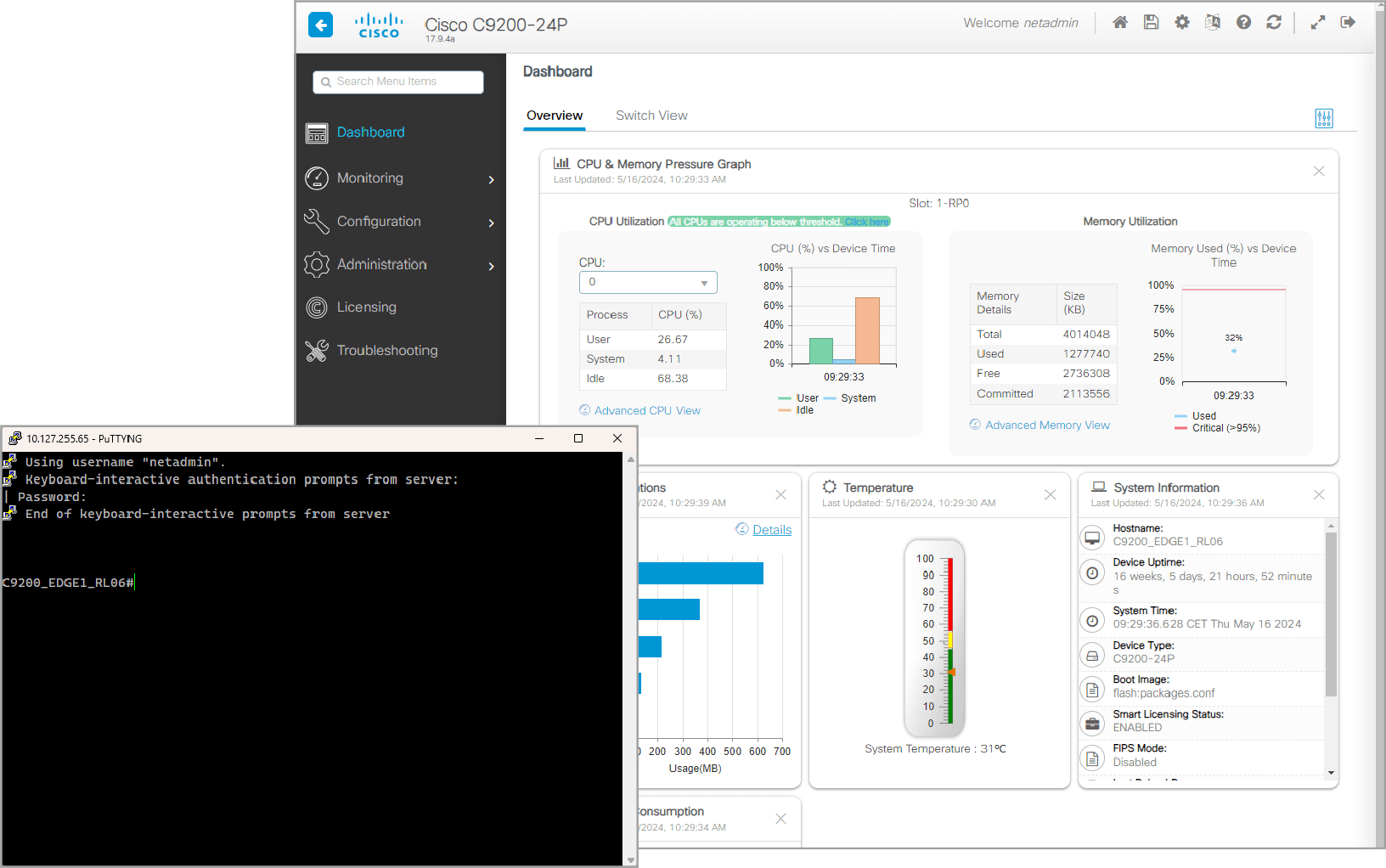
When using a CLI, the user interacts directly with the system in a text-based environment by entering commands on the keyboard at a command prompt. The system executes the command, often providing textual output. The CLI requires very little overhead to operate. But the user must know the underlying structure that controls the system.
使用 CLI 時,使用者是在指令提示字元下,於文字模式環境中直接與系統互動,透過鍵盤輸入指令。系統會執行該指令,通常會提供文字形式的輸出結果。CLI 執行時所需的額外負擔非常低,但使用者必須了解控制該系統的底層結構。
GUIs may not always be able to provide all features that are available in the CLI. Some tasks will require you to use the CLI because they are not supported in the GUI.
GUI 未必總能提供 CLI 中的所有功能。有些工作因為 GUI 不支援,您必須使用 CLI 才能完成。
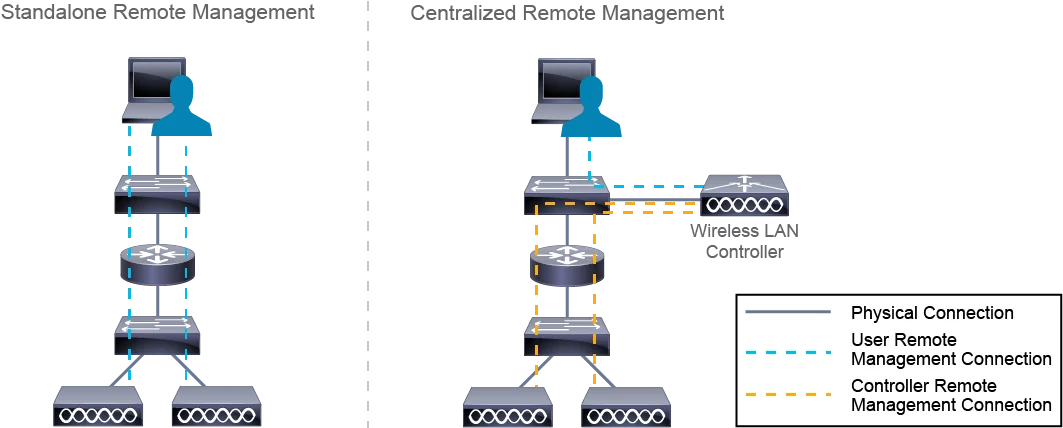
Cisco network devices support the option of remote management access via CLI or GUI. This allows the user to interact with devices even when not directly connected to the device. There are many different options for remote management, depending on device type and function.
Cisco 網路裝置支援透過 CLI 或 GUI 進行遠端管理存取,讓使用者即使未直接連接到裝置,也能與裝置互動。依裝置類型與功能不同,遠端管理有許多不同的選項。
Most devices offer a dedicated Management Interface which is used to connect the device to the management subnet. This is commonly used in small and medium-sized networks, where you can manage devices in standalone fashion with a user interacting directly with the device. In large networks, you can use a centralized management solution to simplify operations. Instead of a user interacting with devices directly, they interact with a network controller, such as Cisco Catalyst Center or Cisco Wireless LAN Controller. The controller then communicates information to network devices.
大多數裝置都提供專用的管理介面,用來將裝置連接至管理子網路。這種方式常見於中小型網路,可讓使用者以獨立方式直接與裝置互動來管理裝置。在大型網路中,則可使用集中式管理解決方案來簡化維運作業。此時使用者不會直接與裝置互動,而是與網路控制器(例如 Cisco Catalyst Center 或 Cisco Wireless LAN Controller)互動,再由控制器將資訊傳達給各網路裝置。