Two features that enhance STP are PortFast and BPDU guard. To fully appreciate the benefits of these features, review the STP initialization process that a switch port transitions through when it is enabled.
PortFast 和 BPDU guard 是強化 STP 的兩項功能。要充分了解這些功能的好處,須先回顧交換器連接埠啟用時所經歷的 STP 初始化程序。
Because STP is responsible for maintaining a loop-free topology, precautions are required each time that you enable a switch port. If the port is connected to another switch, BPDUs are exchanged every two seconds to ensure that a loop is not introduced into the topology. In STP and PVST+, a port goes through these stages when it is enabled:
由於 STP 負責維持無迴圈的拓樸,每次啟用交換器連接埠時都需要採取預防措施。若該連接埠連接到另一台交換器,雙方每兩秒會交換一次 BPDU,以確保拓樸中不會出現迴圈。在 STP 與 PVST+ 中,連接埠啟用時會經歷以下階段:
- Blocking: For up to 20 seconds, the port remains in the blocking state.阻斷(Blocking):連接埠會在阻斷狀態最多停留 20 秒。
- Listening: For 15 seconds, the port listens to BPDUs that it received and listens for new topology information. The switch processes received BPDUs and determines if any better BPDU was received that would cause the port to transition back to the blocking state. If no better BPDU was received, the port transitions into a learning state. In the listening state, the port does not populate the MAC address table with the addresses it learns and it does not forward any frames.聆聽(Listening):連接埠會用 15 秒的時間聆聽收到的 BPDU,並聆聽新的拓樸資訊。交換器處理收到的 BPDU,判斷是否收到更優的 BPDU,導致該連接埠轉回阻斷狀態。若未收到更優的 BPDU,連接埠便會進入學習狀態。在聆聽狀態中,連接埠不會把學到的位址填入 MAC 位址表,也不會轉送任何框架。
- Learning: For up to 15 seconds, the port updates the MAC address forwarding table, but it does not begin forwarding.學習(Learning):連接埠會用最多 15 秒的時間更新 MAC 位址轉送表,但尚未開始轉送。
- Forwarding: Once the switch port is certain it will not form a loop by forwarding frames, it enters the forwarding state. It still monitors for topology changes that could require it to transition back to the blocking state to prevent a loop.轉送(Forwarding):一旦交換器連接埠確定轉送框架不會形成迴圈,就會進入轉送狀態。它仍會持續監控拓樸變化,必要時轉回阻斷狀態以避免迴圈。
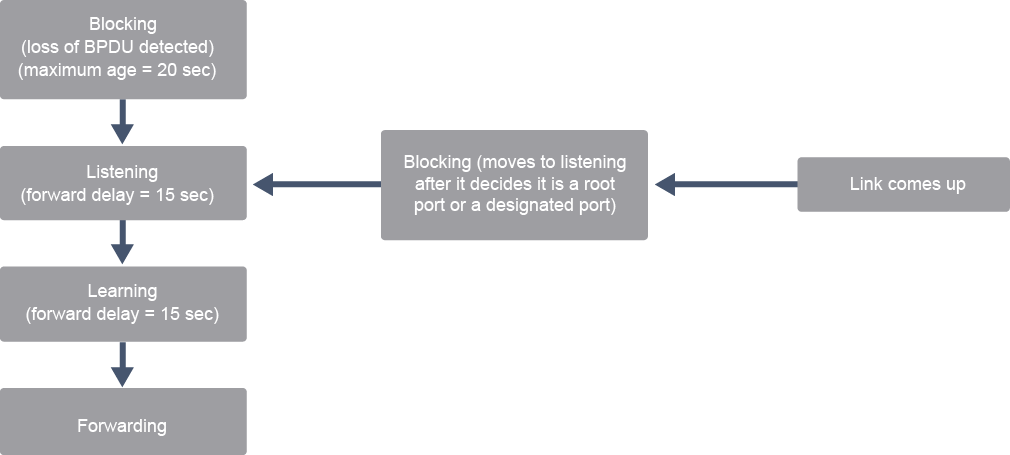
If a switch port connects to another switch, the STP initialization cycle must transition from state to state to ensure a loop-free topology.
如果交換器連接埠連接到另一台交換器,STP 初始化循環必須在各狀態之間轉換,以確保拓樸無迴圈。
PortFast
PortFast
For access devices such as PCs, laptops, servers, and printers, the delays that incurred with STP initialization can cause problems such as DHCP timeouts. Cisco designed the PortFast and BPDU guard features as enhancements to STP to reduce the time that is required for an access device to enter the forwarding state.
對於 PC、筆記型電腦、伺服器和印表機等存取裝置而言,STP 初始化所造成的延遲可能引發 DHCP 逾時等問題。Cisco 設計了 PortFast 與 BPDU guard 功能來強化 STP,藉此縮短存取裝置進入轉送狀態所需的時間。
STP is designed to prevent loops. Because there can be no loop on a port that is connected directly to a host or server, the full function of STP is not needed for that port. PortFast is a Cisco enhancement to STP that allows a switchport to begin forwarding much faster than a switchport in normal STP mode.
STP 的設計目的是防止迴圈。由於直接連接到主機或伺服器的連接埠不可能形成迴圈,該連接埠並不需要 STP 的完整功能。PortFast 是 Cisco 對 STP 的強化功能,可讓交換器連接埠比一般 STP 模式更快開始轉送。
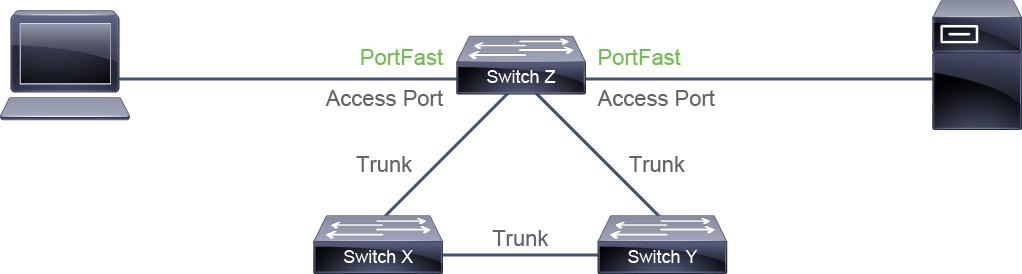
When the PortFast feature is enabled on a switch port that is configured as an access port, that port bypasses the typical STP listening and learning states. This feature allows the port to transition from the blocking to the forwarding state immediately. You can use PortFast on access ports that are connected to a single workstation or to a server to allow those devices to connect to the network immediately rather than waiting for spanning tree to converge.
當交換器連接埠設定為存取埠並啟用 PortFast 功能時,該連接埠會跳過一般的 STP 聆聽與學習狀態。此功能讓連接埠可以立即從阻斷狀態轉換為轉送狀態。你可以在連接單一工作站或伺服器的存取埠上使用 PortFast,讓這些裝置立即連上網路,而不必等待生成樹收斂。
In a valid PortFast configuration, no BPDUs should be received because access and Layer 3 devices do not generate BPDUs. If a port receives a BPDU, that would indicate that another bridge or switch is connected to the port. This event could happen if a user plugged a switch on their desk into the port where the user PC was previously plugged into.
在正確的 PortFast 設定中,連接埠不應收到任何 BPDU,因為存取裝置與第 3 層裝置不會產生 BPDU。若連接埠收到 BPDU,代表有另一台橋接器或交換器連接到該連接埠。例如,使用者把原本插著 PC 的連接埠改插上自己的交換器時,就可能發生這種情況。
For example, assume that users decide they want more bandwidth. Since there are two network access connections in their office, they decide to use both of them. To use them both, they unplug their individual PCs from the network switches and plug it into their own switch. They then plug the new switch into both of the network access ports. If PortFast is enabled on both ports of the network switch, this action could cause a loop and bring the network to a halt.
舉例來說,假設使用者想要更多頻寬。由於他們的辦公室有兩個網路存取連線,他們決定兩個都使用。為了同時使用,他們把各自的 PC 從網路交換器上拔下來,改插到自己的交換器上,再把這台新交換器接到兩個網路存取埠。如果該網路交換器的兩個連接埠都啟用了 PortFast,這個動作可能會造成迴圈,使網路癱瘓。
BPDU Guard
BPDU Guard
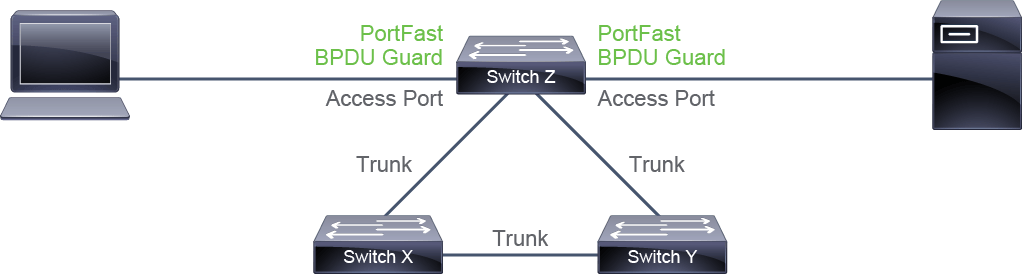
To avoid such situation when using PortFast, the BPDU guard enhancement is the solution. It allows network designers to enforce the STP domain diameter and keep the active topology predictable. The devices behind the ports that have STP PortFast and BPDU guard enabled are not able to influence the STP topology thus preventing the users to connect additional switches and violating STP diameter. At the reception of BPDUs, the BPDU guard operation effectively disables the port that has PortFast configured, by transitioning the port into errdisable state.
為了避免使用 PortFast 時發生這種情況,BPDU guard 強化功能就是解決方案。它讓網路設計人員得以強制執行 STP 網域的直徑,並維持可預期的活動拓樸。啟用 STP PortFast 與 BPDU guard 的連接埠背後的裝置無法影響 STP 拓樸,因而防止使用者連接額外的交換器,違反 STP 直徑限制。一旦收到 BPDU,BPDU guard 便會將啟用 PortFast 的連接埠轉為 errdisable 狀態,實際上等於停用該連接埠。
A message also appears on the switch console. For example, the following message might appear:
交換器主控台上也會顯示訊息,例如可能出現以下訊息:
2024 May 12 15:13:32 %SPANTREE-2-BLOCK_BPDUGUARD: Received BPDU on port Et0/0 with BPDU guard enabled. Disabling port
2024 May 12 15:13:32 %PM-4-ERR_DISABLE: bpduguard error detected on Et0/0, putting Et0/0 in err-disable state.
Portfast and BPDU guard are features that you want to configure at the access layer. Also, by using Portfast, the port does not generate any topology change notification (TCN) when the port changes its state.
PortFast 與 BPDU guard 是你會想在存取層設定的功能。此外,使用 PortFast 時,連接埠在狀態改變時不會產生任何拓樸變化通知(TCN)。
A common example is that you have a host connected to a switch. On the switch interface, you configure Portfast and BPDU guard. If you reboot the host, normally the switch would generate a TCN to notify the change. Because the Portfast feature is configured on the interface, the switch does not generate any TCN. This makes STP and the network more stable because the switches do not flush the MAC Address table when a port state changes. So, a host rebooting does not have any impact on the STP overall.
常見的例子是有一台主機連接到交換器。你在該交換器介面上設定 PortFast 與 BPDU guard。若重新啟動這台主機,正常情況下交換器會產生 TCN 來通知此變化。但由於該介面已設定 PortFast 功能,交換器不會產生任何 TCN。這讓 STP 和網路更加穩定,因為交換器在連接埠狀態改變時不會清空 MAC 位址表。因此,主機重新啟動不會對整體 STP 造成任何影響。
BPDU Filter
BPDU Filter
BPDUs are sent on all ports by default, even if they are PortFast-enabled. You should always run STP on your network switches to prevent Layer 2 loops. However, there are special cases where you may need to prevent BPDUs from being sent out. You can achieve this by using the BPDU feature.
預設情況下,所有連接埠都會傳送 BPDU,即使已啟用 PortFast 也一樣。你應該一律在網路交換器上執行 STP,以防止第 2 層迴圈。不過,在某些特殊情況下,你可能需要阻止傳送 BPDU,這時可以使用 BPDU filter 功能來達成。
Configuring a BPDU filter so that all configuration BPDUs received on a port will be dropped can be useful for example, in service provider environments, where the provider offers Layer 2 Ethernet access to customers. Ideally, the service provider does not want to share any spanning-tree information with customers because such sharing might jeopardize the stability of the internal spanning-tree topology of the service provider. By configuring PortFast and BPDU filter on each customer access port, the service provider will not send any configuration BPDUs to customers and will ignore any configuration BPDUs sent from customers.
設定 BPDU filter 讓連接埠收到的所有組態 BPDU 都被捨棄,這在服務供應商環境中很有用,例如供應商向客戶提供第 2 層乙太網路存取服務時。理想情況下,服務供應商不希望與客戶分享任何生成樹資訊,因為這種資訊分享可能危及供應商內部生成樹拓樸的穩定性。在每個客戶存取埠上設定 PortFast 與 BPDU filter 後,服務供應商就不會向客戶傳送任何組態 BPDU,也會忽略客戶傳來的任何組態 BPDU。

BPDU filters are specialized tools and, unlike BPDU guard, are rarely used within enterprise networks.
BPDU filter 是一種專門工具,與 BPDU guard 不同,在企業網路中很少使用。
A BPDU filter behaves differently whether applied globally or on a per-port basis.
BPDU filter 若全域套用或以個別連接埠套用,行為會有所不同。
When enabled globally, a BPDU filter has these attributes:
全域啟用時,BPDU filter 具有以下特性:
- It affects all operational PortFast ports on switches that do not have BPDU filter that is configured on the individual ports.它會影響所有未在個別連接埠上設定 BPDU filter 的交換器上,運作中的 PortFast 連接埠。
- If BPDUs are detected, the port loses its PortFast status, BPDU filter is disabled, and the STP sends and receives BPDUs on the port as it would with any other STP port on the switch.若偵測到 BPDU,該連接埠會失去 PortFast 狀態,BPDU filter 會被停用,STP 會像處理交換器上其他一般 STP 連接埠一樣,在此連接埠上傳送與接收 BPDU。
- Upon startup, the port transmits 10 BPDUs. If this port receives any BPDUs during that time, PortFast and BPDU filter are disabled.連接埠啟動時會傳送 10 個 BPDU。若在此期間收到任何 BPDU,PortFast 與 BPDU filter 都會被停用。
When enabled on an individual port, BPDU filter has these attributes:
在個別連接埠上啟用時,BPDU filter 具有以下特性:
- It ignores all BPDUs received.它會忽略收到的所有 BPDU。
- It sends no BPDUs.它不會傳送任何 BPDU。