The term peer means the equal of a person or object. By analogy, peer-to-peer communication means communication between equals. This concept is at the core of layered modeling of a communication process. Although a layer deals with layers directly above and below it in performing its functions, the data it creates is intended for the corresponding layer at the receiving host. The concept is also called the horizontal communication.
peer(對等體)一詞指的是與某人或某物地位相等者。以此類推,對等式(peer-to-peer)通訊就是地位相等的雙方之間的通訊。這個概念是通訊過程分層模型的核心。雖然某一層在執行功能時只與其直接上下的層互動,但它所產生的資料是要交給接收主機上對應的同一層。這個概念也稱為水平通訊。
Except for the physical layer, functions of all layers are typically implemented in software. Therefore, you hear about the logical communication of layers. Software processes at different hosts are not communicating directly. Most likely, the hosts are not even connected directly. Nevertheless, processes on one host manage to accomplish logical communication with the corresponding processes on another host.
除了實體層之外,其他各層的功能通常都以軟體實作。因此,你會聽到「各層之間的邏輯通訊」這種說法。不同主機上的軟體處理程序並不是直接通訊,主機之間很可能連直接連線都沒有。儘管如此,一台主機上的處理程序仍能與另一台主機上對應的處理程序完成邏輯通訊。
Applications create data. The intended recipient of this data is the application at the destination host, which can be distant. In order for application data to reach the recipient, it first needs to reach the directly connected physical network. In the process, the data is said to pass down the local protocol stack. First, an application protocol takes user data and processes it. When processing by the application protocol is done, it passes processed data down to the transport layer, which does its processing. The logic continues down the rest of the protocol stack until data is ready for physical transmission. The data processing that happens as data traverses the protocol stack alters the initial data, which means that the original application data is not the same as the data represented in the electromagnetic signal transmitted. On the receiving side, the process is reversed. The signals that arrive at the destination host are received from the media by the link layer, which serves data to the internet layer. From there, data is passed up the stack all the way to the receiving application. Then, the data received as the electromagnetic signal is different from the data that will be delivered to the application. But the data that the application sees is the same data that the sending application created.
應用程式會產生資料。這些資料的預期接收者是目的主機上的應用程式,而目的主機可能相當遙遠。應用程式資料要送達接收者,必須先到達直接連接的實體網路。在這個過程中,我們說資料往下傳遞通過本機的協定堆疊。首先,應用層協定取得使用者資料並加以處理。應用層協定處理完成後,將處理過的資料往下交給傳輸層,由傳輸層進行處理。這個邏輯持續沿協定堆疊向下,直到資料準備好進行實體傳輸。資料穿越協定堆疊時所經的處理會改變原始資料,這表示原始的應用程式資料與實際以電磁訊號傳送出去的資料並不相同。在接收端,這個過程則反向進行。到達目的主機的訊號由鏈結層從傳輸媒介接收,再交給網際網路層。接著,資料往上傳遞通過堆疊,一路到達接收端的應用程式。因此,以電磁訊號形式接收到的資料,與最終交給應用程式的資料並不相同;但應用程式所看到的資料,和發送端應用程式所產生的資料是一樣的。
Passing data up and down the stack is also referred to as vertical communication. For the horizontal, peer-to-peer communication of layers to happen, it first requires vertical down the stack and up the stack communication.
資料在堆疊中往上、往下傳遞,也稱為垂直通訊。各層之間的水平、對等式通訊要能發生,必須先有沿堆疊向下與向上的垂直通訊。
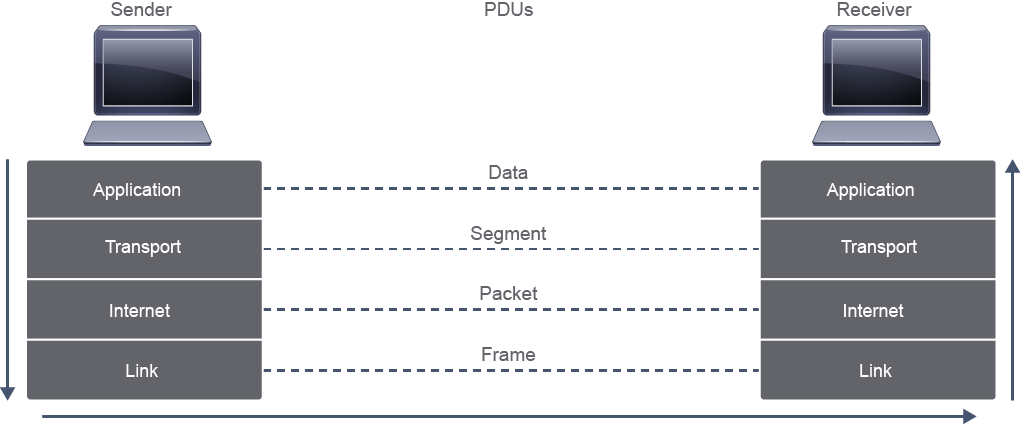
As data passes down or up the stack, the unit of data changes—and so does its name. The generic term used for a data unit, regardless of where it is found in the stack, is a protocol data unit. Its name depends on where it exists in the protocol stack
資料沿堆疊往下或往上傳遞時,資料單元會改變,名稱也隨之不同。不論資料單元位於堆疊的哪個位置,其通用名稱都是協定資料單元(PDU)。它的名稱取決於它在協定堆疊中所處的位置。
Although there is no universal naming convention for PDUs, they are typically named as follows:
雖然 PDU 沒有統一的命名慣例,但通常依下列方式命名:
- Data: general term for the PDU that is used at the application layer資料(Data):應用層所使用 PDU 的通稱
- Segment: transport layer PDU區段(Segment):傳輸層 PDU
- Packet: internet layer PDU封包(Packet):網際網路層 PDU
- Frame: link layer PDU框架(Frame):鏈結層 PDU
To look into PDUs from peer-to-peer communication, you can use a packet analyzer, such as Wireshark, which is a free and open-source packet analyzer. Packet analyzers capture all the PDUs on a selected interface. They then examine their content, interpret it and display it in text or using a graphical interface. Packet analyzers, sometimes also called sniffers, are used for network troubleshooting, analysis, software and communications protocol development, and education.
若要觀察對等式通訊中的 PDU,可以使用封包分析器,例如 Wireshark,這是一款免費且開放原始碼的封包分析器。封包分析器會擷取所選介面上的所有 PDU,接著檢查其內容、加以解讀,並以文字或圖形介面顯示出來。封包分析器有時也稱為 sniffer(嗅探器),可用於網路疑難排解、分析、軟體與通訊協定開發,以及教學。
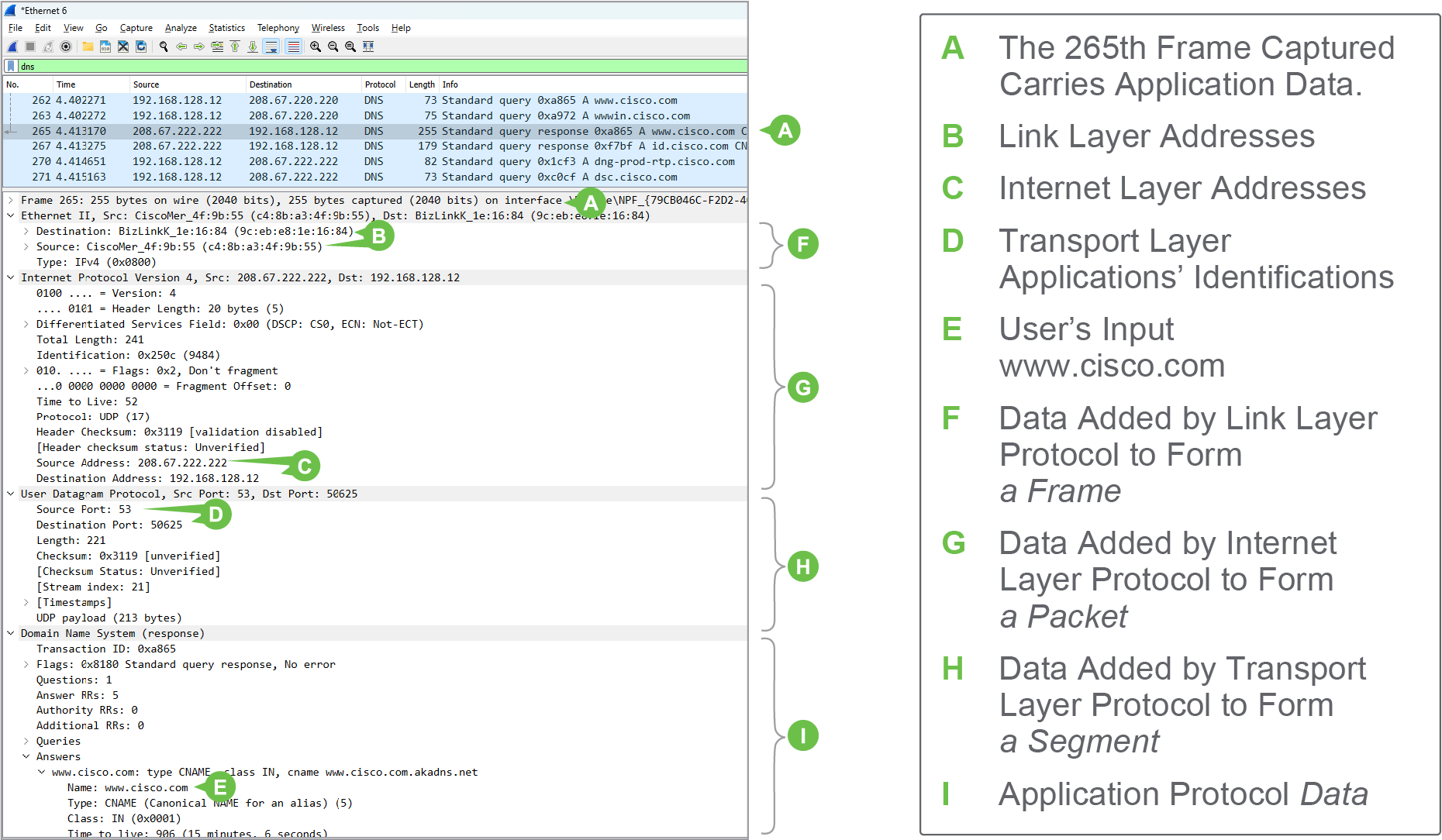
The figure shows a screenshot of a Wireshark capture, which was started on a LAN Ethernet interface. Wireshark organizes captured information into three windows. The top window shows a table listing all captured frames. This listing can be filtered to ease analysis. In the example, the filter is set to show only frames that carry DNS protocol data. In the details pane, the second middle window shows the details of one frame selected from the list. Information is given first for the lower layers. For each layer, the information includes data added by the protocol at that layer. In the third window (not shown in the figure), the bytes pane displays information selected in the details pane, as it was captured, in bytes.
圖中是一張 Wireshark 擷取畫面的截圖,擷取是在一個 LAN Ethernet 介面上啟動的。Wireshark 將擷取到的資訊分成三個視窗。最上方的視窗以表格列出所有擷取到的框架,此清單可以過濾以方便分析。在此範例中,過濾條件設定為只顯示承載 DNS 協定資料的框架。中間的第二個視窗是詳細資料窗格,顯示從清單中選取的某一個框架的細節。資訊先從較低層開始呈現;每一層的資訊都包含該層協定所加入的資料。第三個視窗(圖中未顯示)是位元組窗格,以位元組形式顯示在詳細資料窗格中所選取的資訊,內容與擷取時一致。
In the figure, you can also see how Wireshark organizes analyzed information. In the details pane, it displays data it finds in headers. It organizes header information by layers, starting with the Link layer header and proceeding to the application layer. If you look closely at the display of each header, you will see that information is organized into meaningful groups—these groups are recognizable by the names, followed by a colon, and a value, for example, "Source: CiscoMer_4f:9b:55 (c4:8b:a3:4f:9b:55)" or "Time to live: 52." These groupings correspond to how information is organized in the header. Headers have fields and the names Wireshark uses correspond to header field names. For instance, Source and Destination in Wireshark correspond to the Source Address and destination address fields of a header.
從圖中也可以看到 Wireshark 如何組織分析後的資訊。在詳細資料窗格中,它顯示在各標頭中找到的資料,並依層來組織標頭資訊,從鏈結層標頭開始,一直到應用層。仔細觀察每個標頭的顯示內容,會發現資訊被分成有意義的群組,這些群組由名稱、冒號和值組成,例如「Source: CiscoMer_4f:9b:55 (c4:8b:a3:4f:9b:55)」或「Time to live: 52」。這些分組對應標頭中資訊的組織方式。標頭由欄位組成,Wireshark 所使用的名稱對應標頭的欄位名稱。例如,Wireshark 中的 Source 與 Destination 對應標頭中的來源位址與目的位址欄位。