VLANs create boundaries that can isolate endpoints or traffic so you should design a multi-VLAN topology thoughtfully. The general question that you should ask yourself is the following: "Who is talking to whom and what are they trying to get done?" Here are some considerations that you need to take into account before implementing VLANs:
VLAN 會建立可用來隔離端點或流量的邊界,因此你應該謹慎規劃多 VLAN 拓樸。你應該自問的一般性問題是:「誰在跟誰通訊?他們想要完成什麼?」在實作 VLAN 之前,以下是你需要考量的一些事項:
Typically, access layer Cisco switches support up to 64, 256, 1024, or 4096 VLANs. The maximum number of VLANs is switch-dependent.
一般而言,存取層的 Cisco 交換器可支援多達 64、256、1024 或 4096 個 VLAN,最大數量取決於交換器機型。
Cisco switches have a factory-default configuration in which default VLANs are preconfigured to support various media and protocol types. The default Ethernet VLAN is VLAN 1. For security reasons, a good practice is to configure all the ports on all switches to be associated with VLANs other than VLAN 1. Also, all unused switch ports should be assigned to black hole VLAN and set to be administratively down. A black hole VLAN is a term for a VLAN that is associated with a subnet that has no route, or no default-gateway to other networks within your organization, or to the internet. Hence, you can mitigate the security risks associated with the default VLAN 1.
Cisco 交換器有出廠預設組態,其中預先設定了預設 VLAN 以支援各種媒介與協定類型。預設的 Ethernet VLAN 是 VLAN 1。基於安全考量,良好的作法是將所有交換器上的所有連接埠都設定為關聯到 VLAN 1 以外的 VLAN。此外,所有未使用的交換器連接埠都應指派到黑洞 VLAN,並設定為管理性關閉。黑洞 VLAN 是指與某個子網路關聯、但該子網路沒有路由或沒有預設閘道可通往組織內其他網路或網際網路的 VLAN。如此一來,你就能緩解與預設 VLAN 1 相關的安全風險。
In this example, a black hole VLAN is created and unused ports are placed into that VLAN. Also, unused switch ports are shut down to prevent unauthorized access to the network.
在此範例中,會建立一個黑洞 VLAN,並將未使用的連接埠放入其中。此外,未使用的交換器連接埠會被關閉,以防止未經授權的網路存取。
SW1# configure terminal
SW1(config)# vlan 900
SW1(config-vlan)# name BLACKHOLE
SW1(config-vlan)# interface range Ethernet0/16-24
SW1(config-if-range)# switchport mode access
SW1(config-if-range)# switchport access vlan 900
SW1(config-if-range)# shutdownA good security practice is to separate management and user data traffic. This is because you do not want users to be able to establish Secure Shell (SSH) sessions to the switch when directly connected to it. By default, the management VLAN is VLAN 1 and it should be changed to a different VLAN. If you want to communicate with a Cisco switch remotely for management purposes, the switch must have an IP address and a default gateway configured, so you can reach it. Both the IP address and the default gateway should be in the management VLAN. In this case, users that are not in the management VLAN cannot access the switch, unless they were routed into the management VLAN. Separating management into a dedicated VLAN allows you to easily control who has access to the switch with access and security policies, making your network more secure.
良好的安全實務是將管理流量與使用者資料流量分開,因為你不會希望使用者在直接連接到交換器時,能夠建立安全殼層(SSH)工作階段連往該交換器。預設情況下,管理 VLAN 是 VLAN 1,應該將其改為不同的 VLAN。如果你想要遠端與 Cisco 交換器通訊以進行管理,該交換器必須設定 IP 位址與預設閘道,你才能連上它。IP 位址與預設閘道都應該位於管理 VLAN 中。在這種情況下,不在管理 VLAN 中的使用者將無法存取該交換器,除非他們被路由到管理 VLAN 中。將管理流量獨立到專用 VLAN,可以讓你透過存取與安全政策輕鬆控管誰能存取交換器,使你的網路更加安全。
When configuring a trunk port, consider the following:
在設定中繼埠時,請考量以下事項:
- Make sure that the native VLAN for an 802.1Q trunk is the same on both ends of the trunk port.確保 802.1Q 中繼兩端的原生 VLAN 相同。
- Only allow specific VLANs to traverse through the trunk port.只允許特定 VLAN 通過中繼埠。
- DTP manages trunk negotiations between Cisco switches.DTP 負責管理 Cisco 交換器之間的中繼協商。
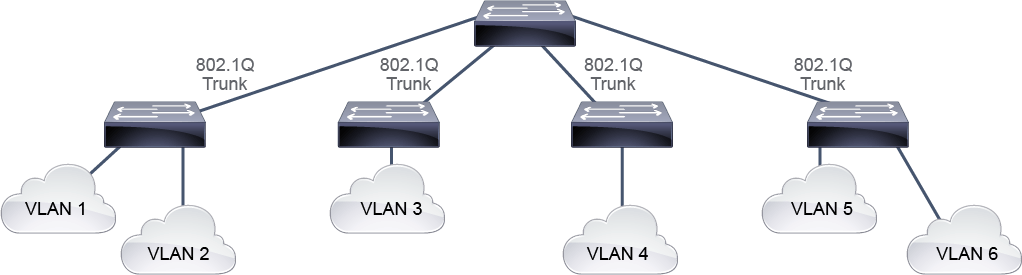
Make sure that the native VLAN for an IEEE 802.1Q trunk is the same on both ends of the trunk link. If the configuration is different on the two switches, the traffic will be forwarded in the wrong VLAN. If IEEE 802.1Q trunk configuration is not the same on both ends, Cisco IOS Software will report error messages. Note that native VLAN frames are untagged.
務必確保 IEEE 802.1Q 中繼兩端的原生 VLAN 相同。若兩台交換器的組態不同,流量會被轉送到錯誤的 VLAN。如果兩端的 IEEE 802.1Q 中繼組態不一致,Cisco IOS 軟體會回報錯誤訊息。請注意,原生 VLAN 的訊框是未標記的。
SW1#
*Mar 31 06:22:46.631: %CDP-4-NATIVE_VLAN_MISMATCH: Native VLAN mismatch discovered on Ethernet0/0(999), with SW2 Ethernet0/0 (99).
Another good security practice is to change the native VLAN to something other than VLAN 1 because all control traffic is sent on VLAN 1. The native VLAN should be changed to be a VLAN that is not used for any other traffic. By default, the native VLAN is not tagged, but it is recommended to tag the native VLAN. The example below shows how to change the native VLAN and tag it.
另一項良好的安全實務是將原生 VLAN 改為 VLAN 1 以外的 VLAN,因為所有控制流量都是在 VLAN 1 上傳送的。原生 VLAN 應改為不用於任何其他流量的 VLAN。預設情況下,原生 VLAN 不會被標記,但建議為原生 VLAN 加上標記。以下範例說明如何變更原生 VLAN 並為其加上標記。
SW1# configure terminal
SW1(config)# interface Ethernet0/0
SW1(config-if)# switchport mode trunk
SW1(config-if)# switchport trunk native vlan 90
SW1(config-if)# switchport trunk native vlan tag
Switches from other vendors do not support DTP. As discussed, DTP is used by Cisco switches to automatically negotiate whether an interface between two switches will be put into access or trunk mode.
其他廠商的交換器不支援 DTP。如前所述,DTP 是 Cisco 交換器用來自動協商兩台交換器之間的介面要設為存取模式還是中繼模式的機制。