FASTLab 9: Implement PAT
FASTLab 9:實作 PAT
Scenario
情境
The customer has asked CCS to provide internet connectivity to their servers. You are asked to complete the implementation of the internet connection on the Branch router.
客戶要求 CCS 為其伺服器提供網際網路連線。你需要完成 Branch 路由器上網際網路連線的實作。
The customer wants their internal network to use NAT to the public IPv4 address that is configured on the interface on the Branch router which faces the ISP router.
客戶希望其內部網路透過 NAT 轉換為設定在 Branch 路由器面向 ISP 路由器介面上的公用 IPv4 位址。
You need to complete these tasks:
你需要完成以下任務:
- On the Branch router, create a single statement standard IPv4 access list named NAT_Traffic. The NAT_Traffic access list should identify all inside local addresses—all addresses of all inside subnets. The address identification ACL statement should specify the range of addresses as close as possible (as narrow as possible).在 Branch 路由器上,建立一條單一陳述式的標準 IPv4 存取清單,命名為 NAT_Traffic。NAT_Traffic 存取清單應識別所有內部本地位址——也就是所有內部子網路的所有位址。位址識別 ACL 陳述式應盡可能指定最窄(最精確)的位址範圍。
- Configure the Branch router interfaces for NAT. Make sure to configure all relevant interfaces. There will be a significant pause in response to the first interface NAT command because the Branch router will have to initiate an internal NVI to support NAT.為 NAT 設定 Branch 路由器介面,並確保設定所有相關介面。第一個介面 NAT 指令的回應會有明顯延遲,因為 Branch 路由器必須先建立內部 NVI 以支援 NAT。
- Specify PAT as the translation mechanism. The traffic to be translated is identified in the NAT_Traffic access list. Public IPv4 address is assigned to the Branch router by the ISP.指定 PAT 作為轉譯機制。要轉譯的流量由 NAT_Traffic 存取清單識別。公用 IPv4 位址由 ISP 指派給 Branch 路由器。
- Verify that all the inside devices have internet connectivity, by checking the connectivity to IPv4 test address 209.165.201.1.透過檢查與 IPv4 測試位址 209.165.201.1 的連線,驗證所有內部裝置皆具備網際網路連線能力。
Topology
拓樸
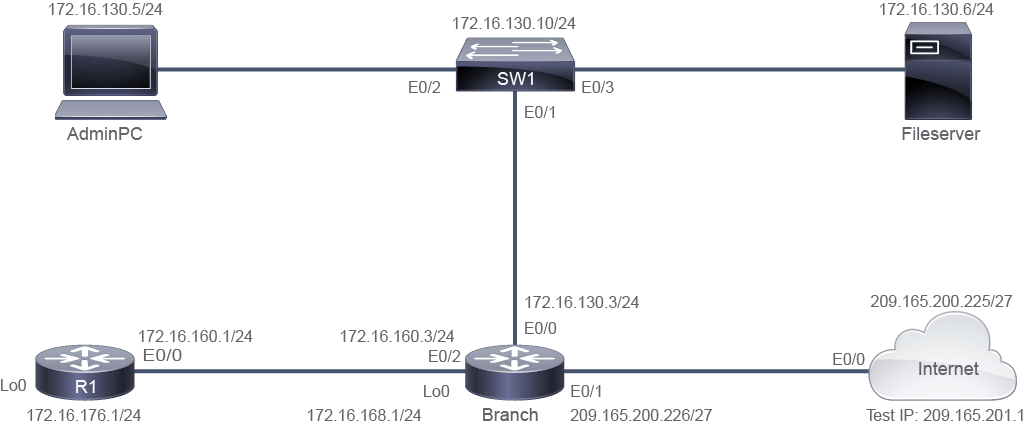
Job Aid
工作輔助資料
Device Information
裝置資訊
Device 裝置 | Interface 介面 | IPv4 Address IPv4 位址 | Remote 遠端 | Interface 介面 | IPv4 Address IPv4 位址 |
SW1 SW1 | VLAN 1 VLAN 1 | 172.16.130.10/24 172.16.130.10/24 | VLAN 1 VLAN 1 | " " | " " |
SW1 SW1 | E0/1 E0/1 | VLAN 1 VLAN 1 | Branch Branch | E0/0 E0/0 | 172.16.130.3/24 172.16.130.3/24 |
SW1 SW1 | E0/2 E0/2 | VLAN 1 VLAN 1 | AdminPC AdminPC | E0/0 E0/0 | 172.16.130.5/24 172.16.130.5/24 |
SW1 SW1 | E0/3 E0/3 | VLAN 1 VLAN 1 | Fileserver Fileserver | E0/0 E0/0 | 172.16.130.6/24 172.16.130.6/24 |
Branch Branch | E0/0 E0/0 | 172.16.130.3/24 172.16.130.3/24 | SW1 SW1 | E0/1 E0/1 | VLAN 1 VLAN 1 |
Branch Branch | E0/1 E0/1 | 209.165.200.226/27 209.165.200.226/27 | Internet Internet | E0/0 E0/0 | 209.165.200.225/27 209.165.200.225/27 |
Branch Branch | E0/2 E0/2 | 172.16.160.3/24 172.16.160.3/24 | R1 R1 | E0/0 E0/0 | 172.16.160.1/24 172.16.160.1/24 |
Branch Branch | Lo0 Lo0 | 172.16.168.1/24 172.16.168.1/24 | " " | " " | " " |
R1 R1 | E0/0 E0/0 | 172.16.160.1/24 172.16.160.1/24 | Branch Branch | E0/2 E0/2 | 172.16.160.3/24 172.16.160.3/24 |
R1 R1 | Lo0 Lo0 | 172.16.176.1/24 172.16.176.1/24 | " " | " " | " " |
AdminPC AdminPC | E0/0 E0/0 | 172.16.130.5/24 172.16.130.5/24 | SW1 SW1 | E0/2 E0/2 | " " |
Fileserver Fileserver | E0/0 E0/0 | 172.16.130.6/24 172.16.130.6/24 | SW1 SW1 | E0/3 E0/3 | " " |
Internet Internet | E0/0 E0/0 | 209.165.200.225/27 209.165.200.225/27 | Branch Branch | E0/1 E0/1 | 209.165.200.226/27 209.165.200.226/27 |
Internet Internet | Lo0 Lo0 | 209.165.201.1/32 209.165.201.1/32 | " " | " " | " " |
Test IPv4 address credentials: admin / Cisco123
測試 IPv4 位址認證資訊:admin / Cisco123
Configuration Tips
設定提示
- On the Branch router, create a single statement standard IPv4 access list named NAT_Traffic. The NAT_Traffic access list should identify all inside local addresses—all addresses of all inside subnets. The address identification ACL statement should specify the range of addresses as close as possible (as narrow as possible).在 Branch 路由器上,建立一條單一陳述式的標準 IPv4 存取清單,命名為 NAT_Traffic。NAT_Traffic 存取清單應識別所有內部本地位址——也就是所有內部子網路的所有位址。位址識別 ACL 陳述式應盡可能指定最窄(最精確)的位址範圍。
- Configure the Branch router interfaces for NAT. Make sure to configure all relevant interfaces.為 NAT 設定 Branch 路由器介面,並確保設定所有相關介面。
- Specify PAT as the translation mechanism. The traffic to be translated is identified in the NAT_Traffic access list. Public IPv4 address is assigned to the Branch router by the ISP.指定 PAT 作為轉譯機制。要轉譯的流量由 NAT_Traffic 存取清單識別。公用 IPv4 位址由 ISP 指派給 Branch 路由器。
- Verify that all the inside devices have internet connectivity, by checking the connectivity to IPv4 test address 209.165.201.1.透過檢查與 IPv4 測試位址 209.165.201.1 的連線,驗證所有內部裝置皆具備網際網路連線能力。
Answer Key
參考解答
- On the Branch router, create a single statement standard IPv4 access list named NAT_Traffic. The NAT_Traffic access list should identify all inside local addresses—all addresses of all inside subnets. The address identification ACL statement should specify the range of addresses as close as possible (as narrow as possible).在 Branch 路由器上,建立一條單一陳述式的標準 IPv4 存取清單,命名為 NAT_Traffic。NAT_Traffic 存取清單應識別所有內部本地位址——也就是所有內部子網路的所有位址。位址識別 ACL 陳述式應盡可能指定最窄(最精確)的位址範圍。
Branch> enable
Branch# configure terminal
Branch(config)# ip access-list standard NAT_Traffic
Branch(config-std-nacl)# permit 172.16.160.0 0.0.63.255
Branch(config)#
HINT: You need to identify common bits for 172.16.130.0/24 and 172.16.160.0/24. You should display the first two octets in decimal value (172.16) and the third and fourth octets as binary 8-bit values:
提示:你需要找出 172.16.130.0/24 與 172.16.160.0/24 的共同位元。請以十進位顯示前兩個八位元組(172.16),並以 8 位元二進位值顯示第三、第四個八位元組:
172.16.130.0 ====> 172.16. 1000 0010. 0000 0000
172.16.160.0 ====> 172.16. 1010 0000. 0000 0000
Which mask represents both networks in a range? Assign 1’s to what is common and 0’s to what is different in the range. In this case 8 bits in first octet, 8 bits in second octet and 2 bits in third octet are common. So, the mask would be:
哪個遮罩可以代表這個範圍內的兩個網路?將共同的部分設為 1,不同的部分設為 0。在此範例中,第一個八位元組的 8 個位元、第二個八位元組的 8 個位元,以及第三個八位元組的 2 個位元皆相同。因此,遮罩會是:
Mask = 1111 1111. 1111 1111. 1100 0000. 0000 0000 = 255.255.192.0What is the Wild card mask? REMEMBER: it is the opposite of Mask:
萬用字元遮罩是什麼?請記住:它與遮罩相反:
Wild Card Mask = 0000 0000. 0000 0000. 0011 1111. 1111 1111 = 0.0.63.255Finally, when writing the ACL, you can use any network number that falls in the range. For example you could use:
最後,撰寫 ACL 時,你可以使用落在此範圍內的任何網路號碼。例如你可以使用:
Permit 172.16.128.0 0.0.63.255 or
Permit 172.16.130.0 0.0.63.255 or
Permit 172.16.160.0 0.0.63.255 or
Permit 172.16.176.0 0.0.63.255
The selected wild card implies: check the first 18 bits in the address and make sure that they are equal to 172.16.10xx xxxx. Xxxx xxxx; x’s mean "do not care about that value".
所選的萬用字元遮罩表示:檢查位址中的前 18 個位元,並確認它們等於 172.16.10xx xxxx. xxxx xxxx;x 表示「不必在意該數值」。
- Configure the Branch router interfaces for NAT. Make sure to configure all relevant interfaces. There will be a significant pause (3 to 5 minutes) in response to the first interface NAT command because the Branch router will have to initiate an internal NVI to support NAT.為 NAT 設定 Branch 路由器介面,並確保設定所有相關介面。第一個介面 NAT 指令的回應會有明顯延遲(3 到 5 分鐘),因為 Branch 路由器必須先建立內部 NVI 以支援 NAT。
Branch(config)# interface ethernet 0/2 Branch(config-if)# ip nat inside Branch(config)# interface ethernet 0/0 Branch(config-if)# ip nat inside Branch(config)# interface ethernet 0/1 Branch(config-if)# ip nat outside Branch(config)# exit - Specify PAT as the translation mechanism. The traffic to be translated is identified in the NAT_Traffic access list. Public IPv4 address is assigned to the Branch router by the ISP.指定 PAT 作為轉譯機制。要轉譯的流量由 NAT_Traffic 存取清單識別。公用 IPv4 位址由 ISP 指派給 Branch 路由器。
Branch(config)# ip nat inside source list NAT_Traffic interface ethernet 0/1 overload Branch(config)# - Verify that AdminPC and FileServer devices have internet connectivity, by checking the connectivity to IPv4 test address 209.165.201.1.透過檢查與 IPv4 測試位址 209.165.201.1 的連線,驗證 AdminPC 與 FileServer 裝置皆具備網際網路連線能力。
AdminPC> enable
AdminPC# ping 209.165.201.1
Type escape sequence to abort.
Sending 5, 100-byte ICMP Echos to 209.165.201.1, timeout is 2 seconds:
!!!!!
Success rate is 100 percent (5/5), round-trip min/avg/max = 1/1/2 ms
AdminPC#
FileServer# telnet 209.165.201.1 Trying 209.165.201.1 ... Open User Access Verification Username: admin Password: Cisco123 CA quick brown fox jumps over the lazy dog Internet>exit [Connection to 209.165.201.1 closed by foreign host] FileServer#