All switch ports, both unused and used, should be secured before the switch is deployed for production use. One way to secure ports is by implementing the port security feature.
所有交換器連接埠,不論使用中或未使用,都應在交換器投入正式使用前先加以保護。保護連接埠的方法之一就是實作連接埠安全性(port security)功能。
Port Security Overview
連接埠安全性概觀
Port security restricts access to a switch port based on the connecting devices MAC addresses. A port that is configured with port security accepts frames only from secure MAC addresses. The MAC addresses of legitimate devices are allowed access, while other MAC addresses are denied. Port security limits the number of valid MAC addresses allowed on a port. Enabling port security can be used to control unauthorized expansion of the network. Also, port security is the simplest and most effective method to prevent MAC address table flooding attacks.
連接埠安全性根據連接裝置的 MAC 位址來限制對交換器連接埠的存取。設定了連接埠安全性的連接埠只會接受來自安全 MAC 位址的框架。合法裝置的 MAC 位址會被允許存取,其他 MAC 位址則會被拒絕。連接埠安全性會限制連接埠上允許的有效 MAC 位址數量。啟用連接埠安全性可用來控制網路的未經授權擴充。此外,連接埠安全性也是防止 MAC 位址表泛洪攻擊最簡單、最有效的方法。
Port security is not enabled by default. When enabled on a port, the port is considered to be a secured port.
連接埠安全性預設未啟用。在連接埠上啟用後,該連接埠即視為安全連接埠。
You can configure a secure port to allow only one specific MAC address, multiple specific MAC addresses, or a maximum number of unspecified MAC addresses.
你可以將安全連接埠設定為只允許一個特定 MAC 位址、多個特定 MAC 位址,或允許最大數量的未指定 MAC 位址。
Allowed MAC addresses are called secure addresses and are stored in the secure MAC address table. Depending on how the secure MAC address is learned by the switch, it can be one of the following addresses:
被允許的 MAC 位址稱為安全位址,會儲存於安全 MAC 位址表中。依交換器學習安全 MAC 位址的方式不同,可分為以下幾種:
- Static secure MAC addresses: Specific MAC addresses that are manually configured on a port. MAC addresses configured in this way are stored in the secure MAC address table and are added to the running configuration on the switch.靜態安全 MAC 位址:手動在連接埠上設定的特定 MAC 位址。以此方式設定的 MAC 位址會儲存於安全 MAC 位址表中,並加入交換器的執行中設定。
- Dynamic secure MAC addresses: MAC addresses that are dynamically learned from devices that connect to the port and are not specified manually. The maximum number of such addresses accepted on a port is configured. This port security configuration is used when you care only about how many MAC addresses are permitted to use the port, rather than which MAC addresses are permitted. Dynamically learned MAC addresses that are not secure are stored in the MAC address table until they age out. However, dynamic secure MAC addresses do not age out by default. Instead, they are removed when the switch restarts or the port goes down. Dynamic secure MAC addresses are not stored in the running configuration.動態安全 MAC 位址:從連接到該連接埠的裝置動態學習而來、未手動指定的 MAC 位址。連接埠上可接受的此類位址最大數量是可設定的。當你只在意連接埠允許多少個 MAC 位址使用,而不在意是哪些 MAC 位址時,就會使用此連接埠安全性設定。動態學習到的非安全 MAC 位址會儲存在 MAC 位址表中,直到逾時失效為止。然而,動態安全 MAC 位址預設不會逾時失效,而是在交換器重新啟動或連接埠中斷時才會被移除。動態安全 MAC 位址不會儲存在執行中設定中。
- Sticky secure MAC addresses:MAC addresses that are dynamically learned and then stored in the address table and added to the running configuration. In other words, sticky secure MAC addresses are learned dynamically and automatically added to the configuration. If you save the running configuration to the startup configuration, then the sticky secure MAC addresses are saved to the startup configuration file, and then when the switch restarts the interface does not need to relearn the addresses. If the sticky secure addresses are not saved, they will be lost.黏性安全 MAC 位址:動態學習後儲存在位址表中,並加入執行中設定的 MAC 位址。換句話說,黏性安全 MAC 位址是動態學習並自動加入設定的。若你將執行中設定儲存為啟動設定,則黏性安全 MAC 位址會儲存到啟動設定檔中,如此一來交換器重新啟動時,該介面就不需要重新學習這些位址。若未儲存黏性安全位址,這些位址將會遺失。
When a frame arrives on a port for which port security is configured, its source MAC address is checked against the secure MAC address table. If the source MAC address matches an entry in the table for this port, the device forwards the frame to be processed. Otherwise, the device does not forward the frame.
當框架抵達已設定連接埠安全性的連接埠時,其來源 MAC 位址會與安全 MAC 位址表進行比對。若來源 MAC 位址與該連接埠表中的項目相符,裝置會轉送此框架以進行處理;否則裝置不會轉送此框架。
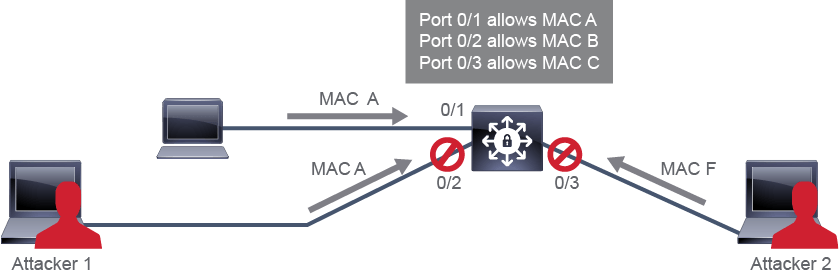
In the example in the figure below, traffic from Attacker 1 and Attacker 2 will be dropped at the switch because the source MAC addresses of these frames do not match MAC addresses in the list of secured (allowed) addresses.
在下圖範例中,來自攻擊者 1 與攻擊者 2 的流量會在交換器上被丟棄,因為這些框架的來源 MAC 位址不符合安全(允許)位址清單中的 MAC 位址。
The following are Port Security recommendations:
以下是連接埠安全性的建議做法:
- Implement port security on all switch ports.在所有交換器連接埠上實作連接埠安全性。
- Specify one or more MAC addresses allowed on a port.指定連接埠上允許的一個或多個 MAC 位址。
- Specify measures for unauthorized MAC address connection attempts.指定針對未經授權 MAC 位址連線嘗試的因應措施。
A security violation occurs in these situations:
在下列情況會發生安全違規:
- When ingress traffic from a MAC address that is different than the allowed MAC addresses arrives at an interface.當來自與允許 MAC 位址不同的 MAC 位址的入向流量抵達介面時。
- When ingress traffic from a MAC address that is different than the allowed MAC addresses tries to connect when the maximum number of allowed MAC addresses on the port is already reached.當連接埠上允許的最大 MAC 位址數量已達上限時,來自與允許 MAC 位址不同的 MAC 位址的入向流量嘗試連線時。
- When ingress traffic from a secure MAC address arrives at a different interface in the same VLAN as the interface on which the address is secured.當來自某個安全 MAC 位址的入向流量,抵達與該位址被鎖定的介面位於同一 VLAN 中的另一個介面時。
As an administrator, you can configure how a switch reacts when a security violation occurs by specifying the violation mode of the port.
身為管理員,你可以透過指定連接埠的違規模式,來設定交換器在發生安全違規時的因應方式。
One of these actions is taken, based on the configured violation mode:
系統會依據已設定的違規模式,採取下列其中一種動作:
- Protect: The offending frame is dropped.Protect(保護):違規的框架會被丟棄。
- Restrict: The offending frame is dropped and an SNMP trap and a syslog message are generated. The security violation causes the violation counter to increment.Restrict(限制):違規的框架會被丟棄,並產生 SNMP 陷阱訊息及 syslog 訊息。此安全違規會使違規計數器遞增。
- Shutdown: The offending frame is dropped. The interface is placed in an error-disabled state and an SNMP trap and a syslog message are generated. The violation counter increments. The port is inactive while in an error-disabled state. Administrative action is required to return the port to a normal state. To make the interface usable, you must use a manual intervention, by first using the
shutdowncommand and then theno shutdowncommand on the interface, or you must configure error-disabled recovery. Shutdown is the default violation mode.Shutdown(關閉):違規的框架會被丟棄。該介面會被置於錯誤停用(error-disabled)狀態,並產生 SNMP 陷阱訊息及 syslog 訊息,違規計數器也會遞增。連接埠在錯誤停用狀態下處於非作用狀態,需要管理員採取動作才能使連接埠恢復正常狀態。若要讓該介面恢復可用,你必須先手動介入,在該介面上先使用shutdown指令再使用no shutdown指令,或者你必須設定錯誤停用復原機制。Shutdown 是預設的違規模式。
You can also specify how dynamic secure MAC addresses age, by configuring aging type and aging time; the default is that they do not age. Aging type can be absolute or based on inactivity. When you configure absolute aging, all the dynamically learned secure addresses age out when the aging time expires. When you configure inactivity aging, the aging time defines the period of inactivity after which all the dynamically learned secure addresses age out.
你也可以透過設定逾時類型與逾時時間,來指定動態安全 MAC 位址的逾時方式,預設為不逾時失效。逾時類型可以是絕對逾時或以非活動狀態為基礎的逾時。當你設定絕對逾時時,所有動態學習到的安全位址會在逾時時間到期後全部失效;當你設定非活動逾時時,逾時時間所定義的是一段非活動期間,在此期間過後所有動態學習到的安全位址都會失效。
Configuring Port Security
設定連接埠安全性
To configure port security on a switch port, follow the steps described below.
若要在交換器連接埠上設定連接埠安全性,請依照下列步驟進行。
- Change the switchport mode from the default Dynamic Trunking Protocol (DTP) dynamic auto mode to either access or trunk. You can configure port security only on static access ports or trunk ports. When an interface is in the default mode, it cannot be configured as a secure port.將 switchport 模式從預設的動態中繼協定(DTP)dynamic auto 模式,改為 access 或 trunk 模式。連接埠安全性只能設定在靜態 access 連接埠或 trunk 連接埠上。當介面處於預設模式時,無法將其設定為安全連接埠。
- In interface configuration mode, use the
switchport mode { access | trunk }command to set the mode to either access or trunk, or use theswitchport nonegotiatecommand to disable DTP.在介面設定模式下,使用switchport mode { access | trunk }指令將模式設為 access 或 trunk,或使用switchport nonegotiate指令停用 DTP。 - Use the
switchport port-securityinterface command without keywords to enable port security on an interface.使用不帶關鍵字的switchport port-security介面指令,以在介面上啟用連接埠安全性。
For all other parameters, such as a secure MAC address, a maximum number of secure MAC addresses, or the violation mode, you use the switchport port-security interface command with keywords. Use the no form of this command to disable port security or to set the parameters to their default states
至於其他所有參數,例如安全 MAC 位址、安全 MAC 位址的最大數量,或違規模式,則使用帶有關鍵字的 switchport port-security 介面指令。使用此指令的 no 形式可停用連接埠安全性,或將參數還原為預設狀態
- Optionally, set the maximum number of secure MAC addresses for the interface. The range depends on the switch platform. The default value is 1.(選用)設定該介面允許的安全 MAC 位址最大數量。範圍依交換器平台而異,預設值為 1。
- Set the maximum number of secure MAC addresses using the
switchport port-security maximumvalue command使用switchport port-security maximumvalue 指令設定安全 MAC 位址的最大數量
- Optionally, specify the allowed MAC addresses or
stickylearning.(選用)指定允許的 MAC 位址或sticky學習方式。When defining static entries, you have to specify the specific MAC address that is allowed on an interface. You can enter as many secure MAC addresses as is the maximum number of MAC addresses you defined. If you configure fewer secure MAC addresses than the maximum, the remaining MAC addresses are dynamically learned.
定義靜態項目時,你必須指定介面上允許的特定 MAC 位址。你最多可以輸入等同於你所定義的最大 MAC 位址數量的安全 MAC 位址。若你設定的安全 MAC 位址數量少於最大值,其餘的 MAC 位址將會被動態學習。
- To specify a specific allowed MAC address, use the
switchport port-security mac-addressmac-address command.若要指定某個特定允許的 MAC 位址,請使用switchport port-security mac-addressmac-address 指令。
- To specify sticky learning of MAC addresses, use the
switchport port-security mac-address stickycommand. Thenoversion of the command,no switchport port-security mac-address sticky, stops sticky learning and deletes learned sticky MAC addresses from the running configuration, but keeps learned MAC addresses in the address table.若要指定 MAC 位址的黏性學習,請使用switchport port-security mac-address sticky指令。此指令的no版本,即no switchport port-security mac-address sticky,會停止黏性學習並從執行中設定中刪除已學習的黏性 MAC 位址,但仍會將已學習的 MAC 位址保留在位址表中。
- Optionally, set the violation mode. This table summarizes the effect of each violation mode. The default mode is shutdown.(選用)設定違規模式。下表彙整了各違規模式的效果,預設模式為 shutdown。Violation Mode違規模式Traffic Is Forwarded轉送流量Sends SNMP Trap傳送 SNMP 陷阱訊息Sends Syslog Message傳送 Syslog 訊息Violation Counter Increment違規計數器遞增Error-Disables Port將連接埠設為錯誤停用ProtectProtectNo否No否No否No否No否RestrictRestrictNo否Yes是Yes是Yes是No否ShutdownShutdownNo否Yes是Yes是Yes是Yes是
- To set the violation mode, use the
switchport port-security violation { protect | restrict | shutdown }command.若要設定違規模式,請使用switchport port-security violation { protect | restrict | shutdown }指令。
- Optionally, set aging parameters for dynamically learned addresses. Use aging parameters to remove and add devices on a secure port without manually deleting the existing secure MAC addresses. Here are the supported aging types:(選用)為動態學習到的位址設定逾時參數。使用逾時參數可在不手動刪除既有安全 MAC 位址的情況下,於安全連接埠上移除並新增裝置。以下是支援的逾時類型:
Absolute: The secure addresses on the port are deleted after the specified aging time. Absolute aging is the default type if aging is enabled.
Absolute(絕對):連接埠上的安全位址會在指定的逾時時間過後被刪除。若啟用逾時機制,絕對逾時是預設類型。
Inactivity: The secure addresses on the port are deleted only if the secure addresses are inactive for a specified aging time. Aging time is specified in minutes.
Inactivity(非活動):連接埠上的安全位址只有在非活動狀態達到指定的逾時時間時才會被刪除。逾時時間以分鐘為單位指定。
- To set the aging type, use the
switchport port-security aging type {absolute | inactivity}command.若要設定逾時類型,請使用switchport port-security aging type {absolute | inactivity}指令。 - To set the aging time, use
switchport port-security aging timeminutes command.若要設定逾時時間,請使用switchport port-security aging timeminutes 指令。
When the port security violation mode is set to shutdown, the port with the security violation goes to the error-disabled state and you receive syslog notification on the device:
當連接埠安全性違規模式設定為 shutdown 時,發生安全違規的連接埠會進入錯誤停用狀態,你會在裝置上收到 syslog 通知:
Sep 20 12:44:54.966: %PM-4-ERR_DISABLE: psecure-violation error detected on Fa0/5, putting Fa0/5 in err-disable state
Sep 20 12:44:54.966: %PORT_SECURITY-2-PSECURE_VIOLATION: Security violation occurred, caused by MAC address 000c.292b.4c75 on port FastEthernet0/5.
Sep 20 12:44:55.973: %LINEPROTO-5-PPDOWN: Line protocol on Interface FastEthernet0/5, changed state to down
Sep 20 12:44:56.971: %LINK-3-UPDOWN: Interface FastEthernet0/5, changed state to down
To make the interface operational again, you need to disable the interface administratively and then enable it again, as shown here:
若要讓該介面重新恢復運作,你需要先以管理方式停用該介面,再重新啟用它,如下所示:
SwitchX(config)# interface FastEthernet 0/5
SwitchX(config-if)# shutdown
Sep 20 12:57:28.532: %LINK-5-CHANGED: Interface FastEthernet0/5,changed state to administratively down
SwitchX(config-if)# no shutdown
Sep 20 12:57:48.186: %LINK-3-UPDOWN: Interface FastEthernet0/5, changed state to up
Sep 20 12:57:49.193: %LINEPROTO-5-UPDOWN: Line protocol on Interface FastEthernet0/5, changed state to up
The example below shows a typical port security configuration for a voice port. Two MAC addresses are allowed and they are learned dynamically. One MAC address is for the IP phone and the other MAC address is for the PC connected to the IP phone. Violations of this policy result in the port being shut down. Aging timeout for the learned MAC addresses is set to 2 hours.
下方範例展示了語音連接埠典型的連接埠安全性設定。此設定允許兩個 MAC 位址,且皆以動態方式學習:一個 MAC 位址屬於 IP 電話,另一個則屬於連接到該 IP 電話的個人電腦。違反此政策將導致連接埠被關閉。已學習 MAC 位址的逾時時間設為 2 小時。
Switch(config)# interface g0/8
Switch(config-if)# switchport mode access
Switch(config-if)# switchport port-security
Switch(config-if)# switchport port-security maximum 2
Switch(config-if)# switchport port-security violation shutdown
Switch(config-if)# switchport port-security mac-address sticky
Switch(config-if)# switchport port-security aging time 120
Verifying Port Security
驗證連接埠安全性
Cisco IOS Software includes several commands that allow you to verify port security configuration. Most of the commands are derivatives of the show port-security command, which is used without and with other keywords.
Cisco IOS 軟體提供多個指令,可讓你驗證連接埠安全性設定。大多數指令都是 show port-security 指令的衍生形式,可不搭配或搭配其他關鍵字使用。
Use the show port-security command withoutkeywords to view port security settings for the switch, including violation count, configured interfaces, and security violation actions.
使用不帶關鍵字的show port-security指令,可檢視交換器的連接埠安全性設定,包括違規計數、已設定的介面,以及安全違規時所採取的動作。
The example of the show port-security command shows that port security is enabled on port GigabitEthernet0/8 with a maximum MAC address count of 2. Currently, no MAC addresses are learned on that port and the violation action has been set to shutdown.
此 show port-security 指令的範例顯示,連接埠 GigabitEthernet0/8 已啟用連接埠安全性,最大 MAC 位址數量設為 2。目前該連接埠上尚未學習到任何 MAC 位址,違規動作已設為 shutdown。
Switch# show port-securitySecure Port  MaxSecureAddr  CurrentAddr  SecurityViolation  Security Action
                (Count)       (Count)          (Count)
---------------------------------------------------------------------------
     g0/8              2            0                  0         Shutdown
---------------------------------------------------------------------------
Total Addresses in System (excluding one mac per port)     : 0
Max Addresses limit in System (excluding one mac per port) : 1024
Use the show port-security interface interface-id command to view port security settings for the specified interface, including the maximum allowed number of secure MAC addresses for each interface, the number of secure MAC addresses on the interface, the number of security violations that have occurred, and the violation mode.
使用 show port-security interface interface-id 指令,可檢視指定介面的連接埠安全性設定,包括每個介面允許的最大安全 MAC 位址數量、該介面上目前的安全 MAC 位址數量、已發生的安全違規次數,以及違規模式。
The output displays the following information (from the top down):
輸出內容由上而下會顯示以下資訊:
- Whether the port security feature is enabled連接埠安全性功能是否已啟用
- Current port status目前的連接埠狀態
- The violation mode違規模式
- Information about secure MAC addresses: the maximum allowed number, the total number of different MAC addresses received, the number of statically configured secure MAC addresses有關安全 MAC 位址的資訊:允許的最大數量、收到的不同 MAC 位址總數、靜態設定的安全 MAC 位址數量
- Aging time and type逾時時間與逾時類型
- SecureStatic address aging靜態安全位址逾時設定
- The number of security violations that have occurred已發生的安全違規次數
The example of the show port-security interface GigabitEthernet0/8 command shows that a violation has occurred. The secure-down status of the port indicates that the port has been shut down (error-disabled) because of the port-security policy violation.
此 show port-security interface GigabitEthernet0/8 指令的範例顯示已發生一次違規。連接埠的 secure-down 狀態表示該連接埠因違反連接埠安全性政策而已被關閉(錯誤停用)。
Switch# show port-security interface GigabitEthernet0/8Port Security              : Enabled
Port status                : Secure-down
Violation mode             : Shutdown
Maximum MAC Addresses      : 1
Total MAC Addresses        : 2
Configured MAC Addresses   : 0
Aging time                 : 120 mins
Aging type                 : Absolute
SecureStatic address aging : Disabled
Security Violation Count   : 1
You can also use the show interface status command to verify the status of the interface.
你也可以使用 show interface status 指令來驗證介面的狀態。
Use the show port-security [interface interface-id] address command to view all the secure MAC addresses that are configured on all switch interfaces, or on a specified interface, with aging information for each address.
使用 show port-security [interface interface-id] address 指令,可檢視在所有交換器介面或指定介面上設定的所有安全 MAC 位址,以及各位址的逾時資訊。
The example below shows that port GigabitEthernet0/8 is in VLAN 1 and has a secured MAC address of 0000.ffff.aaaa, which means that the host with the 0000.ffff.aaaa MAC address can connect to port GigabitEthernet0/8.
下方範例顯示連接埠 GigabitEthernet0/8 位於 VLAN 1 中,並具有安全 MAC 位址 0000.ffff.aaaa,這表示 MAC 位址為 0000.ffff.aaaa 的主機可以連接到連接埠 GigabitEthernet0/8。
Switch# show port-security addressSecure Mac Address Table
-------------------------------------------------------------------
Vlan    Mac Address       Type                Ports   Remaining Age
                                                         (mins)
----    -----------       ----                -----   -------------
   1    0000.ffff.aaaa    SecureConfigured    g0/8       -
-------------------------------------------------------------------
Total Addresses in System (excluding one mac per port)     : 0
Max Addresses limit in System (excluding one mac per port) : 1024no switchport port-security mac-address sticky command on an interface with port security configured?在已設定連接埠安全性的介面上發出 no switchport port-security mac-address sticky 指令後,會產生什麼結果?