Introduction
簡介
It's Monday morning and the weekly operations meeting is about to start. You try to connect to the Webex video conference, but your connection repeatedly fails. After several frustrating attempts, it becomes clear that there's a network issue. Now, what do you do?
現在是星期一早上,每週的營運會議即將開始。你嘗試連線到 Webex 視訊會議,但連線一再失敗。經過幾次令人沮喪的嘗試後,你確定這是網路問題。那麼,接下來該怎麼辦?
You are aware that:
你知道以下幾點:
- Scrambling aimlessly won't lead to a solution. A structured approach to troubleshooting is essential to efficiently diagnose and solve the issue.漫無目的地亂試不會找到解決方案。要有效診斷並解決問題,必須採用結構化的疑難排解方法。
- You need the right tools to investigate and confirm your hypotheses. Tools such as ping, traceroute, and diagnostic commands such asshow interfaces and show logging will be crucial in gathering the necessary data.你需要合適的工具來調查並驗證你的假設。像是 ping、traceroute,以及 show interfaces 和 show logging 等診斷指令,對於蒐集必要資料至關重要。
- The problem could originate from various issues. It might be as straightforward as a physical connection issue or as complex as a routing configuration.問題可能源自各種原因,可能單純是實體連線問題,也可能複雜到是路由設定問題。
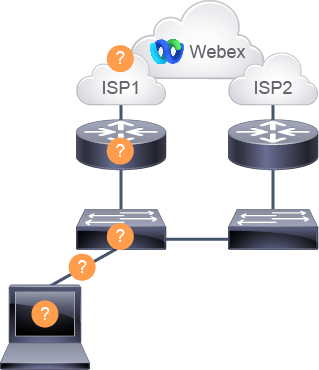
This image illustrates your network setup with the PC having connectivity issues to the video conference. Even though there is redundancy in place with two ISPs, you are still having problems.
此圖說明你的網路架構,其中的個人電腦連線到視訊會議時發生問題。儘管已透過兩家網際網路服務提供商(ISP)建立備援,你仍然遇到問題。
As you prepare to dive into troubleshooting, you realize that you will need to apply a full spectrum of skills—from basic connectivity checks to in-depth network analysis. Each step that you take brings you closer to not just solving a problem, but also to becoming a more capable and confident network professional. Any idea how you can use these skills to resolve issues within a network environment?
在你準備深入疑難排解之前,你了解到需要運用全方位的技能,從基本的連線檢查到深入的網路分析都要涵蓋。你所踏出的每一步,不僅讓你更接近解決問題,也讓你成為更有能力、更有自信的網路專業人員。你知道要如何運用這些技能來解決網路環境中的問題嗎?
In this course, you will:
在本課程中,你將:
- Identify common network issues and their symptoms.識別常見的網路問題及其徵兆。
- Use diagnostic tools to analyze network problems.使用診斷工具分析網路問題。
- Apply structured troubleshooting methods.採用結構化的疑難排解方法。
- Interpret and respond to error messages and alerts.解讀並回應錯誤訊息與警示。
- Configure devices to resolve network faults.設定裝置以解決網路故障。
- Enhance network stability and performance.提升網路的穩定性與效能。
- Carry out preventive maintenance to avoid future disruptions.執行預防性維護,避免未來發生中斷。
- Develop quick resolution strategies for urgent issues.針對緊急問題擬定快速解決策略。
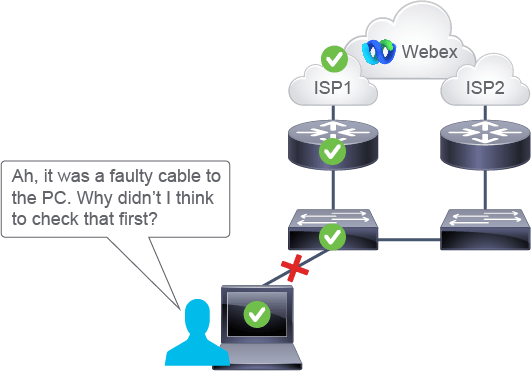
After completing the troubleshooting process, you use Traceroute to check where the path breaks and notice it was a faulty cable to the PC.
完成疑難排解流程後,你使用 Traceroute 檢查路徑在哪裡中斷,並發現是接到個人電腦的網路線故障。