One of the main functions of a router is to forward packets from one network device to another. For the router to perform this task, you must define the characteristics of the interfaces through which the router receives and forwards the packets.
路由器的主要功能之一,就是將封包從一個網路裝置轉送至另一個網路裝置。為了讓路由器完成這項工作,你必須定義路由器用來接收與轉送封包的介面特性。
There are generally two types of physical interfaces used to forward packets on Cisco routers: Ethernet interfaces and serial interfaces.
在 Cisco 路由器上,一般用來轉送封包的實體介面主要有兩種類型:乙太網路(Ethernet)介面與序列(serial)介面。
- Ethernet interfaces: The term Ethernet interface refers to any type of Ethernet interface. For example, some Cisco routers have an Ethernet interface that is capable of only 10 Mbps, so to configure this type of interface, you would use the
interface Ethernetinterface-identifier configuration command. However, other routers have interfaces that are capable of operating up to 100 Mbps. These interfaces are referred to as Fast Ethernet ports. You use theinterface FastEthernetinterface-identifiercommand to configure these types of ports. Similarly, the interfaces that are capable of Gigabit Ethernet speeds are referenced with theinterface GigabitEthernetinterface-identifiercommand. The interfaces that are capable of operating up to 10 Gbps, 25 Gbps, 40 Gbps, and 100 Gbps Ethernet speed are referenced with theinterfaceTenGigabitEthernetinterface-identifier,interfaceTwentyFiveGigEinterface-identifier,interfaceFortyGigabitEthernetinterface-identifier, andinterfaceHundredGigEinterface-identifier commands, respectively.乙太網路介面:「乙太網路介面」一詞泛指任何類型的乙太網路介面。舉例來說,某些 Cisco 路由器的乙太網路介面僅支援 10 Mbps,若要設定這類介面,你會使用interface Ethernet介面識別碼的設定指令。然而,其他路由器則具有可運作至 100 Mbps 的介面,這類介面稱為 Fast Ethernet 埠,你會使用interface FastEthernet介面識別碼指令來設定這類埠。同樣地,能支援 Gigabit Ethernet 速度的介面,則以interface GigabitEthernet介面識別碼指令來表示。至於能以 10 Gbps、25 Gbps、40 Gbps 與 100 Gbps 乙太網路速度運作的介面,則分別以interfaceTenGigabitEthernet介面識別碼、interfaceTwentyFiveGigE介面識別碼、interfaceFortyGigabitEthernet介面識別碼,以及interfaceHundredGigE介面識別碼指令來表示。 - Serial interfaces: Serial interfaces are the second major type of physical interfaces on Cisco routers. To support point-to-point leased lines and Frame Relay access-link standards, Cisco routers use serial interfaces. You can then choose which data link layer protocol to use, such as High-Level Data Link Control (HDLC) or PPP for leased lines or Frame Relay for Frame Relay connections, and configure the router to use the correct data link layer protocol. Use the
interface serialinterface-identifier command when configuring these types of interfaces.序列介面:序列介面是 Cisco 路由器上另一種主要的實體介面類型。為了支援點對點專線及 Frame Relay 存取鏈路標準,Cisco 路由器會使用序列介面。接著你可以選擇要使用哪一種資料鏈結層通訊協定,例如專線可使用高階資料鏈結控制(HDLC)或 PPP,Frame Relay 連線則使用 Frame Relay,並設定路由器使用正確的資料鏈結層通訊協定。設定這類介面時,請使用interface serial介面識別碼指令。
Routers use interface identifiers to distinguish between interfaces of the same type. Depending on the model of the router, the interface-identifier may be:
路由器使用介面識別碼來區分同類型的不同介面。依路由器型號的不同,介面識別碼可能是:
- An interface number, for example,
interface Ethernet1介面編號,例如interface Ethernet1 - A slot/interface number, for example,
interface FastEthernet0/1插槽/介面編號,例如interface FastEthernet0/1 - A module/slot/interface number, for example,
interface Serial1/0/1模組/插槽/介面編號,例如interface Serial1/0/1
Router(config)# interface loopback 0
Router(config-if)# ip address 10.0.0.1 255.255.255.255
An IPv4 address with a mask of 255.255.255.255 (prefix /32, all bits set to binary 1) is called the host IPv4 address. The host IPv4 address indicates that only one IPv4 address is used in the subnet and is often used to address loopback interfaces.
遮罩為 255.255.255.255(前綴 /32,所有位元皆設為二進位 1)的 IPv4 位址,稱為主機 IPv4 位址。主機 IPv4 位址表示該子網路中只使用一個 IPv4 位址,通常用於為回送介面指定位址。
You can configure the loopback address with something less than a /32. The routing table will see that as a directly connected network, but the interface address will be given a /32.
你可以將回送位址設定為比 /32 更寬鬆的遮罩。路由表會將其視為直接連接的網路,但該介面位址仍會以 /32 呈現。
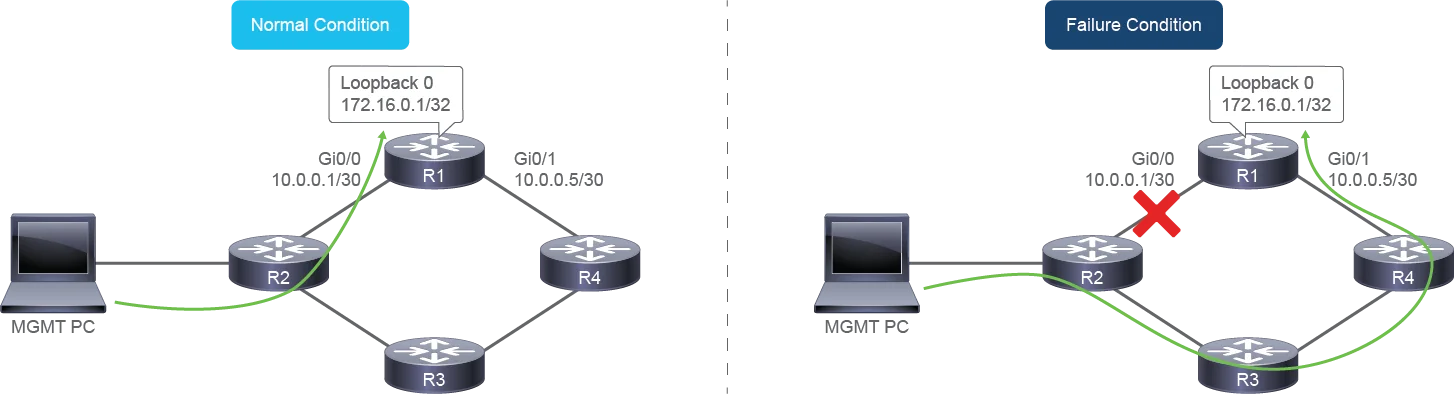
A use case for a loopback interface is for management and monitoring. Although a router can be managed by using a physical interface, this approach is inconsistent in the event of a failure. Referring to the image, R1 could be managed by using the IP address 10.0.0.1 assigned to the GigabitEthernet0/0. This interface would not be available in the event of a failure on the link connecting R1 and R2. Instead of using the address on the interface, you could alternatively use the logical loopback interface. Therefore, regardless of an interface failure, R1 can be managed by using the 172.16.0.1 IP address assigned to the loopback 0 interface because the interface state is not related to a physical circuit or interface failure.
回送介面的一項使用情境是用於管理與監控。雖然路由器可以透過實體介面來管理,但這種方式在發生故障時並不穩定。以圖片為例,R1 可以透過指派給 GigabitEthernet0/0 的 IP 位址 10.0.0.1 來管理。然而,若連接 R1 與 R2 的鏈路發生故障,此介面就無法使用。此時,你可以改用邏輯回送介面,而不使用該介面上的位址。因此,無論介面是否故障,R1 都能透過指派給 loopback 0 介面的 IP 位址 172.16.0.1 來管理,因為該介面狀態與實體電路或介面故障無關。
When you first configure an interface, except in the setup mode, you must administratively enable the interface before the router can use it to transmit and receive packets. Use the no shutdown command to enable the interface.
當你第一次設定介面時(setup 模式除外),必須先以管理方式啟用該介面,路由器才能用它來傳送與接收封包。請使用 no shutdown 指令來啟用介面。
You may want to disable an interface to perform hardware maintenance on a specific interface or a segment of a network. You may also want to disable an interface if a problem exists on a specific segment of the network, and you must isolate this segment from the rest of the network. The shutdown command disables or administratively turns off an interface. To re-enable the interface, use the no shutdown command.
你可能想要停用某個介面,以便對特定介面或網路區段執行硬體維護。若網路的特定區段發生問題,你也可能需要停用該介面,將此區段與網路其餘部分隔離。shutdown 指令會停用介面,也就是以管理方式關閉介面。若要重新啟用該介面,請使用 no shutdown 指令。