Introduction
簡介
To maintain network operations with minimum down time, it is necessary to have procedures in place for backing up Cisco IOS images. In this way, you can quickly copy an image back to a router in case of a corrupted or erased image on the router.
為了以最短的停機時間維持網路運作,必須建立備份 Cisco IOS 映像檔的程序。如此一來,若路由器上的映像檔損毀或被清除,您就能迅速將映像檔複製回路由器。
Topology
拓樸
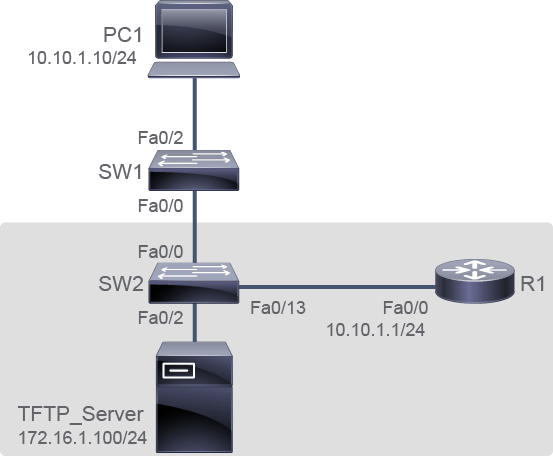
Job Aid
工作輔助資料
Device Information
裝置資訊
Device Information Table
裝置資訊表
Device 裝置 | Characteristic 特性 | Value 數值 |
PC1 PC1 | IPv4 address IPv4 位址 | 10.10.1.10/24 10.10.1.10/24 |
TFTP_Server TFTP_Server | IPv4 address IPv4 位址 | 172.16.1.100/24 172.16.1.100/24 |
SW1 SW1 | VLAN 1 IPv4 address VLAN 1 IPv4 位址 | 10.10.1.2/24 10.10.1.2/24 |
SW1 SW1 | FastEthernet0/0 description FastEthernet0/0 描述 | Link to SW2 連接到 SW2 |
SW1 SW1 | FastEthernet0/2 description FastEthernet0/2 描述 | Link to PC1 連接到 PC1 |
SW2 SW2 | VLAN 1 IPv4 address VLAN 1 IPv4 位址 | 10.10.1.3/24 10.10.1.3/24 |
SW2 SW2 | FastEthernet0/0 description FastEthernet0/0 描述 | Link to SW1 連接到 SW1 |
SW2 SW2 | FastEthernet0/2 description FastEthernet0/2 描述 | Link to PC2 連接到 PC2 |
SW2 SW2 | FastEthernet0/13 description FastEthernet0/13 描述 | Link to R1 連接到 R1 |
R1 R1 | FastEthernet0/0 description FastEthernet0/0 描述 | Link to SW2 連接到 SW2 |
R1 R1 | FastEthernet0/0 IPv4 address FastEthernet0/0 IPv4 位址 | 10.10.1.1/24 10.10.1.1/24 |
Task 1: Create the Cisco IOS Image Backup
任務 1:建立 Cisco IOS 映像檔備份
Activity
活動
Verify that the TFTP server is accessible from the R1 router. Then click Next to proceed.
確認可從 R1 路由器存取 TFTP 伺服器。接著按一下下一步繼續。
You can ping the TFTP server to test connectivity.
您可以 ping TFTP 伺服器以測試連線。
R1# ping 172.16.1.100

Type escape sequence to abort.
Sending 5, 100-byte ICMP Echos to 172.16.1.100, timeout is 2 seconds:
.!!!!
Success rate is 80 percent (4/5), round-trip min/avg/max = 1/3/8 ms
The TFTP server is accessible from the R1 router.
可從 R1 路由器存取 TFTP 伺服器。
Make sure that the TFTP server has sufficient disk space to accommodate the Cisco IOS Software image.
確認 TFTP 伺服器有足夠的磁碟空間可容納 Cisco IOS 軟體映像檔。
You would usually verify this part by going to the TFTP server and verify the available disk space. However, for this task, you will be provided with this information. The free disk space on the TFTP server is 1 GB. Now you need to use the show flash: command on the R1 router to determine the size of the Cisco IOS image file. Notice that you are asked if there is sufficient disk space on the TFTP server. Click Yes or No to indicate your response.
您通常會前往 TFTP 伺服器確認可用磁碟空間來驗證這一部分。不過,在此任務中會直接提供這項資訊:TFTP 伺服器上的可用磁碟空間為 1 GB。現在您需要在 R1 路由器上使用 show flash: 指令,判斷 Cisco IOS 映像檔案的大小。系統會詢問您 TFTP 伺服器上是否有足夠的磁碟空間,請按一下是或否來回答。
R1# show flash:
-#- --length-- -----date/time------ path
1     50933220 Oct 24 2013 14:03:04 +00:00 c2800nm-advipservicesk9-mz.124-15.T.bin
2         1823 Oct 24 2013 14:10:58 +00:00 sdmconfig-2811.cfg
3         1826 Oct 24 2013 14:11:02 +00:00 sdmconfig-28xx.cfg
4       527849 Oct 24 2013 14:11:08 +00:00 128MB.sdf
5         1038 Oct 24 2013 14:11:14 +00:00 home.shtml
6      6036480 Oct 24 2013 14:11:42 +00:00 sdm.tar
7       861696 Oct 24 2013 14:11:54 +00:00 es.tar
8       113152 Oct 24 2013 14:12:00 +00:00 home.tar
9     1164288 Oct 24 2013 14:12:08 +00:00 common.tar
10      793739 Oct 24 2013 14:12:22 +00:00 256MB.sdf

3522560 bytes available (60461056 bytes used)
The file in the example is 50,933,220 B. Comparing the file size to the free disk space on the TFTP server, you determine that you have sufficient disk space on the TFTP server to accommodate the Cisco IOS Software image.
範例中的檔案大小為 50,933,220 位元組。將此檔案大小與 TFTP 伺服器上的可用磁碟空間比較後,可判斷 TFTP 伺服器有足夠的磁碟空間容納此 Cisco IOS 軟體映像檔。
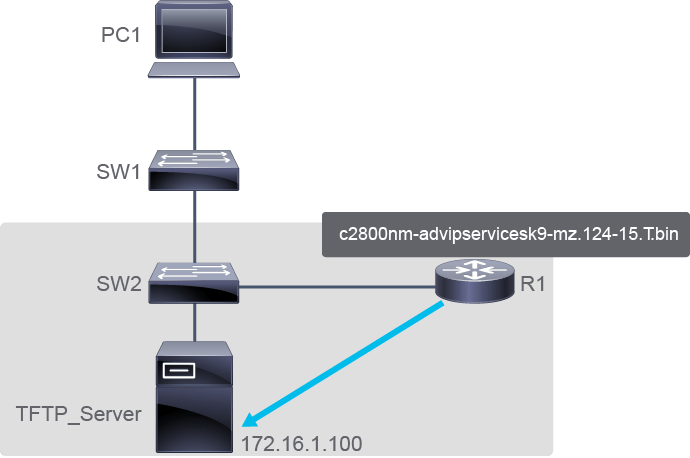
Copy the R1 router image to the TFTP server using the copy command.
使用 copy 指令,將 R1 路由器的映像檔複製到 TFTP 伺服器。
You will create a backup of the current image file on the R1 router (c2800nm-advipservicesk9-mz.124-15.T.bin) to the TFTP server at 172.16.1.100. After you issue the command with specified source and destination URLs, you will be prompted for the source filename, IP address of the remote host, and destination filename.
您將把 R1 路由器上目前的映像檔案(c2800nm-advipservicesk9-mz.124-15.T.bin)備份到位於 172.16.1.100 的 TFTP 伺服器。輸入指令並指定來源與目的 URL 後,系統會提示您輸入來源檔名、遠端主機的 IP 位址,以及目的檔名。
R1# copy flash: tftp:
Source filename []? c2800nm-advipservicesk9-mz.124-15.T.bin
Address or name of remote host []? 172.16.1.100
Destination filename [c2800nm-advipservicesk9-mz.124-15.T.bin]? <Enter>
!!!!!!!!!!!!!!!!!!!!!!!!!!!!!!!!!!!!!!!!!!!!!!!!!!!!!!!!!!!!!!!!!!!!!!!!!!!!!!!!!!!!!!!!!!!!!!!!!!!!!!!!!!!!!!!!!!!!!!!!!!!!!!!!!!!!!!!!!!!!!!!!!!!!!!!!!!!!!!!!!!!!!!!!!!!!!!!!!!!!!!!!!!!!!!!!!!!!!!!!!
50933220 bytes copied in 265.920 secs (191536 bytes/sec)
After you enter all this information, the transfer of the file will occur. The last line in the output indicates that the file has been copied successfully.
輸入完所有資訊後,檔案傳輸即會開始進行。輸出中的最後一行表示檔案已複製成功。
copy flash tftp command indicate?copy flash tftp 指令輸出中的驚嘆號(!!!)代表什麼意思?